STC Recharge in Kuwait 2026: The Simple Guide (Codes, Apps, Vouchers, Banking, Fixes)
I’m Saleh Muhammad, a Kuwaiti citizen, and I’ve been living outside Kuwait for over 10 years. During that time, I’ve recharged my STC lines from airports, from abroad on Wi‑Fi, and even on days when I had zero mobile data left and only an SMS would go through.
If you’re in Kuwait (or you’re an expat managing a line for family, staff, or a second phone), this guide will help you top up fast, avoid the most common mistakes, and know exactly what to do if the recharge “goes through” but your balance doesn’t change.
Do this next (30-second checklist)
Before you start, have these ready:
- Your STC number (the one you want to recharge)
- If you’re using a voucher: the 14-digit PIN
- If you’re paying online: your KNET details or bank app access
- Keep a receipt screenshot or reference number until the credit is confirmed
Then pick one method below. If you have internet, use MySTC or the web quick recharge. If you have no data, use 500 (IVR) or SMS to 500.
All the ways to recharge STC in Kuwait (fastest first)
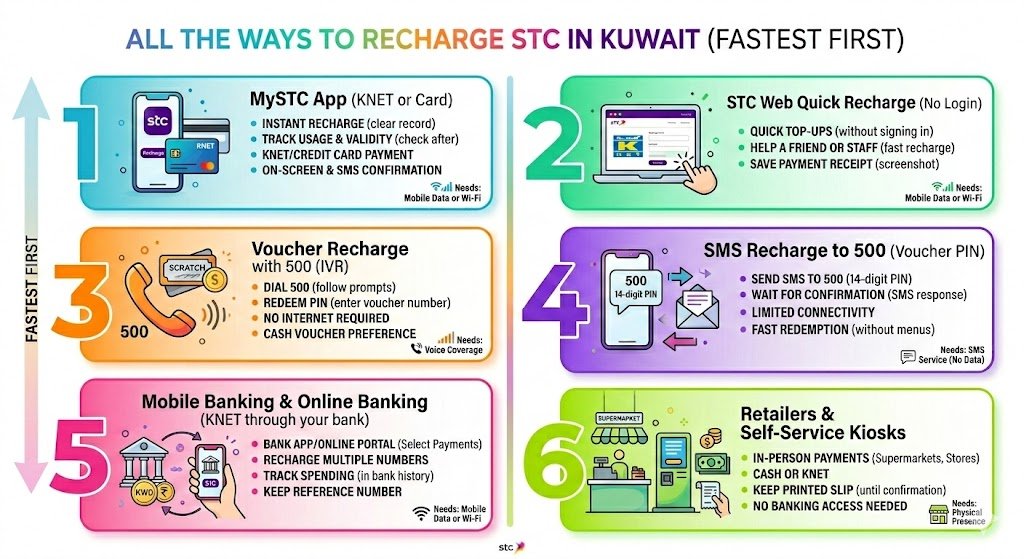
1) MySTC app (KNET or card)
This is the method I personally use most when I’m traveling or when I want a clean receipt in one place.
How it usually works:
- Open the MySTC app
- Go to Recharge or Top-up
- Choose amount
- Pay via KNET (or card if available)
- You’ll normally see an on-screen confirmation plus an SMS
Best for:
- Instant recharge with a clear record
- Recharging your own number or another STC number
- Tracking validity and usage after recharge
What you need:
- Mobile data or Wi‑Fi
2) STC web quick recharge (no login)
If you don’t want to log in (or you forgot your app password), the quick recharge page is one of the easiest options.
Typical flow:
- Enter STC number
- Select amount
- Pay via KNET
- Save the payment receipt page as a screenshot
Best for:
- Quick top-ups without signing in
- Helping a friend or staff member recharge quickly
What you need:
- Mobile data or Wi‑Fi
3) Voucher recharge with 500 (IVR)
This is the lifesaver method when your data is finished or you’re in a low-signal area. You can buy a scratch card or e-voucher and then redeem it through the 500 system.
You’ll use:
- Dial 500 and follow the prompts to enter the voucher PIN
Best for:
- No data situations
- People who prefer cash vouchers
- Anyone who wants a recharge that does not depend on internet
What you need:
- Voice coverage (no internet required)
4) SMS recharge to 500 (voucher PIN)
If calls are failing but SMS still works, this method can still top you up.
Typical flow:
- Send an SMS to 500
- Message body: voucher PIN (the 14 digits)
- Wait for the confirmation SMS
Best for:
- Very limited connectivity
- Fast voucher redemption without menus
What you need:
- SMS service active (no internet required)
5) Mobile banking and online banking (KNET through your bank)
Most Kuwait banks include Mobile Recharge or Telecom Payments inside their apps. If you already trust your bank app more than telecom apps, this is a solid option.
Typical flow:
- Bank app → Payments → Mobile Recharge
- Select STC
- Enter number and amount
- Confirm
- Keep the bank reference number
Best for:
- Recharging multiple numbers
- Keeping recharge spending in one place (your bank history)
What you need:
- Mobile data or Wi‑Fi
6) Retailers and self-service kiosks
Supermarkets, convenience stores, and telecom kiosks can recharge your number in person. You pay cash or KNET, and you usually receive a printed slip.
Best for:
- People who prefer in-person payments
- Anyone without banking access
What you need:
- Your STC number, and keep the printed slip until SMS confirmation arrives
Quick comparison table (so you choose the best method)
| Method | How you do it | Works without data | Typical posting time | Proof of payment |
|---|---|---|---|---|
| MySTC app | App → Recharge → KNET | No | Usually instant | In-app + SMS |
| STC web quick recharge | Web form → KNET | No | Usually instant | Web receipt + SMS |
| Voucher via IVR | Dial 500 → enter PIN | Yes | Usually instant | IVR + SMS |
| Voucher via SMS | SMS to 500 with PIN | Yes | 0 to 1 minute | SMS reply |
| Bank app | Bank → Mobile Recharge | No | Usually instant | Bank receipt + SMS |
| Retailer or kiosk | Pay at counter | Yes | Usually instant | Printed slip + SMS |
Note from my experience: when a recharge is delayed, it’s commonly a network timing issue, not a lost payment. That’s why I always tell you to keep the receipt and wait 10 to 15 minutes before escalating.
Step-by-step: how to recharge STC with a voucher (the reliable method)
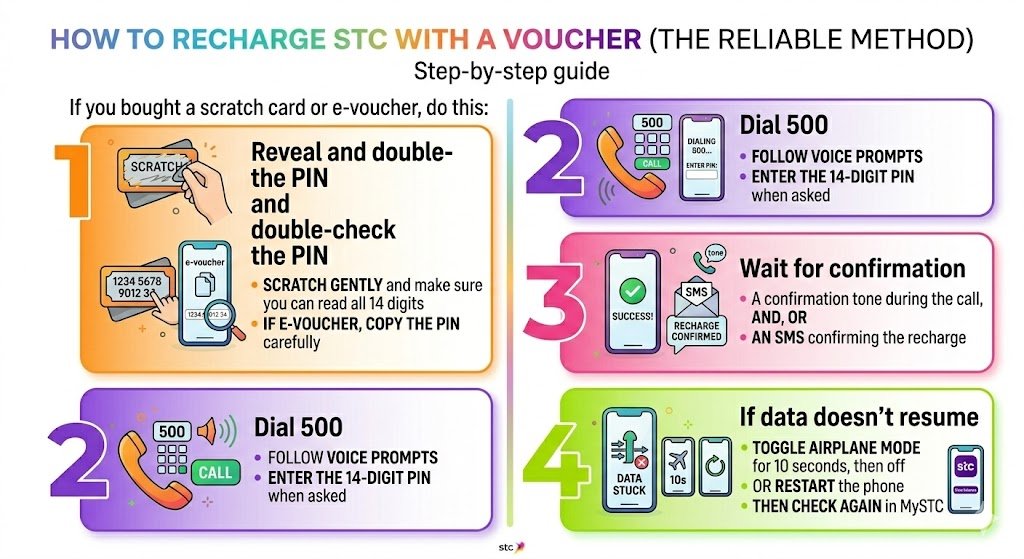
If you bought a scratch card or e-voucher, do this:
Step 1: Reveal and double-check the PIN
- Scratch gently and make sure you can read all 14 digits
- If it’s an e-voucher, copy the PIN carefully
Step 2: Dial 500
- Follow the voice prompts
- Enter the 14-digit PIN when asked
Step 3: Wait for confirmation
You should receive:
- A confirmation tone during the call, and or
- An SMS confirming the recharge
Step 4: If data doesn’t resume
Sometimes the balance updates but data feels “stuck.” Do this:
- Toggle airplane mode for 10 seconds, then off
- Or restart the phone
- Then check again in MySTC
Codes, timings, and what to save as proof
The key STC recharge code in Kuwait
- Main recharge number: 500
You can typically use it for IVR voucher entry and voucher recharge by SMS (PIN in the message).
What to save
If anything goes wrong, these details make support much faster:
- Your STC number
- Amount recharged
- Date and time
- KNET reference (if paid online) or bank transaction ID
- Voucher PIN and photo of the voucher (if used)
Common problems and how I fix them (real-world troubleshooting)
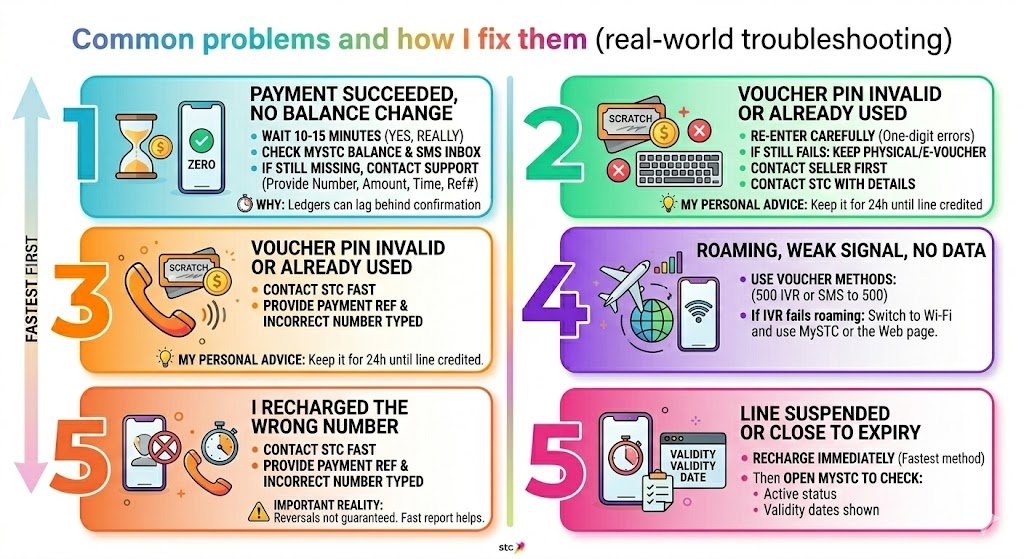
Problem 1: Payment succeeded, but balance didn’t change
What to do:
- Wait 10 to 15 minutes (yes, really)
- Check MySTC balance and your SMS inbox
- If still missing, contact STC support and provide:
- Your number
- Amount
- Time
- KNET or bank reference number
Why this happens:
- Payment confirmation can arrive before the top-up ledger updates. It’s not common, but it does happen.
Problem 2: Voucher PIN shows invalid or already used
What to do:
- Re-enter carefully (most errors are just one wrong digit)
- If it still fails:
- Keep the physical card or the e-voucher message
- Contact the seller first (if it’s a third-party shop)
- Then contact STC with the voucher details
My personal advice:
- Don’t throw away the voucher until your line is credited. I keep it for at least 24 hours.
Problem 3: I recharged the wrong number
This is painful, and I’ve seen it happen often when people are rushing.
What to do immediately:
- Contact STC as fast as possible
- Provide the payment reference and the incorrect number you typed
Important reality:
- Reversals are not guaranteed. Fast reporting improves your chances, but there is no promise.
Problem 4: Roaming, weak signal, or no data
If you’re roaming or your data is cut:
- Use voucher methods: 500 IVR or SMS to 500
- If IVR calls fail while roaming, switch to Wi‑Fi and recharge through MySTC or the web page.
Problem 5: Line suspended or close to expiry
If your prepaid lifecycle is near suspension:
- Recharge immediately using the fastest available method
- Then open MySTC to check:
- Your active status
- Any validity dates shown
Prepaid validity and lifecycle: what typically happens if you don’t recharge
Prepaid lines usually move through stages. The names can differ by plan, but the pattern is consistent:
| Stage | What you can do | What you should do |
|---|---|---|
| Active | Calls, SMS, data work normally | Recharge before the validity ends |
| Grace period (often incoming-only) | You may receive calls and SMS, but outgoing can stop | Recharge ASAP to restore full service |
| Suspension | Most services blocked | Recharge quickly, check if number is still recoverable |
| Disconnection | Line may be permanently deactivated | You may need a new SIM/number |
My advice as someone who has managed lines while abroad: don’t wait until the last day. Recharge a bit early, especially if the number is important for banking OTPs, Civil ID services, or work.
Practical tips that save time (and money)
Tip 1: Save 500 in your contacts
Name it something obvious like:
- STC Recharge 500
When your data is dead, you won’t be searching online for the code.
Tip 2: Screenshot everything
If you paid via KNET or a web portal:
- Screenshot the confirmation page
- Save the reference number
It turns a 30-minute support call into a 3-minute one.
Tip 3: Use the method that matches your situation
- No data: voucher via 500 or SMS to 500
- Need a receipt: MySTC or bank app
- Helping someone else: MySTC “other number” or your bank mobile recharge menu
FAQs
What is the STC recharge code in Kuwait?
The most commonly used STC recharge number is 500. You can dial 500 and follow the prompts to enter your 14-digit voucher PIN. You can also typically send the voucher PIN by SMS to 500 and wait for confirmation.
Can I recharge someone else’s STC number?
Yes. If you use MySTC or your bank app, you can enter another STC number and recharge it. With vouchers, follow the 500 prompts if it asks for the target number, then enter the voucher PIN.
How do I check my STC balance after recharging?
The easiest way is in the MySTC app, and you’ll usually receive an SMS confirmation too. If your data still doesn’t work after a successful recharge, toggle airplane mode or restart your phone.
Are there extra fees when paying online?
Sometimes banks or payment gateways may apply small processing fees depending on the channel. Always check the final amount shown before you confirm payment.
My final recommendation (based on how expats actually live in Kuwait)
If you want the smoothest experience, keep two options ready:
- MySTC for normal days (fast, clean receipt)
- Voucher plus 500 for emergencies (no data required)