Kuwait Civil ID Payment in 2026 (PACI Online, Sahel App, and Kiosk) خطوة بخطوة
I am Saleh Muhammad, a Kuwaiti citizen, and I have lived outside Kuwait for more than 10 years. During that time, I handled my own Civil ID renewals, replacements, and delivery payments from abroad and on short visits back home. In this guide, I will walk you through the exact payment paths that actually work in 2026, what to pay, when the fees appear, and how to keep your receipt safe so you do not get stuck at collection or delivery.
This page is written for you whether you are in Kuwait right now, traveling, or managing your family’s documents from outside.
Quick answer (what I personally do)
If you want the fastest and cleanest method:
- Open PACI e-Services and go to Civil ID Fees Payment
- Enter your Civil ID number
- Pay with K-Net
- Download and save the receipt PDF (and keep the reference number)
If PACI is busy or you are on mobile, I use the Sahel app as the second option. If both fail because of OTP or gateway issues, the PACI kiosk is the most reliable fallback.
What you can pay (and when it shows up)
A lot of people get confused because they try to pay before the system posts the dues. In Kuwait, payment is not always available immediately after you apply.
Renewal vs replacement
- Renewal fees usually appear only after your renewal request is accepted or after your data update is verified.
- Replacement fees apply if your Civil ID is lost or damaged, and the replacement fee is typically fixed.
Fines and late actions
Some fines can appear inside the same payment flow, but not always. If you know you have a fine and it does not show up, it may require using a dedicated fine service first, then returning to PACI payment afterward.
Delivery add-on
Home delivery payment usually becomes available only when your card status changes to something like Ready for delivery or Ready for collection. Delivery is not always paid at the same time as the issuance fee.
Visibility window (important)
From my experience and from what most expats report, it can take 24 to 72 hours after a status change for the fees to appear online. If you see “No dues found”, it does not automatically mean you are done.
Kuwait Civil ID fees (2026 guide)
These are the typical published amounts people see. Always pay the exact amount shown in your PACI or Sahel checkout because categories and add-ons can vary.
| Fee type | Typical amount (KWD) | Where you see it | Notes |
|---|---|---|---|
| Smart Civil ID card (citizens and expats) | 5.000 | PACI, Sahel | Standard issuance or renewal |
| Plastic card (domestic staff category) | 2.000 | PACI, Sahel | Only for specific worker category |
| Issuance or envelope add-on | 0.250 | PACI, Sahel | Often auto-added |
| Replacement (lost or damaged) | 20.000 | PACI, Sahel, kiosk | Common fixed fee |
| Temporary certificate (optional) | 1.000 | PACI | Useful while waiting |
| Home delivery (first card) | 2.000 | PACI, Sahel | Usually after card is ready |
| Additional card to same address | 0.250 | PACI, Sahel | Per additional card |
Payment methods you can actually use
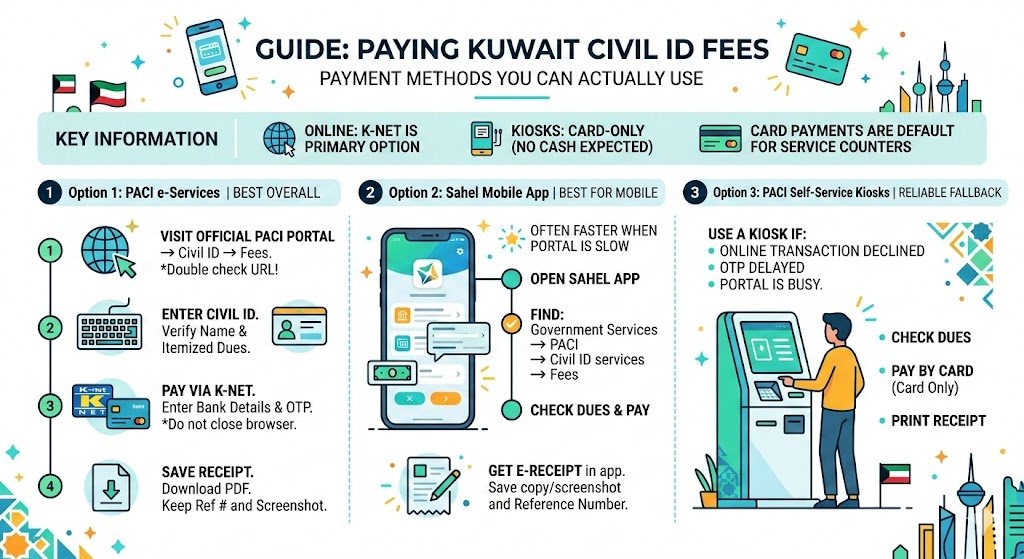
For online payments, Kuwait Civil ID fees are typically paid through the national payment gateway.
- K-Net is the primary option online (debit cards issued by Kuwaiti banks)
- Kiosks are card-only (do not expect cash at the kiosk)
- In rare cases, service counters may follow internal instructions, but you should plan for card payments as the default
Option 1: Pay Civil ID fees online using PACI e-Services (best overall)
This is the method I recommend first because it is direct and usually provides a clean downloadable receipt.
Step 1: Open the official PACI e-Services
Go to the official PACI portal and navigate to Civil ID, then Fees Payment.
My advice: before typing any data, double-check you are on the official website and not a sponsored ad or fake page.
Step 2: Enter your Civil ID number
Type your Civil ID and submit. The system should show:
- Name (or the card holder’s details)
- Itemized dues (card fee, delivery, add-ons, fines if applicable)
- Total amount
If the name looks wrong, stop and do not pay.
Step 3: Pay via K-Net
Select your bank and complete the K-Net steps. You will usually receive an OTP (one-time password) from your bank.
Important: do not close the browser until you see the final confirmation screen.
Step 4: Download and save the receipt
Save the receipt as a PDF if possible. I also keep:
- the payment reference number
- a screenshot (only as backup, not your main proof)
Option 2: Pay through the Sahel app (best for mobile)
When PACI pages are slow, Sahel often works smoothly because it is optimized for phones.
Where to find the payment inside Sahel
Open Sahel, then go to:
Government services, then PACI, then Civil ID services, then Fees or Payment.
What to expect
Sahel usually shows the same dues as PACI. If it shows nothing, it usually means PACI has not posted the fees yet.
Receipt handling
Sahel gives you an e-receipt inside the app. I still recommend saving a copy or taking a clear screenshot and writing down the reference number.
Option 3: PACI self-service kiosks (most reliable fallback)
If K-Net OTP fails online, or PACI and Sahel are under maintenance, kiosks are the method that saves you.
What you can do at the kiosk
- Check dues
- Pay by card
- Print a payment receipt
When I tell people to use kiosks
Use a kiosk if:
- your bank keeps declining online transactions
- OTP messages arrive late and time out
- the portal is busy for days and you need to move fast
Receipt and proof: what to keep (do not skip this)
A Civil ID payment without proof is where people get stuck later. Keep these:
| Item to keep | Why it matters |
|---|---|
| PDF receipt or printed receipt | Strongest proof at delivery or collection |
| Reference number | Needed for tracking or support |
| Date and time of payment | Helps if posting is delayed |
| Card holder Civil ID | Confirms the correct person was paid for |
If you chose delivery, keep your phone available because delivery coordination often happens by SMS or call.
Compare the three payment paths
| Path | Best for | Receipt | Common issues |
|---|---|---|---|
| PACI web | Fastest overall, clear checkout | Downloadable PDF | OTP timeout, maintenance windows |
| Sahel app | Mobile payments, easy access | In-app receipt | App login issues, cached data |
| Kiosk | When online fails | Printed receipt | Limited hours, queues |
Common problems and fixes (real-world troubleshooting)
No dues found
What it usually means: your application is still processing or fees have not posted yet.
What you should do:
- wait 24 to 72 hours and check again
- re-check the Civil ID number carefully
- try Sahel, then kiosk if urgent
K-Net declined or OTP fails
Try:
- enabling online payments from your bank app
- using a different K-Net card if you have one
- switching from mobile data to Wi-Fi (or the opposite)
- using a kiosk if the problem continues
Amount or name mismatch
Do not pay. Refresh and re-check. If it still looks wrong, contact PACI support channels before you complete payment.
Receipt not downloaded
Go back the same day and check payment history if available. If you cannot retrieve it, a printed kiosk receipt is often the easiest proof to secure.
FAQs
How do I know if I still owe Civil ID fees?
Open the official fees payment screen and enter your Civil ID. If there are dues, you will see the total and a pay option. If nothing shows, check again after 24 to 72 hours or use Sahel or a kiosk.
Can I pay for my wife, child, or a family member?
Yes, in most cases you can pay if you have their Civil ID number and permission. The receipt will show their details, so save it for delivery or collection.
Can I pay in cash?
Online payments are typically through K-Net, and kiosks are card-only. Do not depend on cash options.
How long does it take for the payment to reflect?
Many payments post immediately, but status updates can sometimes lag. Refresh after some time, and keep the receipt regardless.