How to Recharge STC in Kuwait in 2026 (All Working Methods)
The time I spent abroad as a Kuwaiti citizen extended over a decade because I remained living outside Kuwait. Throughout my travels I maintained contact with family members and banks and government services and work calls through Kuwaiti SIMs. I’ve used all the listed recharge methods because I needed to recharge my account with cash or KNET or my mobile device.
I will show you the most efficient methods for recharging STC in 2026 because you currently reside in Kuwait or you are an expat who needs to handle life in Kuwait.
The best STC recharge method for you (fast comparison)
Here is the honest comparison I give friends and relatives:
| Method | What you need | Time | Best for | Works without internet |
|---|---|---|---|---|
| Scratch card and USSD code | Recharge card | 30 to 60 seconds | When paying cash, quick shop top-up | Yes |
| STC website (MySTC) | Internet, KNET or card | 1 to 2 minutes | Home or office recharge | No |
| MySTC app | App + internet + payment method | 30 to 90 seconds | The easiest day-to-day method | No |
| STC self-service machine | Bank card, physical kiosk | 2 to 4 minutes | Malls, STC branches, busy areas | Yes (for your phone) |
| Bank app or ATM | Bank account or ATM card | 1 to 3 minutes | People who prefer banking channels | ATM works without internet |
Before you recharge (2 things people forget)
1) Confirm your line type
This guide is mainly for prepaid recharge (top up). If you have postpaid, you usually need to pay a bill rather than “recharge credit.”
2) Use the correct number format
You need to provide the exact STC Kuwait number which consists of 8 digits when you make an online top-up. The country format should begin with +965 and end with the 8-digit number when you make a payment from outside Kuwait.
1) STC Recharge Code Method (Scratch Card)
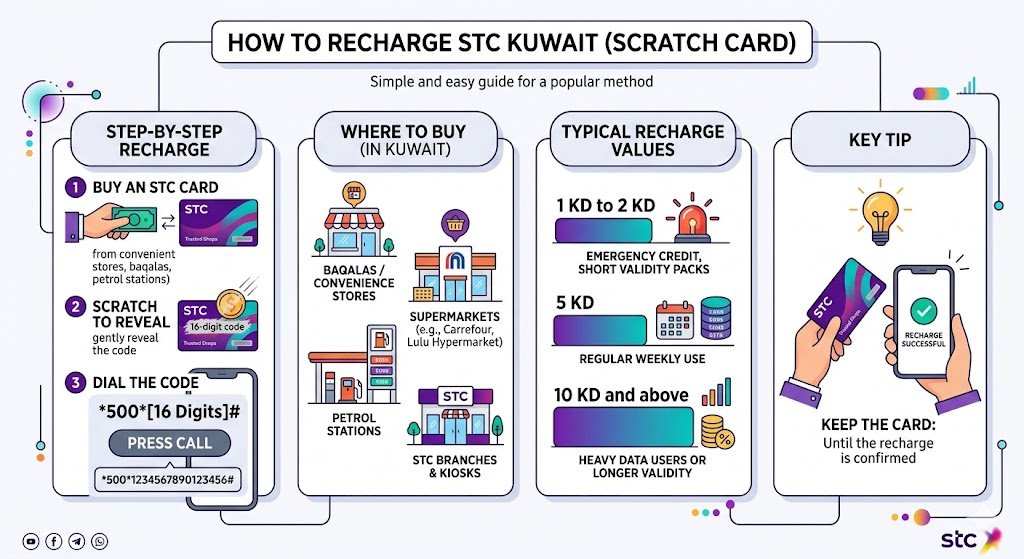
The most popular method at small shops and baqalas and petrol stations remains this option. I use it when I only have cash or when my internet is unstable.
Step-by-step
- Buy an STC recharge card from a trusted shop.
- Scratch the silver panel gently to reveal the recharge code (commonly 16 digits).
- On your phone dial:
500 RechargeCode # - Press call.
Example format
5001234567890123456#
Where to buy STC recharge cards in Kuwait
In my experience, you will find them almost everywhere:
- Convenience stores and baqalas
- Carrefour, Lulu Hypermarket, and similar supermarkets
- Petrol stations
- STC branches and kiosks
Typical recharge card values (common in the market)
These can vary by promotions and availability, but these are commonly seen:
| Denomination (KD) | Best for |
|---|---|
| 1 KD to 2 KD | Emergency credit, short validity packs |
| 5 KD | Regular weekly use |
| 10 KD and above | Heavy data users or longer validity |
Tip from real life: Keep the card until you see the balance updated. If something goes wrong, the code and receipt help support solve it faster.
2) Recharge STC Online (STC Website)
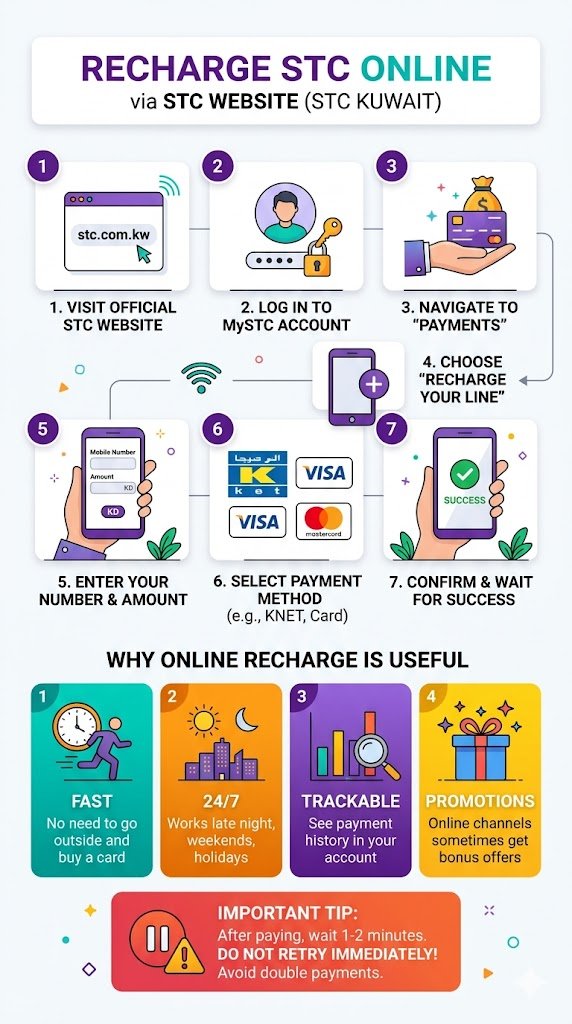
If you have KNET or a debit or credit card, this is one of the cleanest ways. I personally like it when I am recharging for a family member because I can do it calmly and double-check the number.
Steps on STC website
- Go to the official STC Kuwait website.
- Log in to your MySTC account.
- Go to Payments.
- Choose Recharge your line.
- Enter:
- Your STC number
- Recharge amount
- Select payment method (KNET, debit card, credit card depending on what is offered).
- Confirm payment and wait for the success message.
Why online recharge is useful
| Benefit | What it means for you |
|---|---|
| Fast | No need to go outside and buy a card |
| 24/7 | Works late night, weekends, and holidays |
| Trackable | You can often see payment history in your account |
| Promotions | Online channels sometimes get bonus offers |
Practical advice: After paying, wait one or two minutes. Do not retry immediately if the page is loading. Retrying too fast is how people end up with double payments.
3) Recharge Using the MySTC App (My personal favorite)
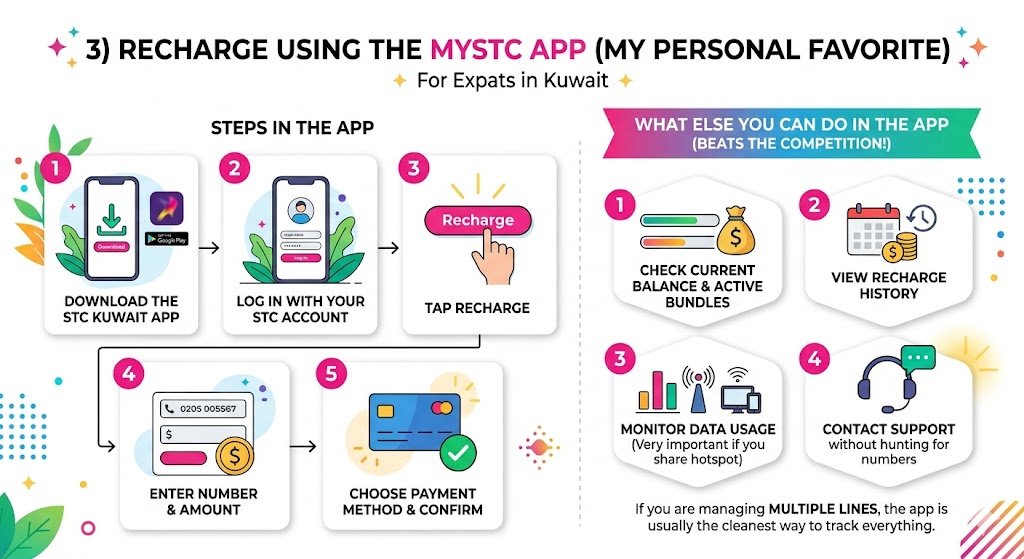
If you live in Kuwait, the MySTC app is usually the easiest. I recommend it to most expats because you can manage everything from one place: top ups, packages, and support.
Steps in the app
- Download the STC Kuwait app from your phone’s official store.
- Log in with your STC account.
- Tap Recharge.
- Enter the number and amount.
- Choose payment method and confirm.
What else you can do in the app
This is why it beats most competitor guides that only talk about “recharge”:
- Check current balance and active bundles
- View recharge history
- Monitor data usage (very important if you share hotspot)
- Contact support without hunting for numbers
If you are managing multiple lines (your line plus spouse or staff), the app is usually the cleanest way to track everything.
4) Recharge via STC Self-Service Machines (Kiosks)
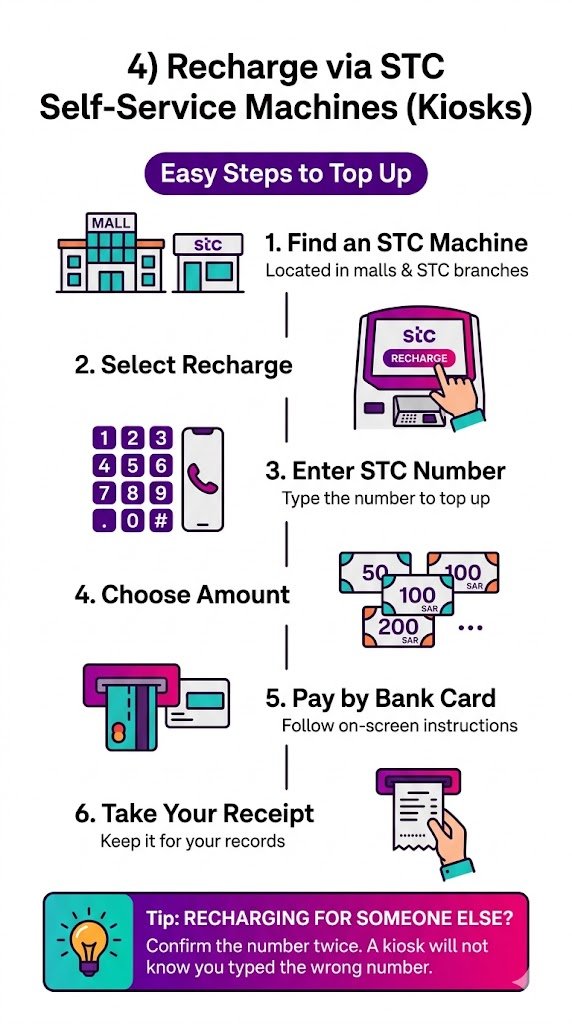
You will often see these in malls and STC stores. I have used them when I needed a receipt and did not want to handle scratch cards.
How to recharge at a kiosk
- Find an STC self-service machine near you (common in malls and STC branches).
- Select Recharge.
- Enter the STC number you want to top up.
- Choose the amount.
- Pay using your bank card (follow the on-screen instructions).
- Take your receipt if available.
Tip: If you are recharging for someone else, confirm the number twice. A kiosk will not know you typed the wrong number.
5) Recharge Through Your Bank (App or ATM)
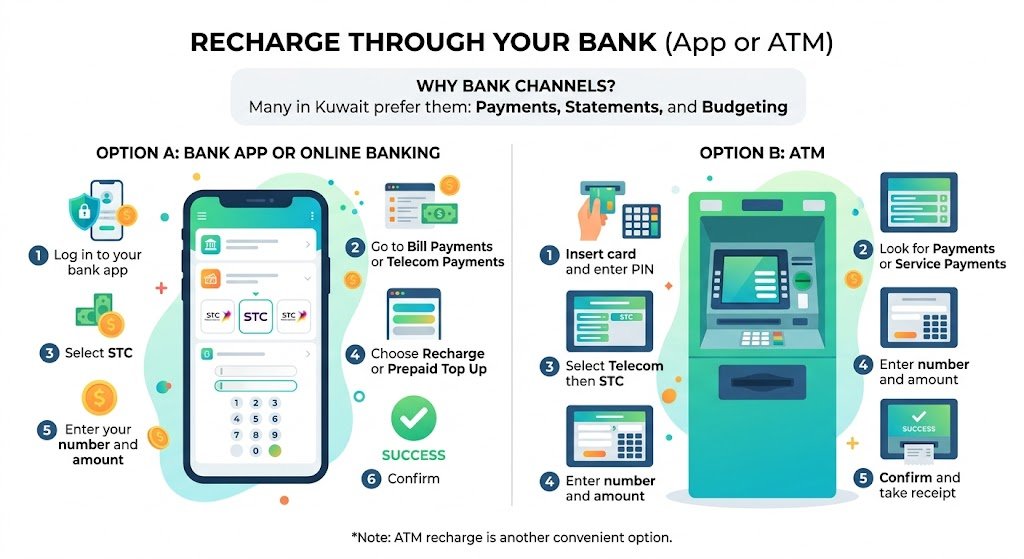
Many people in Kuwait prefer bank channels because everything stays in one place: payments, statements, and budgeting.
Option A: Bank app or online banking
General flow (the wording differs by bank):
- Log in to your bank app
- Go to Bill Payments or Telecom Payments
- Select STC
- Choose Recharge or Prepaid Top Up
- Enter your number and amount
- Confirm
Option B: ATM recharge
- Insert card and enter PIN
- Look for Payments or Service Payments
- Select Telecom then STC
- Enter number and amount
- Confirm and take receipt
ATM recharge is underrated. It is very helpful when your phone has weak internet but you still need credit urgently.
STC Auto-Recharge in Kuwait (Set it once, stop worrying)
If you are the type of person who always hits 0 credit at the worst moment, auto-recharge is a real solution. I recommend it if your number is linked to banking OTPs.
Common auto-recharge styles
| Auto recharge type | How it works | Best for |
|---|---|---|
| Scheduled | Recharge on a fixed date (monthly, weekly) | People paid on a regular schedule |
| Low balance trigger | Recharges when balance drops below a set amount | Heavy users and families |
| Recurring | Daily, weekly, or monthly recharge | Business numbers and staff lines |
You can usually set this up inside the STC website account or the app (depending on what features are enabled in 2026).
Safety note: Use auto-recharge only on your own phone and avoid saving payment methods on shared devices.
Common STC Recharge Problems (and how I fix them)
Here is the troubleshooting table I personally follow:
| Problem | What usually causes it | What you should do |
|---|---|---|
| Recharge code says invalid | Code typed wrong, scratched badly | Re-type carefully, check digits, keep the card |
| Code already used | Old card, or someone used it | Return to seller if immediately purchased, contact STC with proof |
| Payment succeeded but no credit | Network delay | Wait 5 to 10 minutes, restart phone, then check again |
| Online payment failed | KNET session timed out, wrong details | Try again after a few minutes, avoid multiple fast retries |
| App not working | App cache, outdated version | Update app, log out and in, or use website |
If nothing works, contact STC support. The quickest support experiences I have had were when I provided:
- STC number
- Recharge amount
- Time and date
- Screenshot or receipt reference
My practical tips to recharge safely (especially for expats)
- Do not share OTPs with anyone, even if they claim to be support.
- Avoid buying recharge cards from random sellers online. Use real stores.
- If you recharge for a driver or staff line, save the number with a clear label so you do not top up the wrong SIM.
- Keep receipts for bank and kiosk payments, at least until you confirm the balance.