STC Quick Pay 2026
I’m Saleh Muhammad, a Kuwaiti citizen, and I’ve been living outside Kuwait for more than 10 years. Because I’m abroad, I’ve had to rely on online services for almost everything, including paying telecom bills for my own numbers and sometimes helping family back home when something is overdue or a line gets suspended.
If you’re in Kuwait and you’re tired of branch queues, or you’re outside Kuwait and you still need to manage an STC line, STC Quick Pay is one of the easiest tools you can use. In this guide, I’ll walk you through it exactly the way I do it, step by step, with practical tips, common mistakes to avoid, and troubleshooting that actually helps.
What is STC Quick Pay in Kuwait?
STC Quick Pay is STC Kuwait’s online payment service that lets you complete common payments without logging into a full account (in many cases). You can use it 24/7 from the STC website (and you can also do similar actions inside the STC app).
In plain words: it’s the fastest route to pay, recharge, or clear dues when you just want the payment done.
What you can do with STC Quick Pay
Here is the core set of Quick Pay use cases most people need:
| Service | What it does | Who it’s for |
|---|---|---|
| Prepaid recharge (top up) | Adds credit to a prepaid STC line | Anyone using prepaid |
| Postpaid bill payment | Pays your monthly bill (full or sometimes partial) | Anyone on postpaid |
| Voucher redemption | Uses an STC voucher code instead of card or KNET | Gift payments or cash-style control |
| Terminated line dues | Clears outstanding amounts for cancelled or terminated numbers using Civil ID or contract details | People who need to settle old balances |
Why I recommend Quick Pay (and when I don’t)
From my experience, Quick Pay is best when you want speed and certainty.
Benefits that matter in real life
- It saves time compared with visiting a branch.
- It’s available 24/7, which is a big deal if you’re outside Kuwait and time zones don’t match.
- It reduces service interruptions because you can pay as soon as you get an SMS reminder.
- It works well for emergencies like “my line might be suspended” or “I need to clear an old balance now”.
When I prefer the app or customer service instead
- If you need to change your plan, add-ons, or manage multiple lines deeply, the STC app is better.
- If you have repeated payment failures and your bank confirms everything is fine, it’s time to contact STC support.
Quick Pay at a glance (what you’ll need)
Before you start, keep the correct details ready. Most failed payments happen because someone enters the wrong number or uses the wrong identifier.
| Payment type | What you typically need to enter | What you need to pay with |
|---|---|---|
| Prepaid top up | Mobile number | KNET or card, sometimes vouchers |
| Postpaid bill pay | Subscriber number or mobile number (depending on the page) | KNET or card |
| Terminated line payment | Civil ID or Contract Number | KNET or card |
Processing is usually instant. If it succeeds, you normally see a confirmation screen and you may receive an SMS or email receipt depending on what details you entered.
How to use STC Quick Pay online (website method)
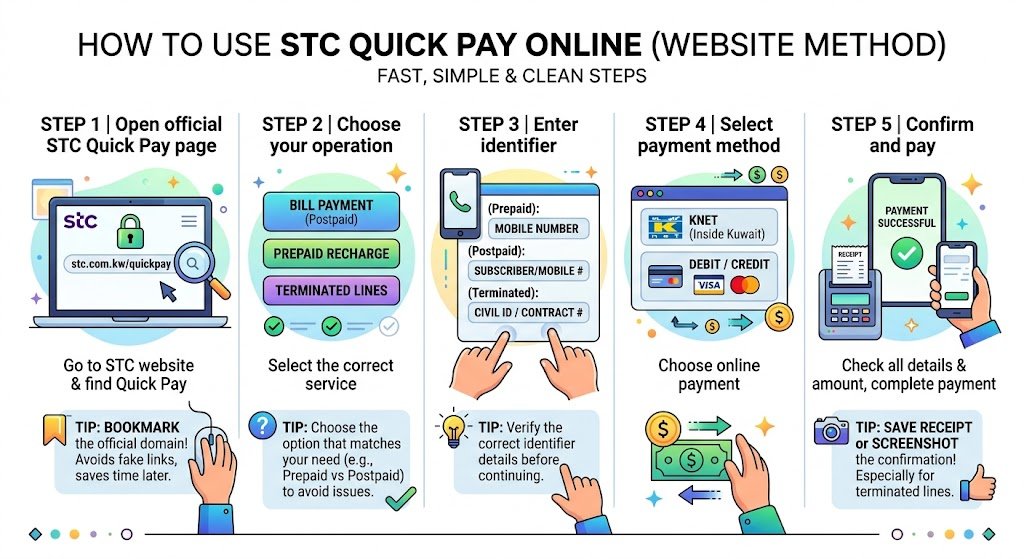
This is the flow I use when I’m on a laptop or when someone messages me from Kuwait and wants the cleanest, quickest steps.
Step 1: Open the official STC Quick Pay page
Go to the STC Kuwait website and find the Quick Pay section.
My tip: bookmark the Quick Pay page once you confirm it’s the official STC domain. It saves time later and reduces the risk of clicking a fake link from a random message.
Step 2: Choose what you want to do
Usually you’ll see options like:
- Bill payment (postpaid)
- Prepaid recharge
- Terminated lines payment
Pick the one that matches your situation. Don’t try to pay a postpaid bill from a prepaid recharge page because it can reject your entry or show “no due amount.”
Step 3: Enter the correct identifier
This part matters:
- For prepaid recharge, it’s normally your mobile number.
- For postpaid, it might ask for subscriber number or mobile number.
- For terminated lines, it often asks for Civil ID or Contract Number.
Step 4: Select payment method (KNET or card)
KNET is the most common method inside Kuwait. Cards can work too, depending on your bank and online authorization rules.
Step 5: Confirm and pay
Double-check the number and amount, then complete payment. Save your receipt or screenshot the confirmation page, especially if you’re paying a terminated line balance.
1. How to pay STC postpaid bills with Quick Pay (step by step)
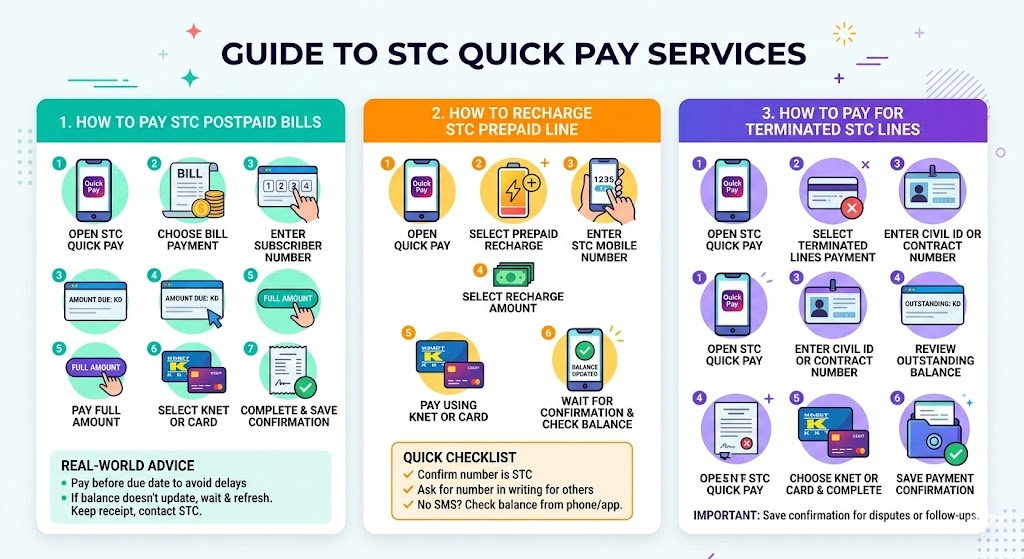
If you’re postpaid, this is the most common task.
- Open STC Quick Pay.
- Choose Bill Payment.
- Enter your subscriber number (or the identifier the page requests).
- Your due amount will appear (in most cases).
- Choose to pay full amount (recommended if you’re close to due date).
- Select KNET or card.
- Complete payment and keep the confirmation.
My real-world advice for bill payments
- Pay at least one day before the due date if you can. Banking verification delays are rare, but they do happen.
- If your payment succeeds but your balance doesn’t update quickly, wait a short time and refresh. If it still doesn’t update, keep your receipt and contact STC with the reference number.
2. How to recharge an STC prepaid line using Quick Pay
Prepaid recharge is usually the smoothest Quick Pay transaction.
- Open Quick Pay.
- Select Prepaid Recharge or Top Up.
- Enter the STC mobile number carefully.
- Select the recharge amount.
- Pay using KNET or card.
- Wait for confirmation and then check your balance.
Quick checklist before you recharge
- Confirm the number is STC (not another operator).
- If you’re recharging for someone else, ask them to message you the number in writing to avoid digit mistakes.
- If you don’t receive an SMS confirmation, check the balance directly from the phone or the STC app.
3. How to pay for terminated STC lines (clearing old dues)
This is the part people usually struggle with, especially when a line is cancelled and they can’t log in normally.
- Open STC Quick Pay.
- Select Terminated Lines Payment.
- Enter Civil ID or Contract Number (use whatever the portal requests).
- Submit and review the outstanding balance.
- Choose KNET or card and complete payment.
- Save the payment confirmation. This is important for disputes or follow-ups.
Why this matters
In Kuwait, unresolved telecom dues can cause real hassle later when you want a new line, a device contract, or even when you’re just trying to close things cleanly. Clearing terminated line balances quickly is one of the smartest “future you” decisions.
Using STC Quick Pay through the STC Kuwait app
If you prefer the app (or you want to track history more easily), do this:
- Download the STC Kuwait app from your official app store.
- Log in using your account details.
- Find Quick Pay or Payments in the menu.
- Choose prepaid top up, bill payment, or other available payment options.
- Confirm the number and amount.
- Pay using the available methods.
My tip: the app is often better for seeing your active lines and balances in one place, while website Quick Pay is great for fast one-off payments.
Payment methods explained (KNET vs cards vs vouchers)
Here’s how I personally think about the payment options.
| Method | Best for | Watch-outs |
|---|---|---|
| KNET | Most local bank customers in Kuwait | Make sure your bank’s KNET authorization is active and you enter OTP correctly |
| Debit or credit card | Expats, travelers, and payments from outside Kuwait | Some banks block telecom or online payments until you enable e-commerce |
| STC vouchers | Controlled gifting or budgeting | Enter voucher code carefully and confirm it matches the service you’re paying |
Important note: STC typically doesn’t charge a separate “Quick Pay fee,” but your bank may apply its own rules or currency conversion if you pay from abroad.
Security and safety (what I do every time)
Because you’re entering sensitive payment information, treat this like online banking.
- Use the official STC website or official STC app only.
- Avoid public Wi-Fi when paying.
- Don’t share OTP codes with anyone. Not even someone claiming to be “support.”
- Keep your receipts until the payment reflects properly.
- If you’re paying for someone else, verify the number twice before confirming.
Common problems and how to fix them (real troubleshooting)
Here’s the troubleshooting table I wish someone had handed me years ago.
| Problem | Check first | Then try |
|---|---|---|
| Payment declined | Wrong card info, expired card, wrong OTP | Try KNET instead of card, or call your bank to enable online payments |
| KNET page not loading | Weak internet, browser issues | Switch browser, disable VPN, try mobile data |
| Paid but balance not updated | Temporary processing delay | Wait a bit, refresh, check SMS, then contact STC with receipt |
| “No dues” showing but you expect a bill | Wrong identifier entered | Re-enter subscriber number, check you selected Bill Payment (not top up) |
| Terminated line not found | Wrong Civil ID or contract number | Confirm contract details, try alternate identifier, contact STC if still missing |
Practical tips I’ve learned (as a Kuwaiti expat helping others)
These are small details, but they prevent big headaches:
- Save the confirmation page as a screenshot for terminated line payments.
- If you’re outside Kuwait, use a payment method you know supports international online transactions.
- If you’re paying a family member’s number, have them send you the number by message, not verbally.
- Don’t wait until the last hour of the due date. Pay earlier and keep proof.
- If you suspect the website is lagging, don’t spam the Pay button. You can end up with duplicate authorizations. Wait and check your bank SMS first.
FAQ (quick answers)
Can I pay an STC bill for someone else using Quick Pay?
Yes, if you have the correct subscriber number or mobile number and you complete payment successfully. Just be careful entering identifiers.
Is Quick Pay available 24/7?
In practice, yes. If any part is down, it’s usually due to temporary maintenance or banking gateway issues.
Can I pay partial amounts for postpaid?
Sometimes partial payment is allowed depending on the bill and portal settings. If partial entry is available, pay at least enough to avoid suspension and then clear the remaining balance as soon as possible.
What should I do if my payment went through but STC still shows unpaid?
Keep the receipt and reference number, wait a short time, then contact STC support with the transaction proof.
Final checklist before you pay (my personal routine)
- Correct service selected: bill, top up, or terminated line.
- Identifier verified: mobile number, subscriber number, Civil ID, or contract number.
- Amount confirmed.
- Payment method ready: KNET or card enabled for online payments.
- Receipt saved.
Final words
If you live in Kuwait, STC Quick Pay is one of the simplest ways to avoid wasting time in branches. If you’re an expat or you travel a lot like I do, it’s even more valuable because it keeps your Kuwait number under control no matter where you are.