How To Check Zain Balance in Kuwait 2026 (All Working Methods)

I’m Saleh Muhammad, a Kuwaiti citizen, and I’ve been living outside Kuwait for more than 10 years. During that time, I’ve kept my Kuwait number active for banking OTPs, family calls, and travel, and I’ve had to check my Zain balance in every situation you can imagine. No internet, roaming abroad, SIM in a spare phone, or even when the app wouldn’t log in.
In this guide, I’ll walk you through the fastest and most reliable ways to check your Zain balance in Kuwait in 2026. I’m writing this like I’d explain it to a friend, and I’ll also share my personal tips to avoid surprises like sudden service suspension or data running out at the worst time.
Quick reality check: Why balance checks matter in Kuwait
Kuwait is one of the most connected countries in the region, and it’s common to have multiple SIMs (personal, business, data). International datasets like the World Bank have shown Kuwait often sits well above 100 mobile subscriptions per 100 people in recent years, which basically means many people carry more than one line.
So if you’re juggling lines or traveling, balance checks are not optional. They save you from:
- Losing data mid-ride or mid-meeting
- Running out of credit before an important OTP
- Roaming charges surprises
- Postpaid overuse (minutes or data add-ons)
Best methods to check Zain balance (fast comparison)
Here’s the easiest way to choose the right method depending on your situation.
Fastest ways to check Zain balance (2026)
| Method | Works without internet | Typical time | Best for | What you need |
|---|---|---|---|---|
| USSD code | Yes | 5 to 15 seconds | Quick checks anytime | Phone signal |
| WhatsApp (Zain) | No | 15 to 60 seconds | Easy chat-based check | Internet + WhatsApp |
| Zain App | No | 30 to 90 seconds | Full account management | Internet + app login |
| Zain Website | No (needs internet) | 1 to 3 minutes | Desktop/laptop users | Internet + login |
| SMS request | Yes | 15 to 60 seconds | When USSD is slow | Signal + SMS |
| Customer care (107) | Yes | 2 to 10 minutes | Complex issues | Call credit/line access |
1. Check Zain balance using USSD codes (no internet needed)
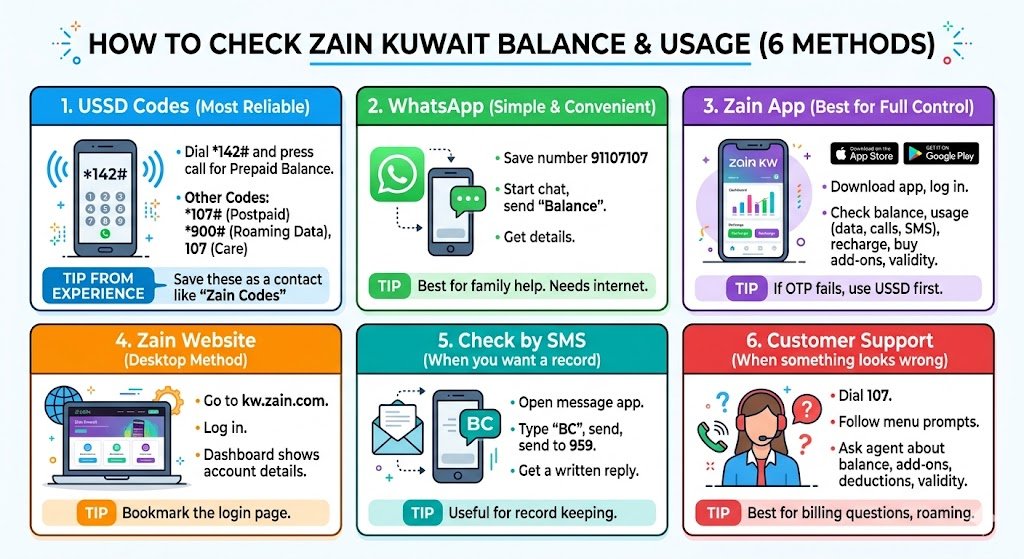
If you want the most reliable method, this is it. USSD works even on old phones and without mobile data. I personally use USSD the most, especially when I’m outside Kuwait and I just need an immediate answer.
Zain prepaid balance check
- Dial: *142#
- Press call
- You should receive your balance by message or on-screen
Zain postpaid usage (minutes and data)
- Dial: *107#
- Press call
- You’ll typically see remaining allowances or usage details (depending on your plan)
Zain roaming data balance
- Dial: *900#
- Press call
- Useful when traveling to check roaming bundles or remaining roaming data
Zain Kuwait USSD codes (save these)
| Purpose | Code |
|---|---|
| Prepaid balance | *142# |
| Postpaid minutes/data | *107# |
| Roaming data/bundles | *900# |
| Zain customer care | 107 |
My tip from experience: Save these codes in your phone notes and also create a contact like “Zain Codes” so you can copy-paste quickly. When you’re stressed or in a hurry, you don’t want to search for codes.
2. Check your Zain balance via WhatsApp (simple and convenient)
If you’re like me and you live inside WhatsApp, this is one of the easiest options. Zain Kuwait supports WhatsApp chat for quick automated requests.
Steps
- Save this number in your contacts: 91107107
- Open WhatsApp and start a chat with that contact
- Send the message: Balance
- You’ll receive an automated reply with your balance details
When I recommend this method: If you’re helping a family member who finds codes confusing, WhatsApp is usually easier. Just make sure they have internet access.
3. Check Zain balance in the Zain App (best for full control)
The Zain app is the most complete option because it doesn’t just show balance, it shows usage breakdown and lets you recharge immediately. If you manage more than one Zain line, this is the method that keeps you organized.
What you can do inside the app
- Check current balance (prepaid) or bill/usage (postpaid)
- View data, calls, SMS usage
- Recharge (top up) using multiple payment options
- Buy add-ons and bundles
- Track validity dates and active subscriptions
Steps
- Download “Zain KW” app from the App Store or Google Play
- Log in with your Zain number
- On the home screen (or My Account), you’ll see your balance/usage
My practical advice: If the app asks for OTP and you’re not receiving it, switch to USSD first to confirm your line is active and has signal. Then try again.
4. Check your Zain balance on the Zain website (desktop method)
If you prefer doing things on a laptop (or you’re managing a line for a parent or employee), the website is straightforward.
Steps
- Go to: https://www.kw.zain.com
- Log in using your mobile number/credentials
- Your dashboard will show balance and account details
My tip: Bookmark the login page. If you only check once per month, it saves you time and prevents you from landing on wrong pages through ads or search results.
5. Check Zain balance by SMS (when you want a record)
SMS is not the fastest, but it’s useful when you want a written reply you can keep, or when USSD is delayed.
Steps
- Open your SMS/messages app
- Type: BC
- Send to: 959
- You’ll receive an SMS with your balance details
Note: SMS replies depend on network conditions. If it doesn’t arrive within a minute, try again or switch to USSD.
6. Check Zain balance via customer support (when something looks wrong)
If you’re seeing unexpected deductions, missing data, or your balance doesn’t match what you purchased, don’t waste time guessing. Call support.
Steps
- Dial: 107
- Follow the voice menu prompts for balance inquiry or account info
- Ask the agent to confirm:
- Current balance/usage
- Active add-ons
- Recent deductions
- Validity/expiry dates
From my experience, this is the best route when:
- Your balance dropped right after a recharge
- You suspect an auto-renewal bundle
- Roaming charges look incorrect
- Your line is stuck or partially active
Common issues and how to fix them (real-world troubleshooting)
Problems people face and the quickest fix
| Issue | What it usually means | Quick fix |
|---|---|---|
| USSD code not working | Temporary network issue or wrong code | Try again, move location, restart phone, then call 107 |
| WhatsApp not replying | No internet or chat automation delay | Switch to USSD *142# or SMS BC to 959 |
| App login fails | OTP delay, roaming restrictions, cached app | Use USSD first, then update app, clear cache, retry |
| Balance shows 0 but line works | Postpaid line or billing cycle | Use *107# or check app under postpaid usage |
| Data finished early | Background apps, hotspot use, video quality | Check usage breakdown in app and disable background data |
My personal best practice for Zain users in Kuwait (and expats)
If you want the simplest routine that prevents surprises, do this:
- Use USSD (*142# or *107#) for quick checks weekly
- Use the Zain app once per month to review detailed usage and active add-ons
- If traveling, check roaming bundles before leaving Kuwait, then use *900# abroad
- Keep SMS (BC to 959) as a backup when USSD delays happen
- If anything looks “off,” call 107 immediately instead of waiting
This routine has saved me many times, especially when I’m outside Kuwait and I can’t afford to lose access to my number.
Final words
Checking your Zain balance in Kuwait in 2026 is easy once you know the right method for your situation. If you want the fastest option with no internet, go with USSD. If you want convenience, WhatsApp is great. If you want full control of your line, the Zain app is the best.