How to Apply for an Exit Permit in Kuwait
I’m Saleh Muhammad, a Kuwaiti citizen who has lived outside Kuwait for more than 10 years. Even while living abroad, I’ve dealt with Kuwait’s expat paperwork more times than I can count, residency changes, sponsorship issues, job transitions, and the small system details that can ruin your travel plans if you ignore them.
If you are a private sector expat and you are planning to travel, this guide will walk you through how to apply for an exit permit in Kuwait using the two official routes people actually use in real life: the Sahel app (employee side) and the Ashal portal (usually HR side).
I’ll also explain who needs it, what your employer must do, how long it takes, and what to do if your request gets stuck.
Quick checklist before you apply
Get these ready first. It saves time and avoids rejected requests.
| What you need | Why it matters |
|---|---|
| Civil ID number | Required to access Sahel services and submit the request |
| Active Sahel account | Most expats apply through Sahel |
| Kuwait Mobile ID activated | Used for authentication and approvals |
| Travel date and expected return date | Mandatory fields in the exit permit request |
| Your employer HR contact | In case approval is delayed |
My personal advice: do not apply on the same day as your flight. Apply a few days early so you have time to chase approval.
What is an exit permit in Kuwait?
An exit permit is an official authorization linked to your labor file that confirms your employer and the Public Authority for Manpower (PAM) are aware you are leaving Kuwait for travel.
In practice, the exit permit process is a digital workflow:
- You submit the request in Sahel (or your company submits via Ashal).
- Your employer approves it in the PAM system.
- The permit is issued electronically once approved.
Why Kuwait uses this system: Kuwait has a very large expatriate workforce. Most estimates put expats at around 70 percent of the total population. When millions of people are under sponsorship and work permits, the government focuses heavily on keeping labor records clean during travel, transfers, and disputes.
Who needs an exit permit in Kuwait?
This guide mainly applies to private sector expatriates under company sponsorship, commonly known as Article 18.
That said, categories can differ depending on residency type and your employer’s classification.
Here’s a practical breakdown I use when people ask me.
| Residency / worker type | Exit permit requirement (typical) | Notes |
|---|---|---|
| Private sector employee (Article 18) | Usually required | Most common category affected |
| Government sector | Often different internal process | Not always handled like PAM private sector workflows |
| Domestic workers (Article 20) | Procedures can differ | Some processes are handled differently than Article 18 |
| Dependents (family visa) | Usually not the same process | Travel is generally not tied to PAM labor file |
Important: rules can be updated. Always check the service inside Sahel or confirm with PAM if your category is unclear.
The fastest method: Apply through the Sahel app (step-by-step)
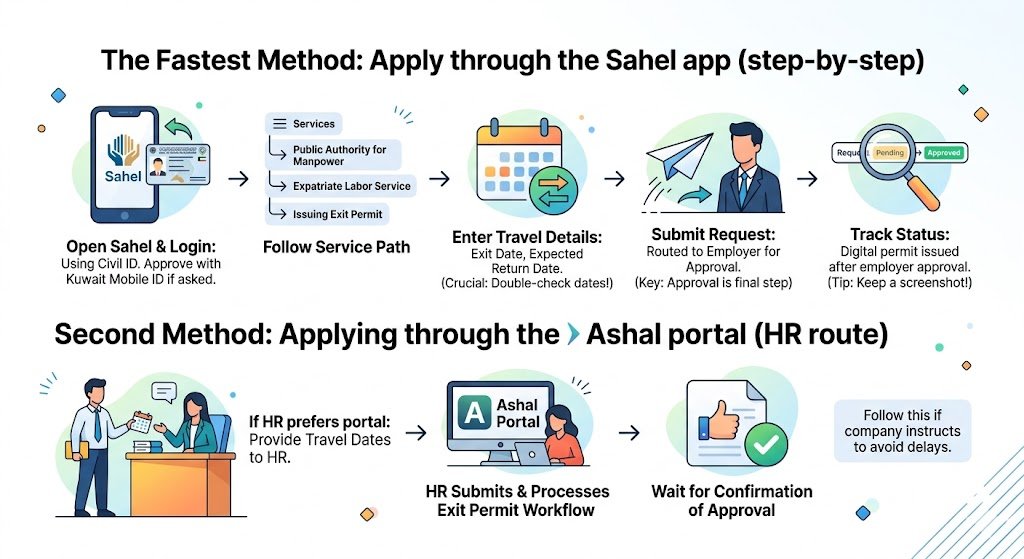
If you’re the employee, Sahel is usually the easiest route.
Step 1: Open Sahel and log in
Open Sahel on your phone and log in using your Civil ID.
If Sahel asks for authentication, approve it through Kuwait Mobile ID.
Step 2: Go to the correct service path
Inside Sahel, follow this path (wording may vary slightly depending on updates):
Services
Public Authority for Manpower
Expatriate Labor Service
Issuing Exit Permit
Step 3: Enter your travel details
You will typically be asked for:
- Exit date
- Expected return date
Double check the dates. Date mistakes are one of the most common reasons people panic later.
Step 4: Submit the request
Once submitted, the request is routed to your employer for approval.
This is the key point many expats miss: submitting is not the final step. Approval is.
Step 5: Track the status
After submission, keep checking your request status inside Sahel. When your employer approves, the permit is issued digitally.
My habit: I always keep a screenshot of the final approved status on my phone. Even if the system is working, it helps if you are stressed at the airport or your mobile data is slow.
Second method: Applying through the Ashal portal (HR route)
Some companies do not want employees submitting requests themselves. They prefer HR to do everything through the Ashal portal.
If your company uses Ashal:
- You still provide travel dates to HR
- HR submits or processes the exit permit workflow
- You wait for confirmation that it is approved
When I recommend Ashal: if your company specifically instructs you to use HR only, follow that. Fighting your company process usually delays approval.
Single-trip vs multiple-trip exit permit (what to choose)
Kuwait introduced options that may include single-trip and multiple-trip permits, depending on what your employer and the system allow.
| Type | Best for | What it means |
|---|---|---|
| Single-trip exit permit | Most employees taking annual leave | One departure and return, then you apply again next time |
| Multiple-trip exit permit | Frequent travelers | Multiple exits and re-entries within a validity period shown in the system |
If you travel regularly for work, ask HR whether a multiple-trip option is available for you. It reduces repeated requests and reduces last-minute approval stress.
Processing time: how long does it take?
In my experience, the system part is fast. The human part is what causes delays.
| Step | Typical time |
|---|---|
| Submit request in Sahel | Immediate |
| Employer review and approval | Same day to a few days |
| Permit issuance after approval | Instant |
My personal rule: apply 3 to 5 days before travel. If your flight is during a busy season or around public holidays, apply even earlier.
Can you leave Kuwait without employer approval?
For private sector workers under sponsorship, the process is designed around employer approval in the system. If your employer does not approve the request, you risk being stopped from completing travel procedures.
If you believe your employer is blocking your travel unfairly, do not argue only on WhatsApp. Keep it official:
- Email HR
- Request a written reason for rejection
- Contact PAM for guidance on the correct complaint channel (if applicable to your situation)
I’m being direct here because I’ve seen people lose tickets and get trapped in last-minute chaos. Your goal is to fix it early, not at the airport.
Required information and what you should keep as proof
Usually, you do not need to upload documents for the basic request. But you should still keep proof of your leave approval internally.
| Item | Why you should keep it |
|---|---|
| Screenshot of submitted request | Proof you applied on time |
| Screenshot of approval | Proof the permit was issued |
| Leave approval email or HR message | Helps if disputes happen later |
| Flight booking details | Useful if HR asks for urgency |
Common issues and how to fix them
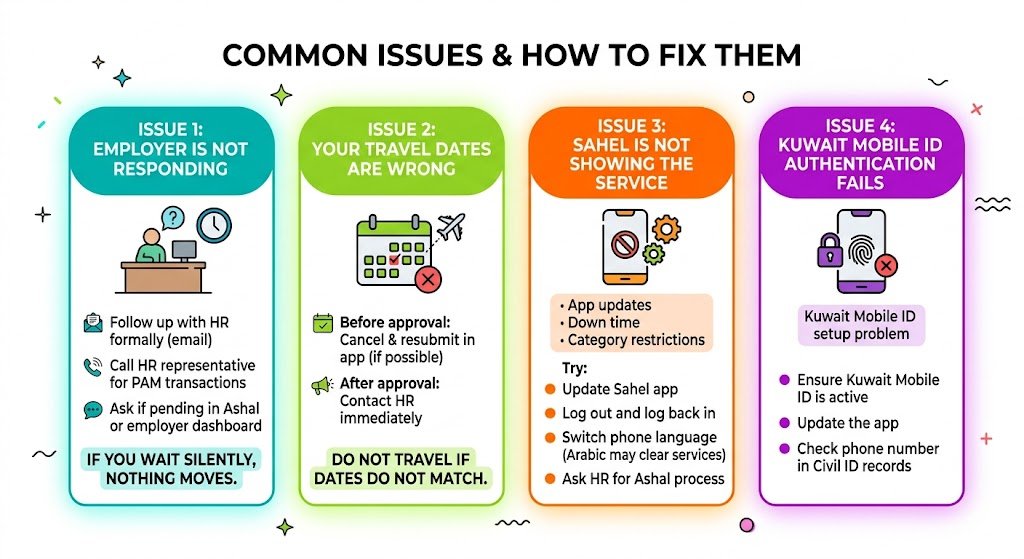
Issue 1: Employer is not responding
What I do in this situation:
- Follow up with HR formally (email if possible).
- Call the HR representative who handles PAM transactions.
- Ask if the request is pending in Ashal or the employer dashboard.
If you wait silently, nothing moves.
Issue 2: Your travel dates are wrong
If you notice the mistake before approval, cancel and resubmit if the option exists in the app.
If it is already approved, contact HR immediately. Do not assume you can “just travel anyway” if the dates do not match your actual plan.
Issue 3: Sahel is not showing the service
This happens sometimes due to:
- App updates
- Service temporarily down
- Category restrictions (not everyone sees the same services)
Try:
- Updating Sahel
- Logging out and logging back in
- Switching phone language (some services appear more clearly in Arabic)
- Asking HR to process through Ashal if Sahel is not working for your account
Issue 4: Kuwait Mobile ID authentication fails
This is usually a Kuwait Mobile ID setup problem, not PAM.
- Ensure Kuwait Mobile ID is active
- Update the app
- Check your phone number is correct in your Civil ID records
Practical tips I give expats (so you don’t get stuck)
- Apply early and treat employer approval as the real deadline
- Keep everything in writing, especially leave approvals
- Save screenshots of the final approval
- If HR delays, escalate politely but firmly with dates and urgency
- If you are in a labor dispute, be extra careful because approvals can get weaponized during conflicts
FAQs
Is an exit permit mandatory for all expats in Kuwait?
Most private sector employees under company sponsorship are the main group expected to follow the exit permit workflow. Other categories may differ, so always confirm inside Sahel or with your employer HR.
How do I apply for an exit permit in Sahel?
Sahel
Services
Public Authority for Manpower
Expatriate Labor Service
Issuing Exit Permit
Enter travel dates and submit, then wait for employer approval.
How long does a multiple-trip exit permit last?
Validity depends on what is issued in the system. Always check the permit details shown in Sahel after approval.
Do I need a printed copy at the airport?
Usually it is electronic, but I always recommend keeping a screenshot in case you have network problems.
Final note from Saleh
I wrote this the same way I’d explain it to a friend who’s flying soon and doesn’t want surprises. Systems in Kuwait can change, and the exact wording inside Sahel can be updated, but the core reality stays the same: submit early, make sure your employer approves, and keep proof on your phone.