Kuwait Traffic Fine Check Online (2026): Fast MOI and Sahel Steps (Civil ID or Plate)
I’m Saleh Muhammad, a Kuwaiti citizen, and I’ve been living outside Kuwait for over 10 years. During that time I’ve handled a lot of Kuwait government services remotely for myself, family, and friends, including traffic fine checks and payments before renewals and travel. In this guide, I’ll walk you through the fastest and most reliable ways to check your Kuwait traffic fines in 2026 using the MOI portal and the Sahel app, explain what each result means, and show you what to do if your fine doesn’t appear.
If you only remember one thing, remember this:
To do a Kuwait traffic fine check in 2026, use either the MOI Traffic Violations service (web) or the Sahel app. Enter your Civil ID or plate number to view violations, then pay online and save the e-receipt. Most fines appear within 24 to 72 hours, but around weekends, holidays, or batch updates, it can take up to 7 days.
Do this next (quick steps)
- Open MOI Portal → E-Services → General Department of Traffic → Traffic Violations
Or open Sahel → Ministry of Interior → Traffic - Enter Civil ID or Plate Number (depending on the channel)
- Review violations and totals
- Pay (if Payable) and download or screenshot the receipt
Where to check traffic fines online in Kuwait (2026)
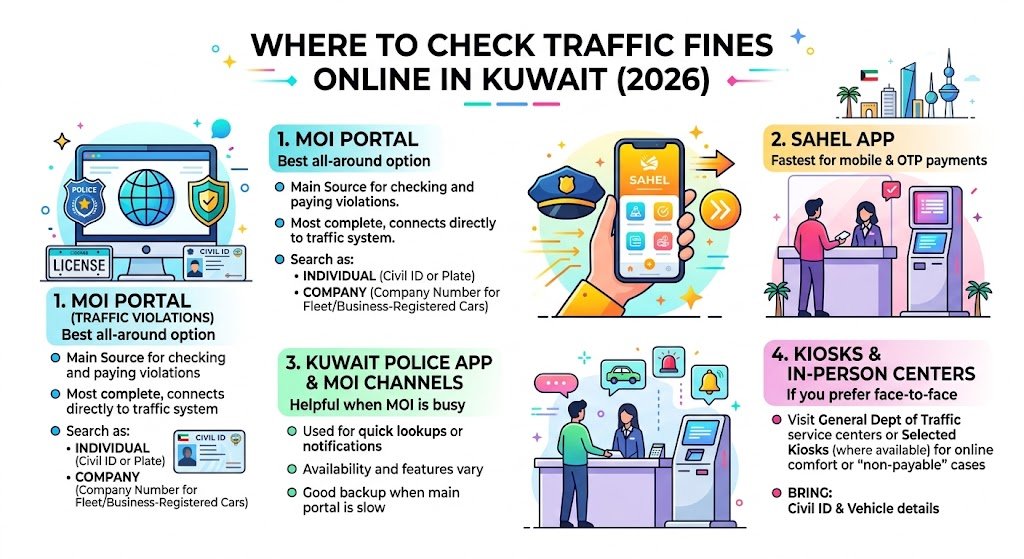
1) MOI Portal (Traffic Violations) – best all-around option
The Ministry of Interior website is the main source for checking and paying traffic violations. It’s usually the most complete because it connects directly to the traffic system.
You can typically search as:
- Individual (Civil ID or plate)
- Company (company number for fleet or business-registered cars)
2) Sahel App – fastest for mobile and OTP payments
Sahel is the official government services app and is usually the quickest option on your phone. Once your profile is verified, you can check violations and pay in the same flow.
3) Kuwait Police App or related MOI channels – helpful when MOI is busy
Some people use Kuwait Police channels for quick lookups or notifications. Availability and features can vary, but it’s a good backup when the main portal is slow.
4) Kiosks and in-person service centers (if you prefer face-to-face)
If you’re not comfortable paying online or your case is “non-payable,” you can visit:
- General Department of Traffic service centers
- Selected kiosks (where available)
Bring your Civil ID and vehicle details.
What you need before you start (so you don’t waste time)
Civil ID vs plate number: which one should you use?
- Civil ID: best if you want to see violations linked to you (and sometimes all vehicles under your profile).
- Plate number: best if you only want to check one specific car.
In real life, when I’m helping someone remotely, I ask for both. If one search doesn’t show results, the other often does.
Payment requirements (for online payment)
Have these ready:
- A working Kuwait bank card (or a card accepted by the portal)
- A mobile number available to receive OTP (one-time password), if required
- Enough balance or limit for the fine amount
Account sign-in (only if prompted)
Some paths require a login to view history or retrieve receipts. If you create your account once, future checks become much faster.
Step-by-step: Kuwait traffic fine check and payment (MOI website)
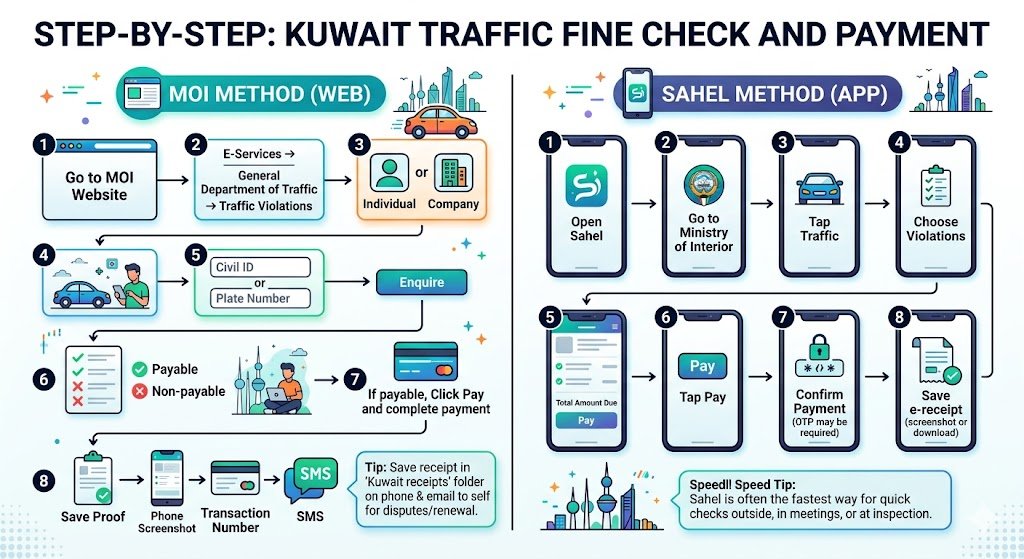
MOI method (web) – step-by-step
- Go to the MOI website
- Navigate to: E-Services → General Department of Traffic → Traffic Violations
- Choose Individual or Company
- Enter either:
- Civil ID, or
- Plate number (depending on what the page requests)
- Click Enquire
- Review the violations list:
- Payable
- Non-payable
- If payable, click Pay
- Complete the online payment
- Save your proof:
- Screenshot the confirmation page
- Save the transaction number
- Keep any SMS confirmation
My personal habit: I save the receipt in a folder named “Kuwait receipts” on my phone and email it to myself. When you need it later for renewal or a dispute, you’ll be happy you did.
Step-by-step: Kuwait traffic fine check and payment (Sahel app)
Sahel method (app) – step-by-step
- Open Sahel
- Go to Ministry of Interior
- Tap Traffic
- Choose Violations
- Review the list and total amount due
- Tap Pay
- Confirm payment (OTP may be required)
- Save the e-receipt (screenshot or download if available)
Sahel is often the fastest way if you just want to check quickly while you’re outside, in a meeting, or even at the inspection center.
Quick reference table (best channel by situation)
| Channel | Search using | Can you pay there | Best for |
|---|---|---|---|
| MOI portal (web) | Civil ID or plate (plus company options) | Yes | Full details, individual and company checks, receipts |
| Sahel app | Your verified profile (Civil ID linked) | Yes | Fast mobile checks and quick payments |
| Kuwait Police channels | Civil ID or plate (varies) | Sometimes | Backup option, quick lookups |
| In-person centers / kiosks | Civil ID + vehicle details | Yes | Non-payable cases, help with special situations |
What the results mean (and what you should do next)
“No violations found”
This usually means your record is clean.
If you just paid, don’t panic if it still shows for a short time:
- Same-channel updates can be quick (often minutes)
- Cross-system updates can take longer during busy periods
“Payable” violations
These can be paid online immediately. Once paid, keep your receipt.
“Non-payable” violations (important)
Non-payable usually means the system will show the fine, but won’t allow online payment. Common reasons include:
- Requires officer review
- Linked to a special case or hold
- Needs confirmation or manual processing
In this situation, your best move is to visit the relevant traffic department or follow the official process shown on the portal.
Company vehicles
If the vehicle is registered under a business:
- Your personal Civil ID search may show nothing
- Use the Company option and the company number to find fleet violations
Processing times: when fines appear and when payments reflect (2026)
Based on what most drivers experience and how government systems typically batch updates:
Typical posting timeline (after a violation)
- Common range: 24 to 72 hours
- Can extend to: up to 7 days during holidays, weekends, or batch uploads
Typical payment status update
- Often: within minutes on the same platform
- Sometimes: a few hours across different platforms (MOI vs Sahel)
Processing time table
| Situation | Normal timing | When to worry |
|---|---|---|
| New fine appearing online | 24 to 72 hours | If nothing after 7 days |
| Payment reflected on same platform | 5 to 30 minutes | If still unpaid after a few hours |
| Payment reflected across platforms | 1 to 12 hours | If still mismatched next day |
If you’re paying fines for a renewal appointment, I personally recommend you pay at least 48 hours before your booking so the record fully syncs.
Troubleshooting: why your traffic fine isn’t showing
Here are the issues I see most often, especially when helping expats remotely.
1) Wrong data entry (Civil ID or plate formatting)
- Re-enter carefully
- Make sure plate digits and letters are correct
- If you’re using a phone keyboard, confirm you didn’t switch number formats accidentally
2) The ticket is too new
Camera or roadside tickets can take time to upload.
- Wait 24 to 72 hours
- Check again on both MOI and Sahel
3) Browser or app session problems
If the site stalls or shows blanks:
- Close the tab and reopen
- Try another browser
- Clear cache (Sahel or browser)
4) Vehicle is under a company
Switch to the company inquiry option (if applicable) and search with company details.
5) System load or maintenance
During peak times, the portal may be slow. Try:
- Early morning hours
- Sahel as an alternative channel
Troubleshooting table (fast fixes)
| Problem | What you see | Fast fix |
|---|---|---|
| Mistyped Civil ID/plate | No results | Re-type, try the other identifier |
| Fine too recent | No fine yet | Wait 24–72 hours, recheck |
| Portal stuck | Page not loading | Switch browser, clear cache |
| Company-registered car | Nothing under Civil ID | Use Company inquiry |
| Status not updated after payment | Still shows unpaid | Refresh later, check receipt, try again in a few hours |
Receipts, proof, and refunds (protect yourself)
Keep your proof of payment
Your proof may include:
- Confirmation screen
- Transaction number
- SMS or email confirmation (if provided)
When someone tells me “I paid but it still shows,” the receipt and transaction ID are what solves the problem quickly.
Duplicate charges or failed payment with money deducted
If you see:
- Payment failed but amount deducted
- Duplicate charges
Do this:
- Save screenshots
- Note the transaction IDs and time
- Contact the official support channel shown on the portal or visit the traffic department with proof
FAQs (2026)
How can I check Kuwait traffic fines without a Civil ID?
Use the plate number option on the MOI Traffic Violations page (or a supported police channel). Plate search is vehicle-specific and useful when you don’t have the Civil ID available.
How long after payment will the fine disappear?
Often within minutes on the same service, but it can take a few hours for all government systems to sync. If it still shows the next day, rely on your receipt and contact support with the transaction ID.
Can I pay someone else’s traffic fines?
Yes, as long as you have the correct Civil ID or plate number and the violation is marked Payable. Always send them the receipt after payment.
What does “non-payable” mean in Kuwait traffic violations?
It means the fine exists but cannot be paid online. It usually requires manual processing, a review, or an in-person step at a traffic department.
I’m clearing fines for vehicle renewal. When should I pay?
Pay 48 hours before your renewal or inspection appointment when possible. This reduces the risk of a syncing delay causing problems during your renewal workflow.
Final tip from my experience
If you’re checking fines from outside Kuwait (or you’re an expat handling things remotely), always do two things:
- check on MOI and Sahel if one is slow, and
- save the receipt immediately after payment.