How to Apply for K-Net in Kuwait (2026 Complete Guide)
I am Saleh Muhammad, a Kuwaiti citizen, and I have been living outside Kuwait for over 10 years. During that time, I have helped friends, family, and business owners handle Kuwait-related setups remotely, including banking, payment collection, and merchant onboarding. In this guide, I will walk you through K-Net in a simple, practical way, the same way I would explain it to someone starting a business today.
If you want the quick answer: you do not apply to KNET directly. You apply through a K-Net member bank in Kuwait.
And if you are just an individual customer, you usually do not apply at all because your Kuwait debit card already works with K-Net.
What is K-Net in Kuwait
K-Net is Kuwait’s national electronic payment network operated by the Shared Electronic Banking Services Company (KNET). It connects:
- Kuwaiti bank debit cardholders
- Merchants (shops, clinics, restaurants, online stores)
- Government portals (many services accept K-Net at checkout)
Why K-Net is so important in Kuwait
In day-to-day life, K-Net is the payment method you see everywhere in Kuwait. It is the default debit payment rail for local cards, and it is widely trusted because it runs through Kuwait’s banking infrastructure.
What K-Net is not
- K-Net is not a separate bank account.
- K-Net is not a wallet app you download.
- K-Net is not something individuals typically “register” for.
If you have an active Kuwaiti debit card, you are already a K-Net user.
Who needs to apply for K-Net (and who does not)
Quick table: merchant vs individual
| User type | Do you need to apply? | What you need |
|---|---|---|
| Individual (consumer) | No | A Kuwait bank debit card |
| Physical shop or restaurant | Yes | POS terminal via a member bank |
| Online store or app | Yes | Online K-Net gateway via a member bank |
| Service providers (private or government-linked) | Yes | Bank sponsorship plus technical compliance |
This article focuses on the part people struggle with: merchant applications.
K-Net merchant application checklist (what you should prepare first)
From my experience, most delays happen because a business applies too early, before documents are ready. Use this checklist before you contact the bank.
Document checklist (typical requirements)
Banks can vary, but these are commonly requested:
| Requirement | Why it matters |
|---|---|
| Commercial Registration (CR) from MOCI | Core proof your business is legally registered |
| Authorized signatory ID (Civil ID for Kuwaitis, Civil ID and passport for expats) | Confirms who can sign the agreement |
| Company bank account at the same bank | This is where K-Net settlements are deposited |
| Trade license or activity approvals (if applicable) | Some activities require extra approvals |
| Business address proof (lease agreement) | Often requested for POS installation |
| Website details (for online gateway) | Bank checks legitimacy and compliance |
| Company articles, signatures, and KYC forms | Standard bank compliance |
My practical advice: make one folder (PDFs) before you start, so you do not go back and forth with the bank for weeks.
Step-by-step: How to apply for K-Net in Kuwait (merchant)
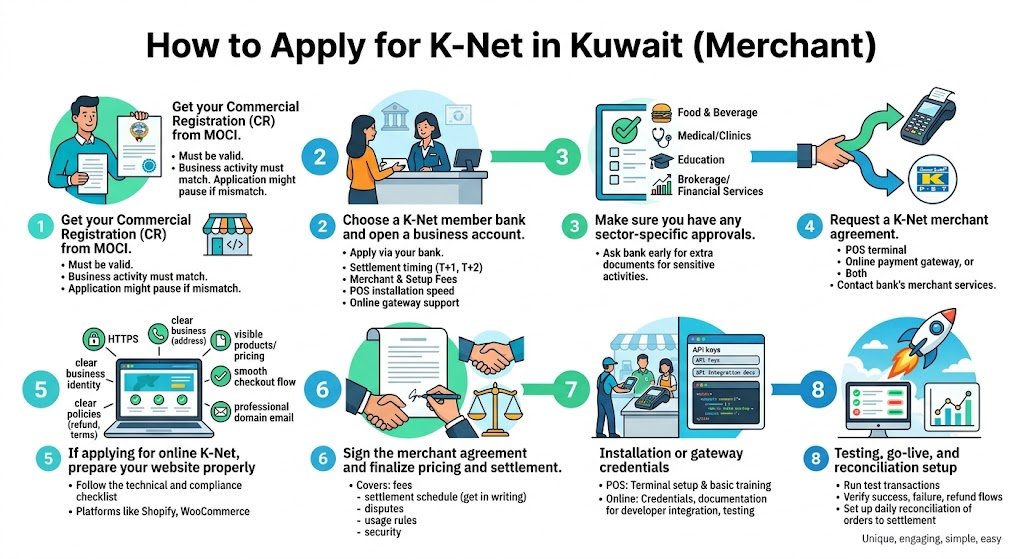
Step 1: Get your Commercial Registration (CR) from MOCI
You need a valid Commercial Registration issued by the Ministry of Commerce and Industry (MOCI). Without a CR, banks generally will not proceed with K-Net merchant onboarding.
Important note: your CR should show an active business activity that matches what you sell. If your activity and your actual business do not match, banks may pause the application.
Step 2: Choose a K-Net member bank and open a business account
You apply for K-Net through your bank. If you do not have a company account yet, open one first.
When choosing a bank, think like an operator, not just like a customer. Ask:
- How fast are settlements, T+1 or T+2
- What are the merchant fees, setup fees, and any monthly charges
- How fast do they install a POS terminal
- For online gateway, how good is their technical support
Step 3: Make sure you have any sector-specific approvals
Some activities in Kuwait commonly trigger extra checks, such as:
- Food and beverage
- Medical and clinics
- Education and training
- Brokerage and financial services
- Anything regulated or sensitive
If your business falls into one of these categories, ask the bank early what extra documents are needed so you do not waste time.
Step 4: Request a K-Net merchant agreement (POS, online, or both)
Contact your bank’s merchant services department and request the K-Net forms.
You will choose one of these:
- POS terminal (physical payments in-store)
- Online payment gateway (website or app)
- Both (many businesses in Kuwait use both)
Step 5: If you are applying for online K-Net, prepare your website properly
This is where many online businesses get rejected or delayed.
Here is a simple technical and compliance checklist that banks commonly expect:
| Item | What “good” looks like |
|---|---|
| HTTPS security | Your website has a valid SSL certificate |
| Clear business identity | Company name, address, phone, email visible |
| Policies | Refund policy, delivery policy, terms and privacy policy |
| Product clarity | Products and pricing are clear and not misleading |
| Checkout flow | Works smoothly, no broken pages |
| Domain and email | Preferably a professional domain email |
If you are using Shopify, WooCommerce, or a custom site, you can still integrate K-Net. The difference is how the gateway is implemented (API, hosted payment page, or through a provider).
Step 6: Sign the merchant agreement and finalize pricing and settlement
Once the bank approves your documents, you sign the merchant agreement. This agreement typically covers:
- Merchant service charges (fees)
- Settlement schedule
- Dispute handling process
- Terminal usage rules (for POS)
- Security obligations
My advice: ask for settlement timing in writing. For some businesses, a one-day difference in settlement changes cash flow dramatically.
Step 7: Installation or gateway credentials
Depending on what you requested:
If you requested POS
- The bank provides a K-Net certified POS terminal
- Terminal is configured and installed at your location
- Staff training may be provided (basic steps, end-of-day reports)
If you requested online gateway
- You receive credentials and integration documentation
- Your developer integrates and configures callbacks and receipts
- You test on a staging or test environment before going live
Step 8: Testing, go-live, and reconciliation setup
Before you take real customer payments:
- Run test transactions
- Confirm success and failure handling
- Confirm refunds or reversals process (if enabled)
- Set up daily reconciliation (matching orders to settlement)
This step is boring, but it prevents serious accounting headaches later.
POS terminal vs Online K-Net gateway (which one do you need)
| Feature | POS terminal | Online gateway |
|---|---|---|
| Best for | Shops, salons, clinics, restaurants | E-commerce, delivery, booking, apps |
| Setup effort | Low | Medium (technical work) |
| Hardware | Yes | No |
| Customer experience | Tap, insert, PIN | Redirect and OTP, then confirmation |
| Cashier training needed | Yes | No cashier, but support team needed |
| Common issues | Paper rolls, connectivity | OTP, redirect issues, website compliance |
If you are running a modern business, I usually recommend planning for both, even if you start with one.
K-Net member banks in Kuwait (2026)
You can apply through Kuwait’s K-Net member banks. Here are major banks that typically sponsor merchant K-Net services:
| Bank | Type |
|---|---|
| National Bank of Kuwait (NBK) | Conventional |
| Kuwait Finance House (KFH) | Islamic |
| Gulf Bank | Conventional |
| Burgan Bank | Conventional |
| Commercial Bank of Kuwait (CBK) | Conventional |
| Boubyan Bank | Islamic |
| Warba Bank | Islamic |
| Kuwait International Bank (KIB) | Islamic |
| Al Ahli Bank of Kuwait (ABK) | Conventional |
Always confirm current merchant onboarding requirements directly with the bank, because policies and packages change.
Fees, charges, and settlement timing (what you should expect)
Banks do not all price K-Net the same way. In Kuwait, merchant pricing usually includes some combination of:
Common fee components
| Cost item | What it means |
|---|---|
| Setup fee | One-time onboarding or installation |
| Terminal rental or maintenance | Sometimes monthly, sometimes waived |
| Merchant service charge (MSC) | A percentage or per-transaction pricing |
| Settlement timing | T+1, T+2, or batch schedule depending on bank |
I cannot responsibly promise a single “standard fee” because banks change pricing frequently and it depends on your business volume and risk category. What I can tell you is this: the best way to reduce fees is to show stable business details, clear activity, and consistent expected volume.
How to pay with K-Net as an individual (no application needed)
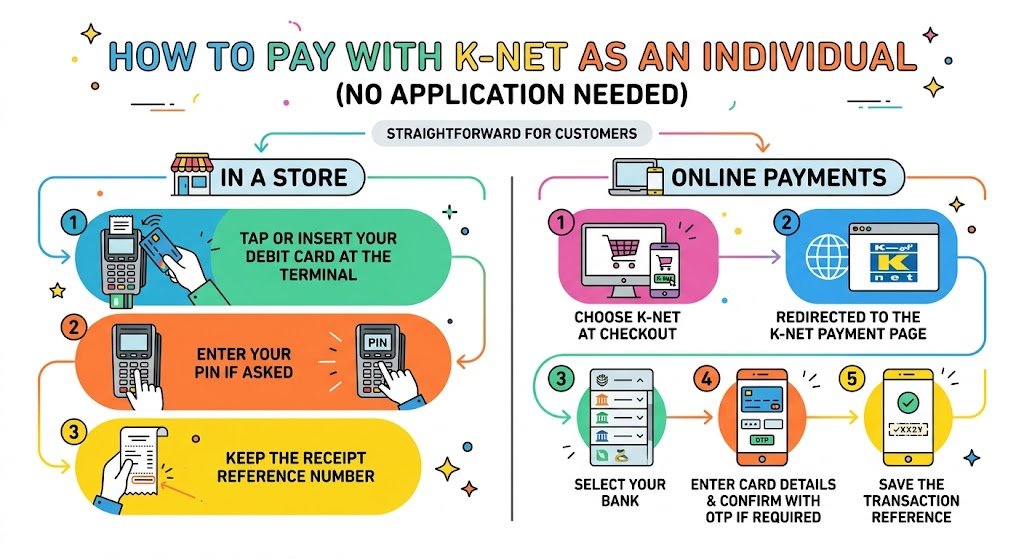
If you are a customer, it is straightforward.
In a store
- Tap or insert your debit card at the terminal
- Enter your PIN if asked
- Keep the receipt reference number
Online
- Choose K-Net at checkout
- You are redirected to the K-Net payment page
- Select your bank
- Enter card details as prompted and confirm with OTP if required
- Save the transaction reference
Security and compliance (important for merchants)
K-Net transactions are designed with multiple security layers. For online payments, OTP-based verification is commonly used as part of authentication, and merchants must follow bank and gateway security requirements.
Merchant risk basics you should understand
- If a customer disputes a transaction, the dispute is usually handled through your sponsoring bank.
- Keep invoices, delivery proof, and refund logs.
- Make your refund policy visible to reduce complaints.
From experience, businesses that clearly communicate delivery timelines and refund steps get fewer disputes and smoother relationships with banks.
Troubleshooting common K-Net problems (real-world fixes)
Payment declined on POS
What I do first:
- Check funds and card expiry
- Try chip instead of tap (or vice versa)
- If the terminal shows a bank error, wait and retry, or ask customer to use another card
Online payment page not loading
Common fixes:
- Enable JavaScript
- Try another browser
- Disable ad blockers or strict privacy extensions
- Try mobile data instead of Wi-Fi (sometimes network routing causes issues)
OTP not received
- Confirm the mobile number is updated at the bank
- Check SMS blocking settings
- Wait a few minutes and resend OTP
Merchant settlement delayed
- Check your agreement settlement schedule
- Confirm if it is a weekend or public holiday
- Contact merchant support with terminal ID, transaction dates, and amounts
Mini case example (what a typical timeline looks like)
A small business setup I have seen in Kuwait usually follows this pattern when documents are ready:
| Stage | Typical time |
|---|---|
| Document preparation | 1 to 5 days (depends on you) |
| Bank review and approval | 3 to 10 business days |
| POS installation or online credentials | 2 to 7 business days |
| Testing and go-live | 1 to 3 days |
So in many cases, you can realistically go live in about 1 to 3 weeks if everything is correct from day one.
Final thoughts (my honest advice)
If you are opening a business in Kuwait, accepting K-Net is not optional in practice. Customers expect it, and many will walk away if you only take cash.
The smartest approach is:
- Get your CR and licenses clean and aligned with your activity
- Choose a bank based on settlement speed and merchant support, not just brand name
- If you are online, make your website look legitimate and compliant before applying
- Track settlements and keep your transaction records organized from the start
If you want, tell me what type of business you have (shop, salon, restaurant, online store, service business) and which bank you are considering, and I will help you figure out the best route and what documents you should prepare first.
FAQs
Can expats apply for a K-Net merchant account in Kuwait
Yes, expats can apply as long as the business is properly registered in Kuwait with a valid Commercial Registration and the business has a bank account at a K-Net member bank. The exact ownership and licensing structure depends on Kuwait’s business rules and your company setup, but the K-Net merchant process itself is bank-driven.
How long does it take to get K-Net for a business
If your documents are ready, many merchants complete onboarding within 7 to 15 business days, sometimes faster for POS and sometimes slower for online gateways depending on website review and technical integration.
Do I apply directly to KNET
No. In Kuwait, merchants typically apply through a K-Net member bank. The bank sponsors your merchant account and coordinates the K-Net setup.
Can I get both POS and online K-Net
Yes. Many businesses run both under the same bank relationship, depending on the bank’s merchant offering.
Which government services accept K-Net
Many Kuwait government portals support K-Net payments for various services. Availability depends on the specific portal and service type, but K-Net is widely used across e-government payments in Kuwait.
Does K-Net support contactless tap-to-pay
Yes, many modern POS terminals support contactless payments. The contactless behavior and limits can depend on the issuing bank and card rules.