Health Insurance Kuwait Online Payment 2026 Guide
I am Saleh Muhammad. I have maintained my Kuwaiti citizenship while I have resided outside Kuwait for more than ten years. I have managed all Kuwaiti documentation needs from international locations for myself and my family and friends. The process of Health insurance payment for residency renewal creates an impression of complexity which disappears after completing the procedure for the first time.
In this guide, I will show you the complete process which I teach to my friends by presenting every mistake people make and how to avoid those mistakes.
Quick action plan
- Open the official MOH Health Insurance online system (start from the MOH website if the direct link changes).
- Choose Personal or Group.
- Select the correct residence category.
- Enter Civil ID, choose New or Renewal, and set your coverage dates to match your residency.
- Pay using KNET and download or print the receipt immediately.
If you do only one thing right, do this: save the receipt PDF to your phone and email. Most “my renewal is stuck” cases I see happen because the receipt is lost or dates are wrong.
What this insurance is (and what it is not)
It is a residency requirement
In Kuwait, expatriates must maintain MOH residency health insurance to get or renew residency. Your residency transaction references this payment.
It is not private insurance
This is not the same as having private hospital coverage. You can still buy private insurance if you want faster access or broader coverage, but MOH health insurance payment is the mandatory one tied to residency.
Who can pay MOH health insurance online
In practice, online payment is used by most residency categories, including:
- Private sector employees (and many of their dependents)
- Dependents under family residency (Article 22)
- Students
- Self sponsors (where applicable)
- Domestic workers and similar categories under Article 20 (often via Express)
Before you start: what to prepare (my checklist)
Here is the exact checklist I use.
| Item | Why you need it | My tip |
|---|---|---|
| Civil ID number | Portal verification and receipt | Type carefully. One wrong digit wastes time. |
| Your mobile number | OTP or contact confirmation (varies) | Use a number you can access right now. |
| KNET enabled debit card | Payment method | Check your bank daily limit before paying. |
| Correct residency period | Insurance must match residency | Decide your renewal duration first (usually 1 year). |
| Email or cloud storage | Saving receipt | Save PDF and also screenshot the receipt number. |
Official portal: where to pay (and how to make sure it is real)
I strongly recommend you start from the Ministry of Health Kuwait official website and navigate to E Services and then Health Insurance. Links sometimes change, and scammers copy pages.
How you check it is genuine:
- The page should clearly be a Kuwait government health service
- The payment should redirect to the official KNET gateway
- Do not pay through random links sent by WhatsApp
If you are using a typing office, that’s normal in Kuwait, but I still suggest you personally download and keep the receipt.
Health insurance Kuwait online payment step by step (2026)
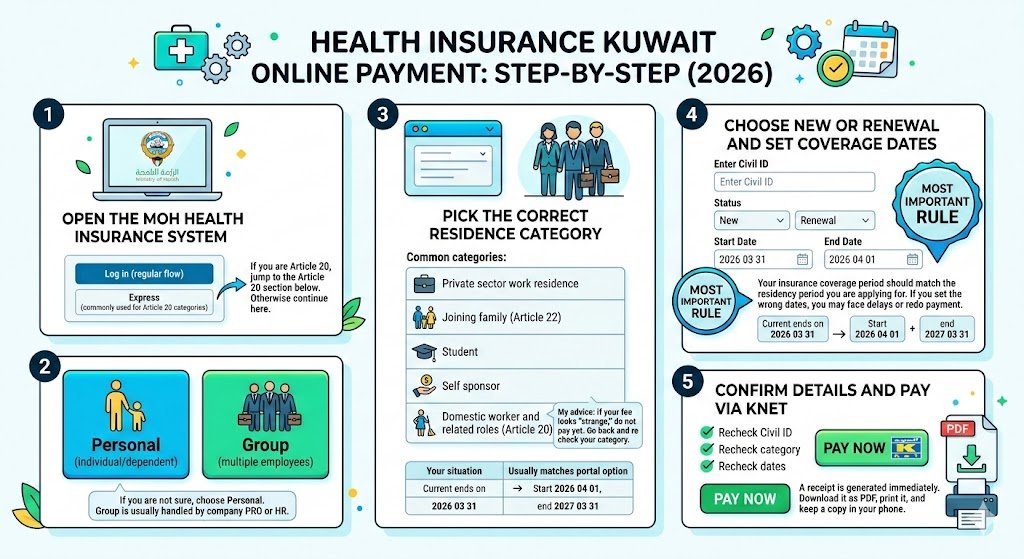
Step 1: Open the MOH Health Insurance system
Once you reach the health insurance e service page, you’ll typically see options like:
- Log in (regular flow)
- Express (commonly used for Article 20 categories)
If you are Article 20, jump to the Article 20 section below. Otherwise continue here.
Step 2: Choose service type (Personal or Group)
Personal
Choose Personal if you are paying for yourself or a dependent as an individual. Most residency renewals for families use Personal.
Group
Choose Group if you are processing multiple employees through a company account.
If you are not sure, choose Personal. Group is usually handled by company PRO or HR.
Step 3: Pick the correct residence category
This part matters more than people think. The category controls the fee rules and sometimes the allowed period.
Common categories you might see:
- Private sector work residence
- Joining family (Article 22)
- Student
- Self sponsor (if available in your case)
- Domestic worker and related roles (Article 20)
My advice: if your fee looks “strange,” do not pay yet. Go back and re check your category.
Category guide (simple)
| Your situation | Usually matches portal option |
|---|---|
| You are employed in private sector | Work residence, private sector |
| Your spouse or child is under you | Joining family, Article 22 |
| You sponsor a domestic worker | Article 20 category |
| You are studying | Student |
If your residency is a special case, your typing office or PRO can confirm the category name shown on the portal.
Step 4: Choose New or Renewal and set coverage dates
You will typically enter:
- Civil ID
- Status: New or Renewal
- Coverage start and end dates
The most important rule
Your insurance coverage period should match the residency period you are applying for.
If you are renewing one year, your insurance should cover that year. If you set the wrong dates, you may face delays or you may need to redo payment.
Date examples (how I do it)
| Scenario | What you set |
|---|---|
| Renewal and your current insurance ends on 2026 03 31 | Start 2026 04 01, end 2027 03 31 |
| New residency issuance for 1 year | Start near issuance date, end one year later (as required) |
If you are unsure about the exact start date the system expects, pay a few days before your residency submission and confirm with your PRO. Small timing mismatches sometimes cause system sync issues.
Step 5: Confirm details and pay via KNET
Before you click pay:
- Recheck Civil ID
- Recheck category
- Recheck dates
Then proceed to KNET payment.
After successful payment:
- A receipt is generated immediately
- Download it as PDF, print it, and keep a copy in your phone
Article 20 health insurance payment (Express option)
If you sponsor or are a domestic worker under Article 20, many people use Express because it avoids the full login flow.
How Express works
You still do the same important steps:
- Select New or Renewal
- Enter Civil ID
- Choose coverage period
- Pay via KNET
- Download receipt immediately
Even though it is “Express,” you must be just as careful with dates and Civil ID. Express does not mean “no verification.” It just means fewer account steps.
Fees, timing, and proof (what to expect)
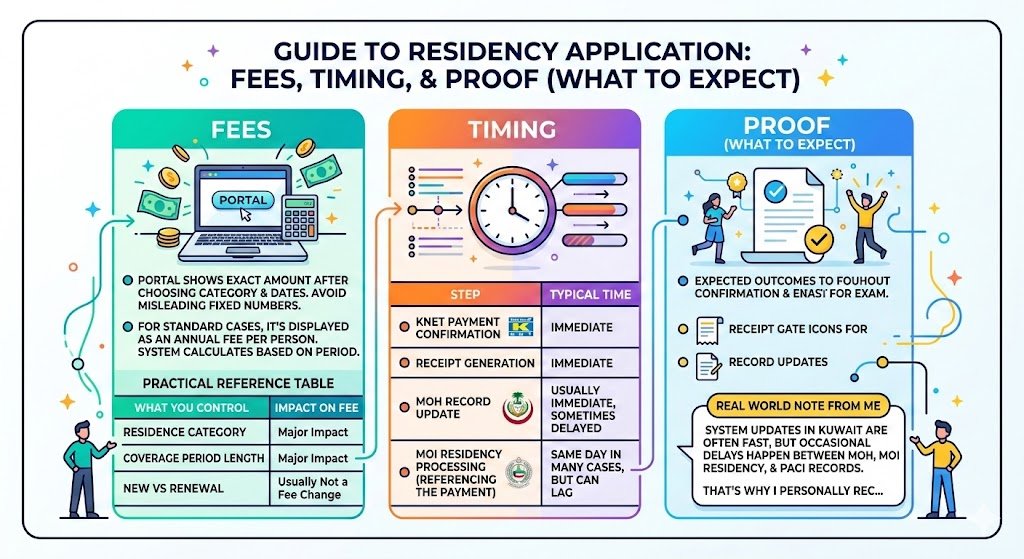
Fees
The portal shows the exact amount after you choose your category and dates. Fees can change, and different categories can have different rates, so I avoid giving a single fixed number that might mislead you.
What I can tell you from experience: for many standard residency cases, the amount is displayed as an annual fee per person, and the system calculates based on the period you select.
Here is a practical reference table you can use while checking the portal:
| What you control | What changes the fee |
|---|---|
| Residence category | Major impact |
| Coverage period length | Major impact |
| New vs Renewal | Usually not a fee change by itself, but affects date logic |
Timing
| Step | Typical time |
|---|---|
| KNET payment confirmation | Immediate |
| Receipt generation | Immediate |
| MOH record update | Usually immediate, sometimes delayed |
| MOI residency processing referencing the payment | Same day in many cases, but can lag |
Real world note from me
System updates in Kuwait are often fast, but occasional delays happen between MOH, MOI Residency, and PACI records. That’s why I personally recommend paying a few days before your residency appointment or submission.
Proof you need
The receipt is your proof. Keep:
- Receipt number
- Civil ID on receipt
- Coverage dates
- Amount paid
Common errors and quick fixes (the ones I see most)
| Problem you see | Why it happens | Fix |
|---|---|---|
| Civil ID mismatch | Wrong digit, or records not synced | Re enter carefully. If you recently updated documents, retry later or check with MOI or PACI. |
| Wrong category fee | Incorrect category selected | Cancel before payment and choose correct residence category. |
| Card declined on KNET | Daily limit, insufficient balance, bank block | Check limit in your banking app, try again, or use another KNET card. |
| Dates rejected or look wrong | Start date overlaps or does not align | Use renewal logic: start after current coverage ends. |
| Receipt not downloaded | Closed page too quickly | Reopen the portal and retrieve using the same Civil ID flow if available, or contact support channels. |
After you pay: what happens next
1. Your receipt is issued and the payment posts
Immediately after payment, you get a receipt. The system records it against your Civil ID.
2. You proceed with residency steps
You then continue your MOI residency process (renewal or new issuance). During submission, the residency system references your insurance payment.
3. Keep the receipt for your file
Even if the system is linked, I still keep a printed copy. Kuwait paperwork is improving, but having the receipt saves you time if someone asks for it at a counter.
Useful stats and context (why online payment matters)
Kuwait is an expat heavy country, and residency processes happen at scale. Even small delays become big problems during peak renewal periods.
Here are practical, widely reported demographic patterns you should keep in mind:
- Kuwait’s population is roughly 4.5 million, and expatriates make up the majority of residents in many years of PACI reporting.
- Because of the volume of renewals, online payments reduce counter workload and save you multiple visits.
This is exactly why I always tell you: do online payment early, keep the receipt, and do not leave it to the last day.
My personal tips to make this painless
Pay a few days early
If your residency expires soon, do not wait until the final 24 to 48 hours. A bank limit issue or a system sync delay can cost you a full working day.
Save your receipt in three places
- Download the PDF
- Screenshot the receipt number
- Email it to yourself or upload to Google Drive or iCloud
If you are renewing dependents, do one person at a time
If anything goes wrong, you will isolate the issue quickly instead of guessing which dependent record caused it.
Do not mix up Article 20 and Article 22
This one causes a lot of wrong payments. Article 20 is domestic workers. Article 22 is joining family. The portal fees and logic can differ.
FAQ (quick answers)
Is MOH health insurance the same as my private insurance?
No. MOH residency health insurance is the mandatory payment for residency. Private insurance is optional.
Can I pay for my wife and kids online?
Yes, in many cases you can pay online depending on their residency category. Use the correct dependent category and Civil ID.
Can I pay from outside Kuwait?
Often yes, as long as you can access the portal and complete KNET. The bigger challenge is having access to a KNET enabled card and receiving any OTP messages.
What if I selected the wrong category and already paid?
In many cases you will need formal correction steps. Do not guess. Contact the relevant channel or a trusted typing office and show them the receipt and the correct category you should have used.