How to Check Kuwait Nursing License Status Online (MOH Medical Licensing System)
My name is Saleh Muhammad. I’m a Kuwaiti citizen, and I’ve lived outside Kuwait for more than 10 years. Even from abroad, I’ve dealt with Kuwait paperwork like renewals, transfers, government portals, and the frustrating “everything is fine until suddenly it isn’t” situation.
If you are a nurse in Kuwait and you need to confirm your nursing license status (active, pending, returned, expired, approved), the safest and most accurate method is to check it inside the Ministry of Health medical licensing system using your own login. That portal view is the same one used for renewals and follow ups, so you are not relying on rumors, screenshots from others, or outdated HR updates.
This guide is written in a practical way so you can check your status in minutes and know exactly what to do if the system shows a problem.
Quick action checklist (do this first)
Before you start, prepare these so you do not get stuck mid process.
- Civil ID number
- MOH medical licensing portal login (username and password)
- A clear copy of your Civil ID (front and back)
- A clear copy of your residency page (latest valid one)
- A stable internet connection
- If you are renewing or transferring, keep passport copy and qualification documents ready
If you cannot log in, do not skip ahead. Your license status is usually tied to the account that submitted the application or renewal.
What “license status” means in real life (why you should care)
A nursing license in Kuwait is not just a document to keep on file. Your status in the MOH system affects what you can do next.
Here are the most common real life moments when people suddenly need an updated status:
- You are joining a new employer and HR asks for proof your license is active
- Your license is close to expiry and you want to renew early to avoid delays
- You submitted an application and it shows under review, and you need to know if anything is missing
- Your file was returned and you need to fix the exact attachment that caused the return
In my experience, most delays happen for simple reasons: an unclear scan, an expired residency copy, or a mismatch in dates or spelling. The earlier you check, the easier it is to fix.
How to check Kuwait nursing license status online (MOH portal)
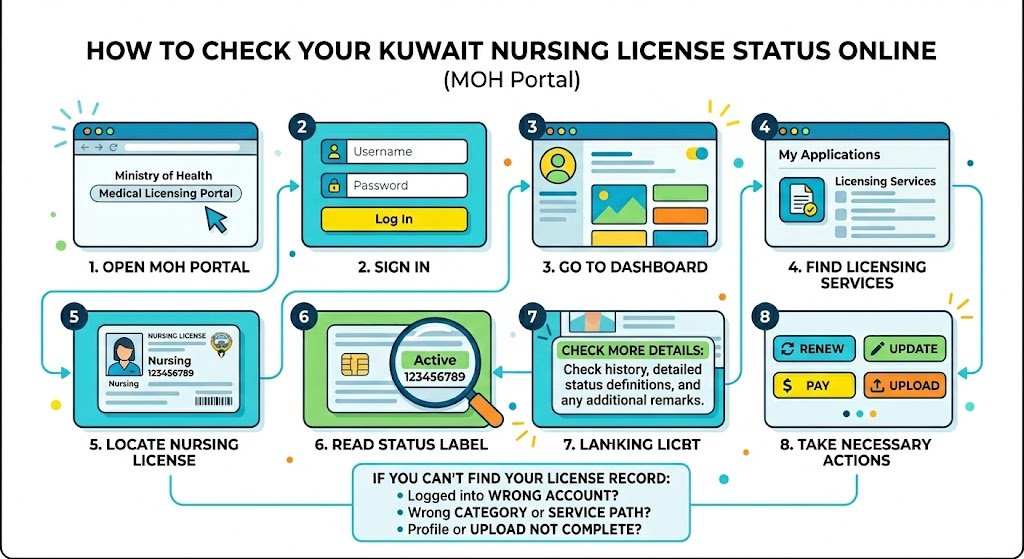
The MOH provides a medical licensing system where you can view your license record and its current status after you sign in.
Step by step: check your status inside your MOH account
- Open the Ministry of Health medical licensing portal in a normal browser (Chrome works well).
- Sign in using your username and password.
- Go to your Dashboard.
- Find the section for Licensing Services or your applications list.
- Locate your nursing license record.
- Read the current status label shown on the record (examples: active, pending, under review, returned, rejected, expired, approved).
- If the system shows an action button like Renew, Update, Pay, or Upload, follow the prompts on that same page.
If you cannot find your license record in the dashboard
Usually, it is one of these issues:
- You are logged into a different account than the one used for the original submission
- You selected the wrong category or service path (some steps differ between sectors)
- Your profile was not fully completed, or a required upload step was not completed, so the record does not display correctly
If you have more than one account, try to remember which email or mobile number you used when you first applied.
Nursing license statuses you may see (and what to do next)
Different portals sometimes use slightly different wording, but the logic is usually similar. This table will help you interpret what you are seeing.
| Status in MOH system | What it usually means | What you should do |
|---|---|---|
| Active | Your license is valid right now | Save a screenshot or download a copy if available |
| Approved | Your request is accepted, final steps may remain | Check if there is a payment step or final issuance step |
| Pending or Under review | Your file is in the review queue | Wait, then re check. Do not resubmit unless asked |
| Returned | Something is missing, unclear, or mismatched | Open the notes, fix the exact attachment, resubmit |
| Rejected | The request was refused due to a reason shown in the system | Read the rejection reason carefully and follow the correct path or appeal route if available |
| Expired | License validity ended | Start renewal immediately and upload the latest residency and Civil ID |
My personal rule: if it says returned, treat it as fixable. If it says rejected, treat it as “stop and read the reason line by line” before doing anything.
Issue vs renewal vs transfer (do not mix the service types)
A lot of nurses lose time because they click the wrong service option. The screens can look similar, but the requirements can change.
| Task | Best time to use it | What you usually need ready | What happens next |
|---|---|---|---|
| Check status | Anytime | Login access, Civil ID | You view status and system notes |
| New license issuance | New job or first time licensing | Civil ID, residency, passport, qualifications, employer documents if requested | Submit and wait for review, may include fees |
| Renewal | Before expiry or right after expiry | Updated Civil ID, latest residency copy, any updated attachments | Renewal review, may include fees |
| Transfer or update | Changing employer or updating details | Previous license record, employer related documents if requested | Review steps depend on the selected service |
If you are not sure, start with “check status” and look for what action buttons the system itself shows. That is usually the safest path.
Documents commonly requested (especially for expats)
Requirements can differ based on sector and the exact service you choose, but these are the attachments that most commonly show up in the system.
| Document | Why it matters | My practical tip |
|---|---|---|
| Civil ID front and back | Confirms identity and civil number | Use a clean scan, not a shadowed photo |
| Residency copy | Confirms legal status and validity dates | Always upload the newest residency page after renewal |
| Passport copy | Name and passport validity | Make sure the passport name matches your profile spelling |
| Qualification documents | Confirms nursing credentials | Keep clear scans of certificates and transcripts if requested |
| Employer letter or facility document | Links you to the facility for certain actions | Ask HR for the exact format they use in Kuwait |
| Medical or other forms (if requested) | Some workflows require extra validation | Upload exactly what the portal asks for, nothing random |
One thing I have learned the hard way from Kuwait portals: if a scan is unclear, the system might not “partially accept it”. It will simply return the request and you lose days.
Fees (what to expect)
Fees can vary by sector and service type, and they can change. The best source is always the fee screen inside your MOH portal at the time you apply.
| Service | Where the fee is confirmed | Notes |
|---|---|---|
| License issuance | Inside MOH portal | Amount can differ by category |
| License renewal | Inside MOH portal | Some cases require updated documents before payment |
| Transfer or updates | Inside MOH portal | Requirements can differ based on your route |
If someone tells you a fixed amount without checking the portal, treat that as unofficial.
If your status shows returned, rejected, or pending (what I recommend)
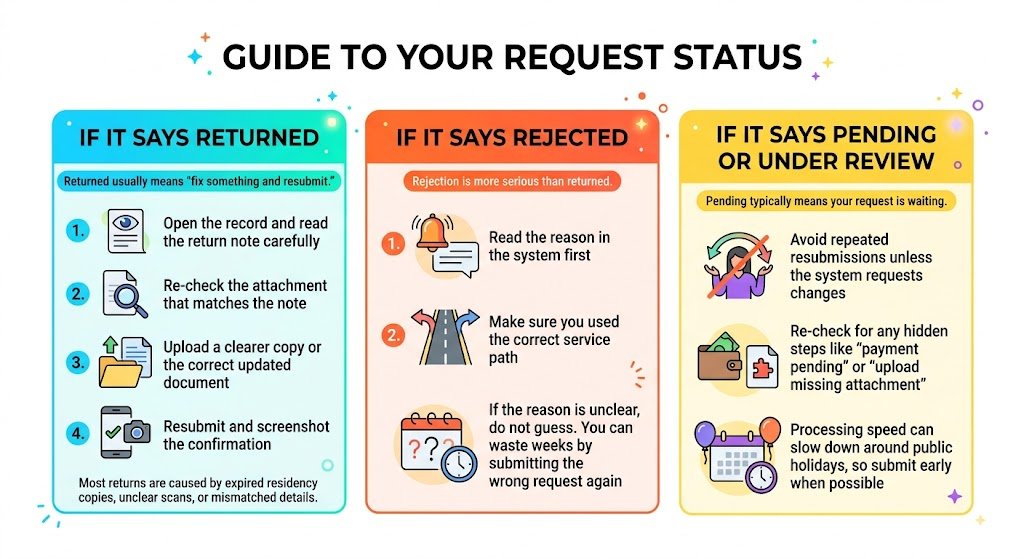
If it says Returned
Returned usually means “fix something and resubmit.” Do this:
- Open the record and read the return note carefully
- Re check the attachment that matches the note
- Upload a clearer copy or the correct updated document
- Resubmit and screenshot the confirmation
Most returns are caused by expired residency copies, unclear scans, or mismatched details.
If it says Rejected
Rejection is more serious than returned.
- Read the reason in the system first
- Make sure you used the correct service path
- If the reason is unclear, do not guess. You can waste weeks by submitting the wrong request again
If it says Pending or Under review
Pending typically means your request is waiting.
- Avoid repeated resubmissions unless the system requests changes
- Re check for any hidden steps like “payment pending” or “upload missing attachment”
- Processing speed can slow down around public holidays, so submit early when possible
Common problems and fixes (fast troubleshooting)
| Problem | Likely reason | Fast fix |
|---|---|---|
| Cannot log in | Wrong credentials or wrong account | Use password reset and try older email or mobile number |
| License not visible | Different account or wrong category | Check other account or confirm you selected the correct service |
| Status not changing | Still in queue | Wait and re check later, avoid duplicate submissions |
| Returned for unclear attachment | Poor scan quality | Upload a clean scan or PDF with readable text |
| Returned for mismatch | Residency date or name spelling issue | Upload the newest residency copy and ensure consistent spelling |
A practical routine I suggest (so you do not get surprised)
If you work in Kuwait long enough, you learn that it is better to check early than to panic later. Here is a simple routine you can follow:
- Check your MOH license status every time you renew residency
- Check it again before job transfer discussions
- Start renewal preparation weeks before expiry, not in the final days
- Keep a folder on your phone with the latest Civil ID and residency scans
This is especially important because Kuwait has a large expat workforce and admin systems are strict about document validity. Small mismatches create real delays.
FAQs
Can I check my Kuwait nursing license status without logging in?
In most cases, no. The license status is tied to your user dashboard in the MOH medical licensing system. If you cannot access your account, reset your login first.
What should match before I submit a renewal?
Your Civil ID, residency copy, passport name, and employer details should match and be current. Even small spelling differences or an expired residency copy can trigger a return.
My status is pending. Should I submit again?
No, not unless the system asks you to update something. Re submitting can duplicate requests and slow your case. Instead, look for system notes, missing attachments, or a payment step.
Do private and government sector requirements differ?
Yes, they can. The selected service path can change required documents, letters, and fee steps. If you are switching sector or changing employer, confirm you chose the correct option before uploading documents.
Final note from me
I wrote this in the same way I help friends and expats when they message me from Kuwait. Always treat the MOH portal status screen as the final reference, because procedures can be updated.
If you tell me what you see in your status field (active, returned, rejected, pending) and whether you are renewing, transferring, or applying new, I can guide you on the clean next steps and what documents you should prepare before you waste time uploading the wrong thing.