How To Check Zain Internet Balance in Kuwait 2026 (3 Reliable Methods + My Practical Tips)
My name is Saleh Muhammad. I am a Kuwaiti citizen who has been living outside Kuwait for over 10 years. I have maintained my connection to Kuwait through my family and work activities while using Zain as my Kuwaiti SIM during my daily life. I understand the deep frustration that occurs when your data plan ends at the worst possible time because you depend on WhatsApp calls and Google Maps and banking apps and laptop hotspot usage.
I will demonstrate the most reliable methods to check Zain internet balance in Kuwait within the year 2026 along with the basic behaviors which will help you conserve data usage.
Why You Should Check Your Zain Internet Balance (Before It Hurts)
If you use mobile data in Kuwait, you probably do at least one of these daily:
- Video calls for work or family
- YouTube, Netflix, Shahid, TikTok, Instagram
- Uber, Careem, Google Maps
- Mobile banking and OTP messages
- Tethering your laptop when Wi-Fi is weak
Checking your Zain internet balance helps you:
- Stay connected when you actually need it
- Avoid sudden slow speeds or cutoffs (depending on your plan)
- Decide if you should top up or switch packages
- Control costs if you are prepaid or using add-ons on postpaid
Quick data reality check (simple, useful numbers)
These are safe, practical averages (your usage may vary based on quality settings):
| Activity | Typical Data Use |
|---|---|
| WhatsApp voice call | 20 to 30 MB per hour |
| WhatsApp video call | 150 to 300 MB per hour |
| Instagram or TikTok scrolling | 500 MB to 1.5 GB per hour |
| YouTube 720p | 1 to 2.5 GB per hour |
| Google Maps navigation | 5 to 20 MB per hour |
| One HD movie stream | 2 to 4+ GB |
If you stream even a little daily, checking your balance becomes a weekly habit, not a “when it breaks” action.
How To Check Zain Internet Balance in Kuwait (3 Easy Methods)
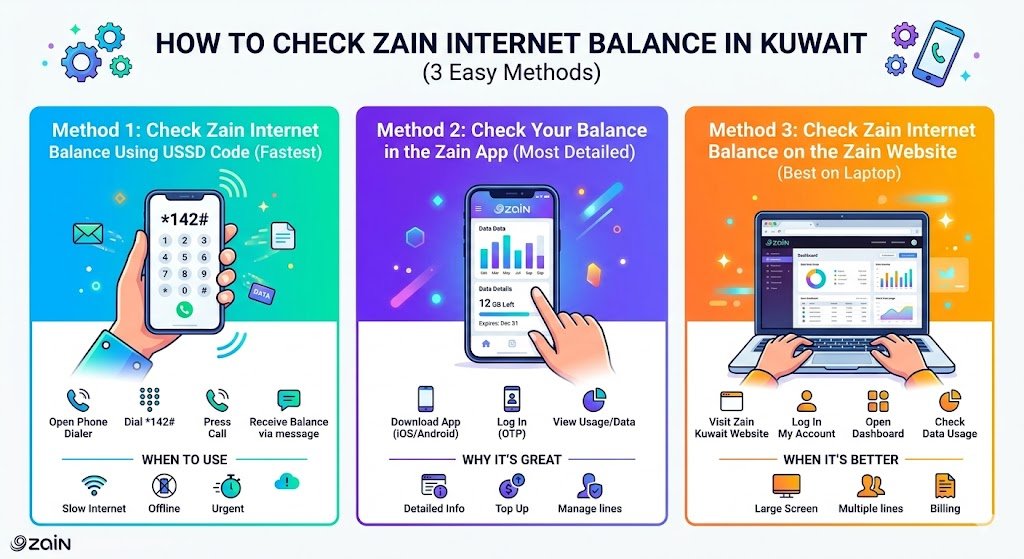
Zain gives you multiple ways, and honestly, you should know at least two. Sometimes USSD is down, or the app needs an update, or you’re in a place with weak signal.
Method 1: Check Zain Internet Balance Using USSD Code (Fastest)
This is the method I personally use when I want an immediate answer and I don’t want to log into anything.
Steps
- Open the phone dialer (as if you’re making a call)
- Dial: *142#
- Press Call
- Wait a few seconds
- You will receive your balance details (usually via on-screen message or SMS)
When USSD is the best option
- Your internet is already slow or not working
- You cannot access the app
- You want a quick check without logging in
Method 2: Check Your Balance in the Zain App (Most Detailed)
If you want the cleanest breakdown (remaining data, active package, add-ons, renewal dates), the Zain app is usually the best.
Steps
- Download the official Zain app (Apple App Store or Google Play)
- Log in (often via OTP)
- Go to the section like My Line, My Data, or Usage
- View remaining data and package details
Why I like the app
- You can see active bundles, expiry/renewal dates, and sometimes usage history
- You can top up or buy add-ons immediately
- It’s easier to manage multiple lines if you have family numbers
Method 3: Check Zain Internet Balance on the Zain Website (Best on Laptop)
This is helpful if you manage your account from a computer, or if you’re already working on a laptop and using hotspot.
Steps
- Visit the official Zain Kuwait website
- Log in to My Account
- Open your dashboard
- Look for data usage, remaining data, and package info
When the website is better than the app
- You prefer a bigger screen
- You’re managing several lines
- You’re already handling bills, renewals, or plan changes
Quick Comparison: Which Method Should You Use?
| Method | Works Without Internet? | Speed | Details Shown | Best For |
|---|---|---|---|---|
| USSD code *142# | Yes | Very fast | Basic | Emergency checks, quick balance |
| Zain App | No | Fast | High | Full management, add-ons, renewals |
| Zain Website | No | Medium | High | Desktop users, account management |
If you ask me to pick only two: keep USSD for emergencies and the app for daily management.
Zain Internet Packages in Kuwait (Examples + How to Choose)
Zain packages change over time, and promotions come and go. So I always recommend you confirm the latest packages inside the Zain app or official site before subscribing.
| Package Example | Data Allowance | Typical Monthly Price (KD) | Best For |
|---|---|---|---|
| Starter | 5 GB | 5 KD | Light browsing, messaging |
| Mid | 25 GB | 8 to 9 KD | Regular daily use |
| Heavy | 50 GB | 12 to 14 KD | Frequent streaming, hotspot sometimes |
| Ultra | 200 GB | Around 18 KD | Heavy streaming, gaming, hotspot often |
How I help you choose the right package (simple rule)
- If you mostly chat and browse: 5 to 25 GB
- If you watch videos daily: 50 GB
- If you hotspot your laptop often or stream a lot: 200 GB or higher
How To Manage Your Zain Internet Balance (Real-Life Habits That Save Data)
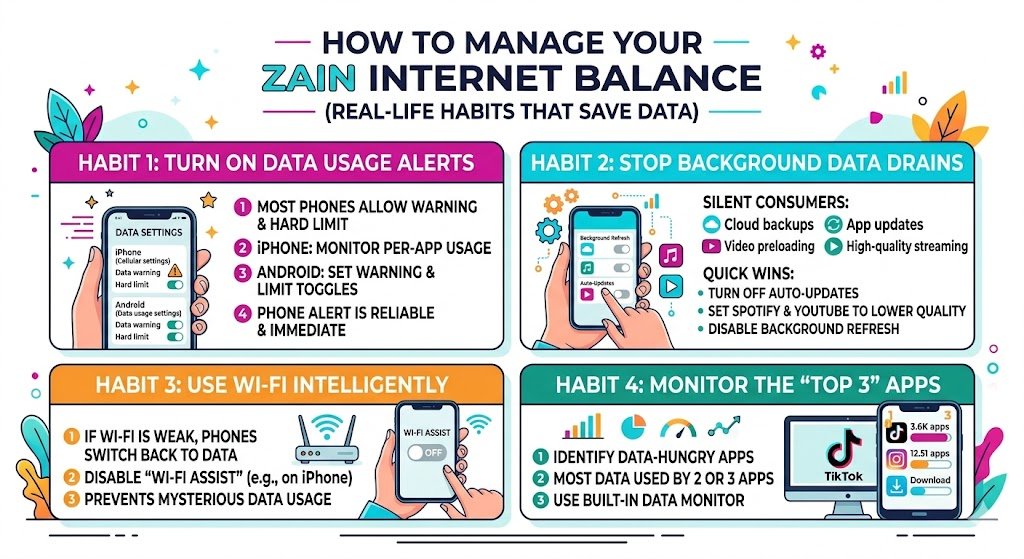
Here are the habits I personally use and recommend to friends and family.
1) Turn on data usage alerts
Most phones allow you to set a data warning and a hard limit.
- On iPhone: use Cellular settings and monitor per-app usage
- On Android: set a warning and limit inside Data usage settings
Even if Zain has alerts, your phone-level alert is more reliable because it reacts immediately.
2) Stop background data drains
Some common silent data consumers:
- Cloud backups
- App updates
- Social media preloading videos
- Streaming music at high quality
Quick wins:
- Turn off auto-updates on mobile data
- Set Spotify and YouTube to lower quality on mobile data
- Disable background refresh for apps you don’t need
3) Use Wi-Fi intelligently
If you have Wi-Fi at home, still be careful:
- Some phones switch back to mobile data when Wi-Fi is weak
- Disable “Wi-Fi assist” (especially on iPhone) if your data disappears mysteriously
4) Monitor the “top 3” apps
Most people find that 2 or 3 apps consume most of their data. Once you identify them, you can control 80 percent of your usage without changing your whole lifestyle.
Troubleshooting: If You Can’t Check Your Zain Balance
If one method fails, try another. Here’s a quick troubleshooting table based on what I’ve seen happen in real life.
| Issue | Likely Cause | Fix |
|---|---|---|
| USSD code not working | Temporary network issue or phone dialer problem | Restart phone, try again later, use app/website |
| App not logging in | OTP delay, outdated app | Update app, ensure signal, request OTP again |
| Website login fails | Password/OTP issue | Reset login, try private browser, use app instead |
| Balance shows but internet not working | APN issue, plan expired, data exhausted | Restart phone, check plan expiry, contact Zain support |
Prepaid vs Postpaid: Does Balance Checking Look Different?
Yes, slightly.
Prepaid
- You usually track remaining data and any active bundle
- You may also need to track credit balance if your bundle expires
Postpaid
- You often track remaining data in your monthly quota
- You may see add-ons and bill cycle dates
Either way, the same three checking methods apply.
My Personal Advice for Expats in Kuwait (What I’d Do If I Arrived Today)
If you’re new in Kuwait and you’re setting up your SIM:
- Install the Zain app immediately after activation
- Save the USSD code *142# in your notes or contacts
- For the first 7 days, check your usage daily
- After you understand your pattern, choose a package that matches your reality, not your hope
This is exactly how you avoid overpaying or running out unexpectedly.
Final Thoughts
Knowing how to check Zain internet balance in Kuwait is not just a “nice to know.” It’s basic survival if you work online, navigate the city, or keep in touch with family abroad.
Use one of these three methods:
- USSD code *142# for the fastest check
- Zain app for the most details and easiest control
- Zain website when you’re managing everything from a laptop
If you want, tell me your typical daily usage (for example 1 hour TikTok, 30 minutes YouTube, hotspot for laptop yes or no), and I’ll suggest a realistic Zain package range so you don’t waste money in 2026.