How to Transfer Balance from stc to stc Kuwait (2026 Guide)
I’m Saleh Muhammad, a Kuwaiti citizen, and I’ve been living outside Kuwait for more than 10 years. Even though I’m abroad, I still manage my Kuwait number, help my family, and guide friends and expats with everyday telecom issues like credit transfers, recharges, and plan changes. One of the most common situations is simple: someone runs out of credit at the worst time, and you want to send them balance immediately.
Kuwait has a very large prepaid user base. In practice, that means balance sharing is not a “nice to have” feature, it’s something people rely on constantly for quick help.
This page is my step by step, real world guide for transferring balance from stc to stc in Kuwait in 2026, including the exact USSD codes, international transfer options, limits, fees, and the mistakes I see people make.
Quick Answer
To transfer stc balance to another stc number in Kuwait, dial:
588Amount*RecipientNumber#
Example: To send KD 10 to 55XXXXXX, dial:
58810*55XXXXXX#
You’ll receive a confirmation message after the transfer request is processed.
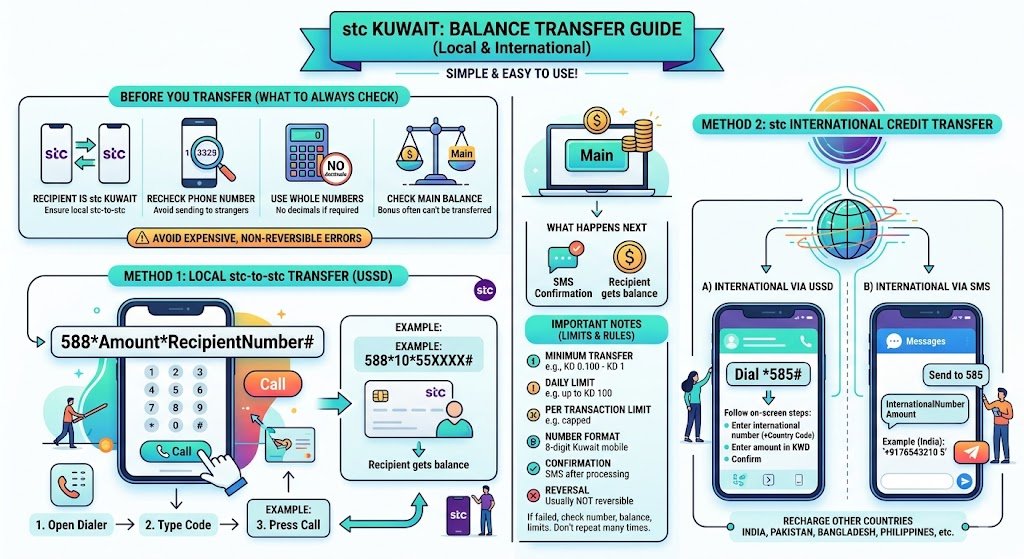
Before You Transfer (What I Always Check)
When you’re in a hurry, it’s easy to make small errors that become expensive because transfers are usually not reversible. Here’s what I personally check every time:
- Confirm the recipient is also stc Kuwait (for local stc-to-stc transfer).
- Recheck the phone number (one wrong digit sends credit to a stranger).
- Use whole numbers if the system requires it (no decimals).
- Make sure you have enough main balance (bonus balance often can’t be transferred).
Method 1: Transfer stc Balance to Another stc Number Using USSD
This is the fastest method and works on any phone, even without internet.
Steps (Local Transfer)
- Open your phone dialer.
- Type the transfer code in this format:
588Amount*RecipientNumber# - Press Call.
Example
If you want to transfer KD 10 to 55XXXXXX:
58810*55XXXXXX#
What happens next
- You usually receive an SMS confirmation.
- The recipient receives the balance added to their line (subject to stc rules on validity and usage).
Important Notes (Local stc to stc)
Here are the limits and rules you should keep in mind because they affect whether your transfer succeeds:
| Item | Typical Rule for Local stc Transfer |
|---|---|
| Minimum transfer | Often starts from a small minimum (commonly KD 0.100 or KD 1 depending on offer and account type) |
| Daily limit | Commonly up to KD 100 per day (can change) |
| Per transaction limit | Often capped (example: KD 50 per transfer) |
| Number format | Kuwait mobile number (8 digits, usually starting 4, 5, 6, 9) |
| Confirmation | SMS confirmation after processing |
| Reversal | Usually not reversible once completed |
My advice: if your transfer fails, don’t repeat it 5 times. First verify the number, your balance, and your transfer limits, then try again once.
Method 2: stc International Credit Transfer (Recharge Other Countries)
stc also supports international credit transfer for certain destinations. I’ve seen many expats in Kuwait use this to top up family numbers back home (India, Pakistan, Bangladesh, Philippines, and others depending on availability).
You generally have two ways:
- USSD menu
- SMS format
A) International Transfer via USSD
- Open your phone dialer.
- Dial: *585#
- Follow the on-screen steps:
- Enter the international number (with country code)
- Enter the amount in KWD
- Confirm
This option is useful because it guides you through the process instead of relying on typing an exact long format.
B) International Transfer via SMS
- Open Messages on your phone.
- Create a new SMS to: 585
- Write the message as:
InternationalNumber Amount
Example (India):
+9176543210 5
Then send the SMS. You should receive a confirmation message if it goes through.
stc Balance Transfer Terms and Conditions (Local vs International)
Terms change sometimes, so I always recommend confirming the latest rules in the My stc app or by calling customer care. But the table below reflects the most common structure users experience.
| Feature | Local Transfer (stc to stc Kuwait) | International Transfer |
|---|---|---|
| Who can use it | Prepaid and many postpaid users (depending on account setup) | Prepaid and many postpaid users (depending on destination availability) |
| Fees | Usually a small fee per successful transfer (often around 20 fils) | Fees vary by country and amount |
| Minimum transfer | Usually small (commonly KD 0.100 or KD 1) | Varies by country |
| Maximum transfer | Often capped per transaction and per day/month | Varies by country and partner network |
| What balance can be used | Main balance (bonus/promotional balance often excluded) | Main balance (bonus/promotional often excluded) |
| Where the balance can be used | Typically calls, SMS, and internet (not always VAS/content) | Depends on destination operator rules |
| Can you cancel/reverse | No, usually non-reversible | No, usually non-reversible |
| Service availability | May pause during maintenance | Depends on destination network compatibility |
If you want the most accurate limits for your line type, call stc at 102 and ask them to confirm your transfer ceiling and fees for your account.
Practical Tips From My Experience (Avoid These Common Problems)
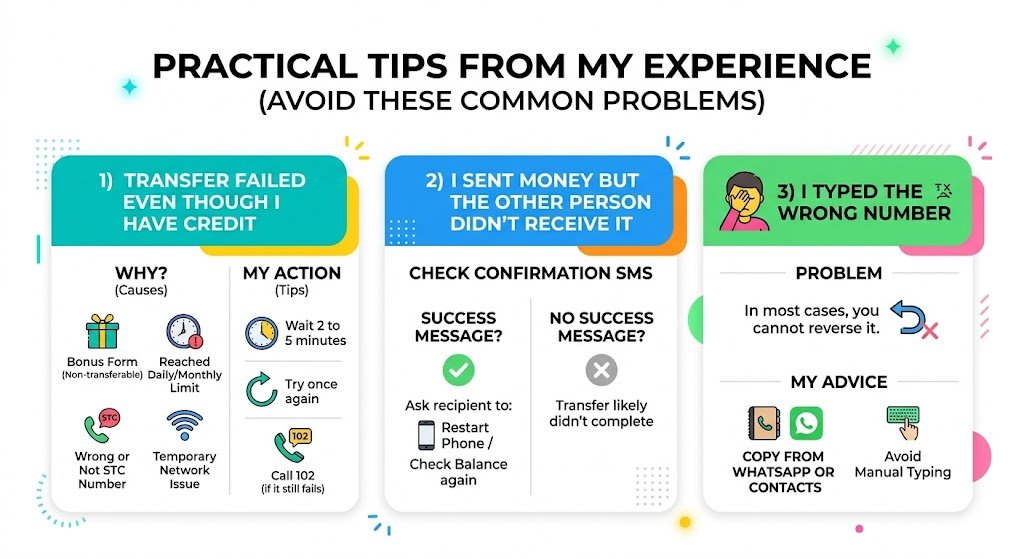
1) Transfer failed even though I have credit
This often happens because:
- Your balance is in bonus form (not transferable)
- You hit a daily or monthly transfer limit
- The recipient number is wrong or not stc
- Temporary network issue
What I do: wait 2 to 5 minutes, then try once again. If it still fails, I call 102 instead of wasting balance on repeated attempts.
2) I sent money but the other person didn’t receive it
First, check the confirmation SMS on your phone. If you received a success message, ask the recipient to restart their phone or check their balance again. If no success message came, the transfer likely didn’t complete.
3) I typed the wrong number
In most cases, you cannot reverse it. That’s why I always suggest you copy the number from WhatsApp or contacts instead of typing it manually.
Helpful stc Codes (Quick Reference)
| Task | Code / Method |
|---|---|
| Local balance transfer | 588Amount*Number# |
| International transfer menu | *585# |
| International transfer by SMS | Send to 585: InternationalNumber Amount |
| Customer care | 102 |
| Check balance | Often available via USSD (varies) or the My stc app |
Because USSD codes can be updated, if any code doesn’t work for you in 2026, the safest option is the My stc app or calling 102.
Conclusion
Transferring balance from stc to stc in Kuwait is one of the quickest ways to help a friend, a family member, or even your own second line when you’re out and about. If you want speed, use the local USSD code 588Amount*Number#. If you’re sending credit internationally, use *585# or the SMS method to 585.
If you want, tell me in a comment what you’re trying to do (local transfer or international, and which country). I’ll guide you with the cleanest method and what to double-check so you don’t lose money to a wrong entry.
FAQs: stc Balance Transfer Kuwait
What if I enter the wrong number?
Most successful transfers are not reversible. Always verify the number before confirming.
Can I transfer balance to a postpaid stc number?
In many cases yes, but it can depend on how the postpaid line is configured. If it fails, call 102 to confirm eligibility.
Is there a fee for transferring balance?
Usually yes, a small fee per successful transfer (commonly around 20 fils for local transfers), but stc can change this.
How do I check my balance after transferring?
Use the My stc app or the official balance check USSD for your line. If you’re unsure, call 102 and ask for the current balance check code.