Meta Kuwait Portal (meta.e.gov.kw): Registration, Login, and Online Appointments
People who stay in Kuwait for an extended time already understand that government operations follow the traditional system, which requires visitors to arrive early and take a numbered ticket before entering a lengthy wait period which can last for several hours.
The Meta Kuwait Portal serves as the main platform through which Kuwait has transitioned its appointment-based services to digital platforms during the past three years. I am Saleh Muhammad I hold Kuwaiti citizenship and I have been living outside Kuwait for more than 10 years. I have managed various Kuwait procedures from overseas while helping my friends and family, and expatriates complete identical tasks.
In this guide, I will tell you all the information you need to know about Meta Kuwait and how to register and book an appointment.
Note: I am not affiliated with the government or CAIT, or any government agency. I provide users with effective methods to access official portal functions, leveraging my professional knowledge and firsthand experience. Users must verify all information through the official website and their confirmation message details.
What is Meta Kuwait?
Meta Kuwait (meta.e.gov.kw) is Kuwait’s official centralized portal for government appointment booking. Instead of walking into a ministry and waiting in a physical queue, you can:
- Choose the ministry/authority
- Select the department and service
- Pick an available date/time slot
- Receive a confirmation (usually via on-screen confirmation and/or SMS/email depending on your profile and settings)
This platform is widely used for services connected to:
- Ministry of Interior (MOI) (including biometrics)
- Civil ID-related appointment-based services
- Some health and administrative services depend on the current system setup
In practice, if a counter or service requires an appointment, Meta is often the gatekeeper.
Before you start (save yourself 20 minutes)
When people tell me “Meta isn’t working,” half the time it’s because they didn’t have the right details ready. Before registering, keep these items with you:
- Civil ID number
- Civil ID serial number (printed on the Civil ID card)
- A working mobile number (preferably the one tied to your Civil ID)
- A valid email address you can access right now (you’ll likely need it for activation or password reset)
My tip: Use an email you won’t lose access to (not a temporary work email). Password resets usually go to the registered email.
Meta Kuwait registration (new user) — step by step
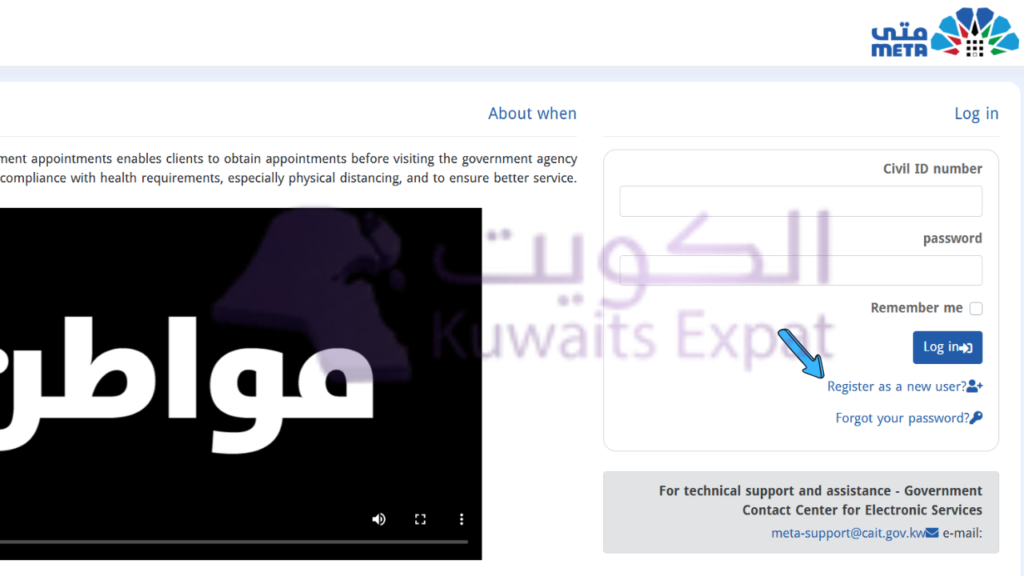
- Go to the official Meta Portal:
https://meta.e.gov.kw - Choose “Register as a New User” (wording may vary slightly depending on updates).
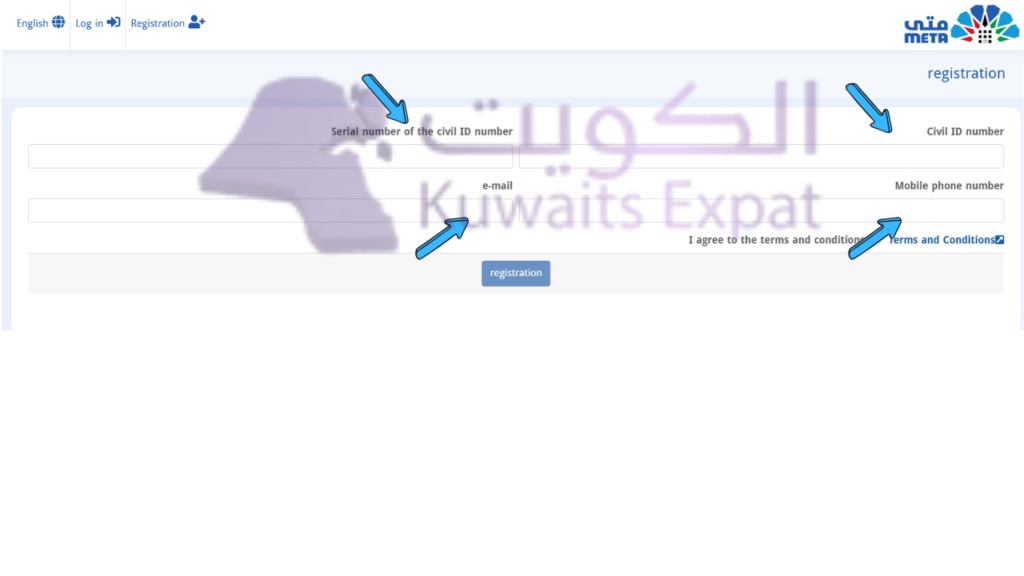
3. Enter your details carefully:
- Civil ID number
- Civil ID serial number
- Mobile number
- Email address
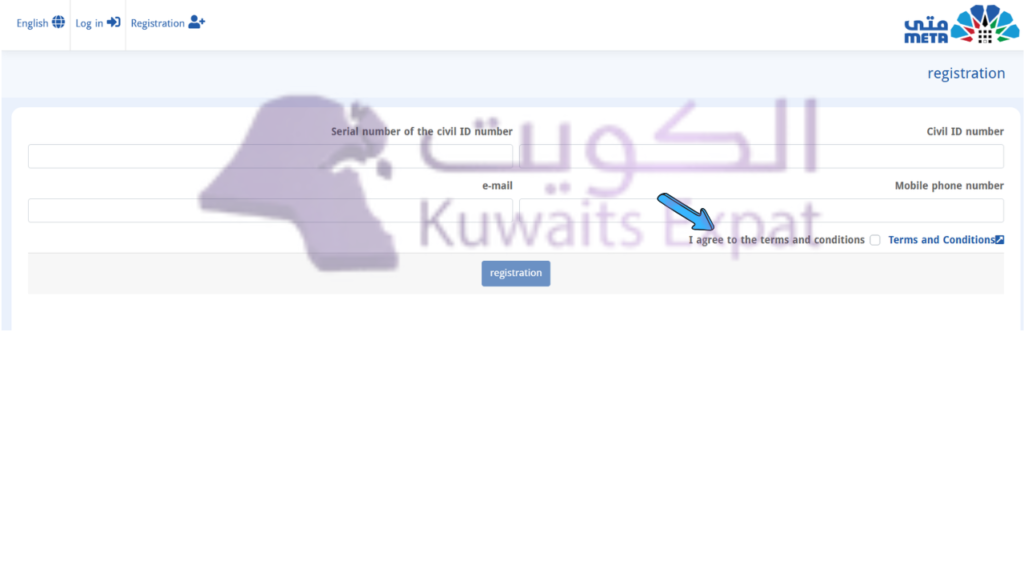
4. Accept the terms and conditions
5. Check your email for the activation link (or verification message).
- If you don’t see it, check Spam/Junk.
- If it still doesn’t arrive, confirm you typed the email correctly.
6. Set your password and complete registration.
After this, your account is created and you can book appointments.
Real-life advice: If you’re registering for a parent, spouse, or employee, do it while they’re with you so you can confirm the details correctly. A single wrong digit in Civil ID serial can block your registration.
Meta Kuwait portal login (and “forgot password”)
Login steps
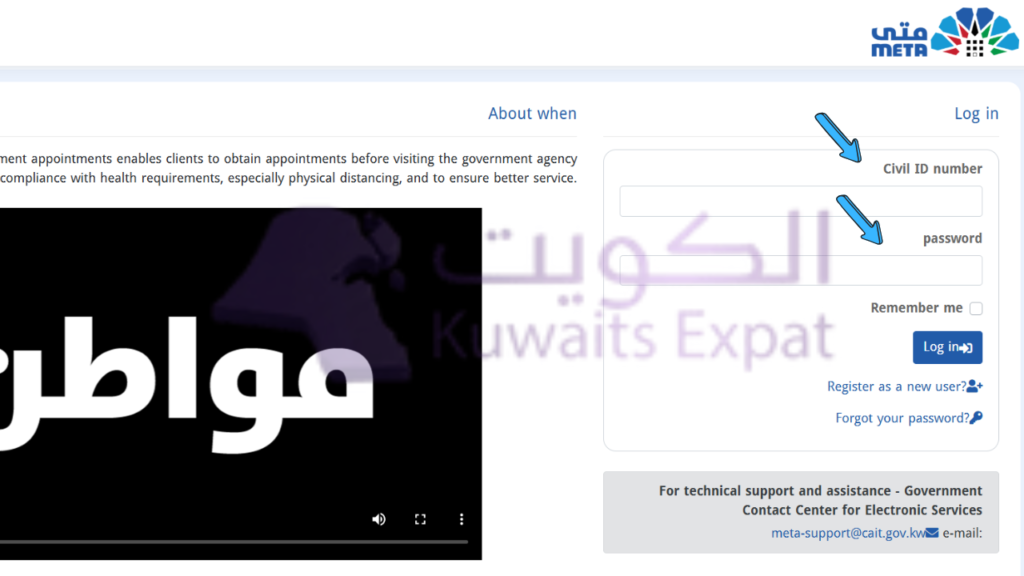
- Visit: https://meta.e.gov.kw
- Go to Login
- Enter:
- Civil ID number
- Password
- Click Login to reach your dashboard
If you forgot your password
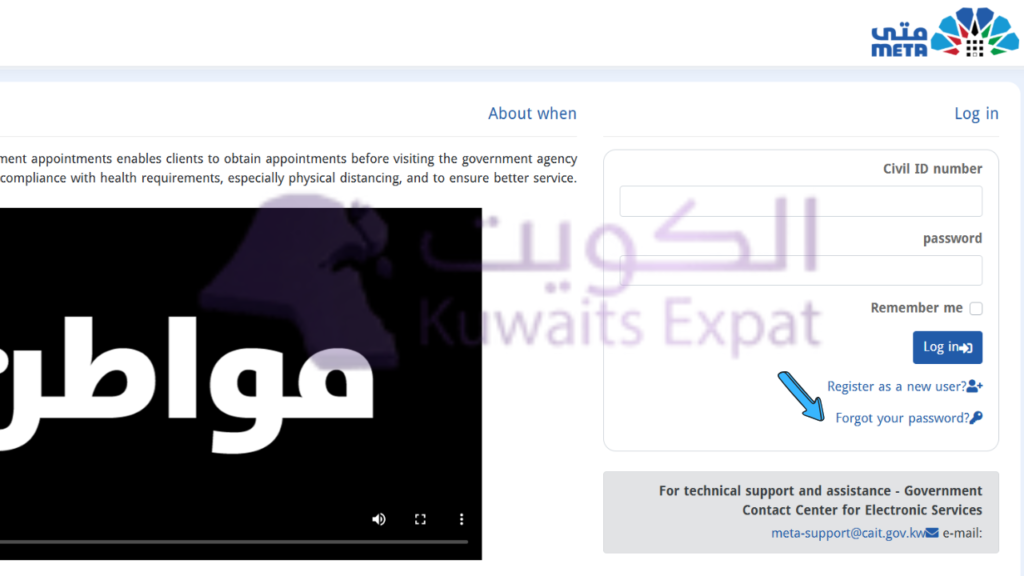
- On the login page, click “Forgot Password”
- Enter your Civil ID number
- Follow the reset instructions sent to your registered email
- Set a new password and log in again
My tip: If you’re not receiving the reset email, don’t keep retrying for an hour—check Spam first, then confirm the email you used during registration.
Meta Kuwait online appointment booking (any ministry/service)
Once logged in, appointment booking is straightforward, but the menu labels can vary slightly.
- Log in to Meta
- From the left-side menu (or dashboard), choose:
Appointments Search (or similar) - Select the Government Agency / Ministry
- Choose the Department
- Choose the Service
- Select the branch/location (if prompted)
- Pick an available date and time
- Confirm the booking
After confirming:
- Take a screenshot of the appointment confirmation
- Save any reference number / QR code (if shown)
- Keep the confirmation accessible on appointment day
My scheduling tip (works more often than not):
- Try mid-week (Tuesday–Thursday)
- Try early morning slots
Meta Kuwait biometric appointment (MOI)
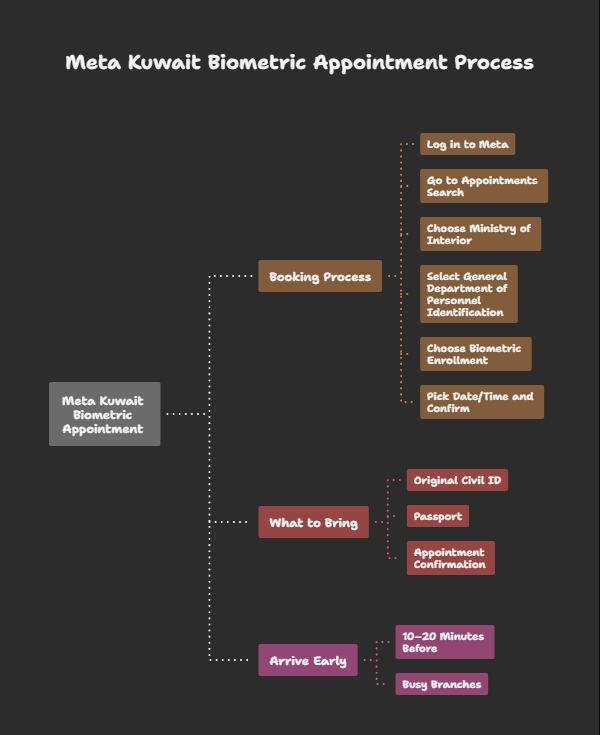
Biometric enrollment is one of the most common reasons people use Meta right now. It typically includes fingerprints, facial scan, and iris scan depending on the current requirements.
To book a biometric appointment:
- Log in to Meta
- Go to Appointments Search
- Choose: Ministry of Interior
- Select: General Department of Personnel Identification
- Choose the service: Biometric Enrollment
- Pick the date/time and confirm
What to take with you
In most cases, bring:
- Original Civil ID
- Passport (recommended, especially for expats)
- Appointment confirmation (digital is usually fine)
Arrive early: I recommend arriving 10–20 minutes before your slot, especially at busy branches.
Booking appointments via the Sahel App (mobile option)
If you prefer doing everything on your phone, Kuwait’s official government app Sahel can route you into Meta-related appointment booking.
Sahel booking steps (common flow)
- Download Sahel (iOS/Android)
- Log in with your Civil ID (and the required verification method)
- Go to E-Services
- Look for META / Meta Portal
- Select the ministry (often MOI for biometrics)
- Choose the department and service
- Confirm date/time
My honest view: Sahel can be easier for quick checks, but if you need to troubleshoot or navigate many service categories, the Meta website on a computer can be clearer.
How to check, reschedule, or cancel your Meta appointment
Check your appointment
- Log in to Meta
- Go to My Appointments
- Review the appointment details (location, time, service)
Reschedule (modify)
Meta often doesn’t “edit” an appointment directly. The usual method is:
- Go to My Appointments
- Cancel the existing appointment
- Book a new slot
Cancel an appointment
- Open My Appointments
- Select the appointment
- Click Cancel Appointment
- Confirm the cancellation
Important: Don’t cancel unless you’re confident you can find another slot soon. Some services get fully booked quickly.
Troubleshooting Meta Kuwait portal issues (quick fixes that actually help)
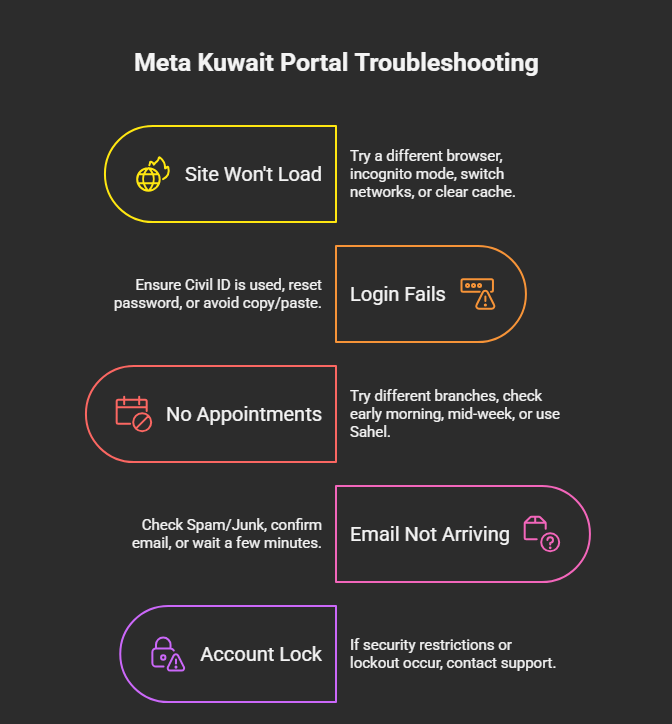
Here are the most common problems I see people face:
1) The site won’t load / keeps spinning
- Try a different browser: Chrome or Firefox
- Use incognito/private mode
- Switch networks (mobile hotspot vs Wi-Fi)
- Clear browser cache
2) Login fails even with correct password
- Make sure you’re entering the Civil ID number (not serial)
- Reset password using Forgot Password
- Avoid copy/paste if it adds spaces
3) No appointments available
- Try different branches/locations
- Check early morning (availability sometimes refreshes)
- Try mid-week
- If urgent, consider Sahel + Meta website (sometimes one shows slots earlier than the other)
4) Email activation/reset not arriving
- Check Spam/Junk
- Confirm the registered email is correct
- Try requesting once, then wait a few minutes (multiple requests can sometimes delay things)
5) Account lock or repeated errors
If the portal indicates security restrictions or lockout, the safest path is to use official support (details below) rather than repeatedly attempting logins.
Why Meta Kuwait is genuinely useful (when you use it right)
From my perspective, Meta is not just a “website”—it’s Kuwait’s way of controlling crowds and speeding up service:
- No physical queue just to get a ticket
- Time-slot system improves predictability
- Works 24/7 for booking (even if appointment times are during office hours)
- Civil ID-based access adds a layer of identity control
- Covers multiple agencies/services in one place
- Free to use (no appointment booking fees)
Official Meta Kuwait contact details (for real support)
If you need help beyond basic troubleshooting, use official channels:
- Official Portal: https://meta.e.gov.kw
- Helpline: 164 or 1800164 (as commonly listed for support)
- Support Email: meta-support@cait.gov.kw
(If any of these change, the Meta portal itself is the best place to confirm updated contact info.)
Final thoughts (my advice after dealing with this system)
If you’re an expat in Kuwait—or a Kuwaiti citizen trying to get something done quickly—Meta can save you a lot of time, but only if you treat it like an “appointments first” system:
- Register properly (correct Civil ID + serial + email)
- Book the correct ministry/department/service
- Keep proof of your appointment
- Arrive early with the right documents
That’s it. No drama, no wasted mornings.
If you want, tell me which service you’re trying to book (biometric, MOI, Civil ID, etc.) and what error you’re seeing, and I’ll guide you based on the most common real cases.
FAQs about Meta Kuwait
1) What is Meta Kuwait used for?
It’s Kuwait’s official portal for booking appointments with government ministries and agencies.
2) Do I have to register to book an appointment?
Yes. You typically need a Meta account linked to your Civil ID.
3) Can I book a biometric appointment online?
Yes. Biometrics are commonly booked via Meta (or through the Sahel App routing to Meta services).
4) I forgot my Meta password—what should I do?
Use Forgot Password on the login page and follow the email reset steps.
5) Is there an official Meta Kuwait app?
There isn’t usually a standalone Meta app. The official mobile alternative is the Sahel App, which connects to Meta-related services.