Why Online Privacy Matters More Than Ever for Internet Users in Kuwait
I am Saleh Muhammad, a Kuwaiti citizen, and I have lived outside Kuwait for over 10 years. I have handled everything remotely from abroad, banking, residency paperwork, job applications, family documents, and daily communication across time zones. That experience taught me one thing very clearly: online privacy is not a “tech person” topic anymore. In Kuwait, it is now a daily life skill.
When you renew services, access Civil ID related platforms, use banking apps, sign into work portals, or even connect to Wi-Fi at a mall, you are constantly sharing pieces of your identity. If you protect those pieces, your life stays smooth. If you don’t, problems can become expensive, stressful, and time consuming.
Digital life in Kuwait: convenience with responsibility
Kuwait is highly connected. Public reports like ITU and DataReportal consistently rank Kuwait among countries with very high internet access and smartphone usage. In plain words, almost everyone is online, and most people do everything through a phone.
That convenience is great. But it also means your personal data is moving all the time between:
- Your phone and apps
- Wi-Fi routers and telecom networks
- Company servers and cloud services
- Third party trackers and ad platforms
Most people only think about privacy after something goes wrong. I want you to think about it before. Because prevention is always cheaper than recovery.
What “privacy” really means in real life
Privacy is not about hiding. It is about control:
- Who can access your data
- What apps can collect
- What you can recover if your account is hacked
- What damage is possible if your phone is lost
The Kuwait reality: what data you share every day
Here is a simple table to show how normal actions can expose important information.
| Everyday activity in Kuwait | What you share | What could go wrong if exposed | Safer habit |
|---|---|---|---|
| Logging into bank app or online banking | Identity, login credentials, transaction history | Account takeover, fraud attempts | Use mobile data, enable 2FA, never save password on shared devices |
| Using government related portals or ID services | Civil ID details, address, personal records | Identity misuse, document leaks | Use trusted networks, verify official URLs, log out after use |
| Applying for jobs online | Passport, CV, phone number, email | Scams, fake offers, data resold | Share documents only with verified employers, watermark sensitive files |
| Using public Wi-Fi in malls or cafés | Browsing activity, logins if not protected | Credential theft, session hijacking | Avoid sensitive logins, use encrypted connections, disconnect after use |
| Sending documents over chat apps | Passport, visa page, salary info | Forwarded files, cloud backups, leaks | Use secure sharing links with expiry, remove metadata, limit who can view |
If you are an expat, you usually manage even more systems across borders, which increases exposure. I’ll explain that in a dedicated section below.
Public Wi-Fi in Kuwait: useful, but often not secured the way you think
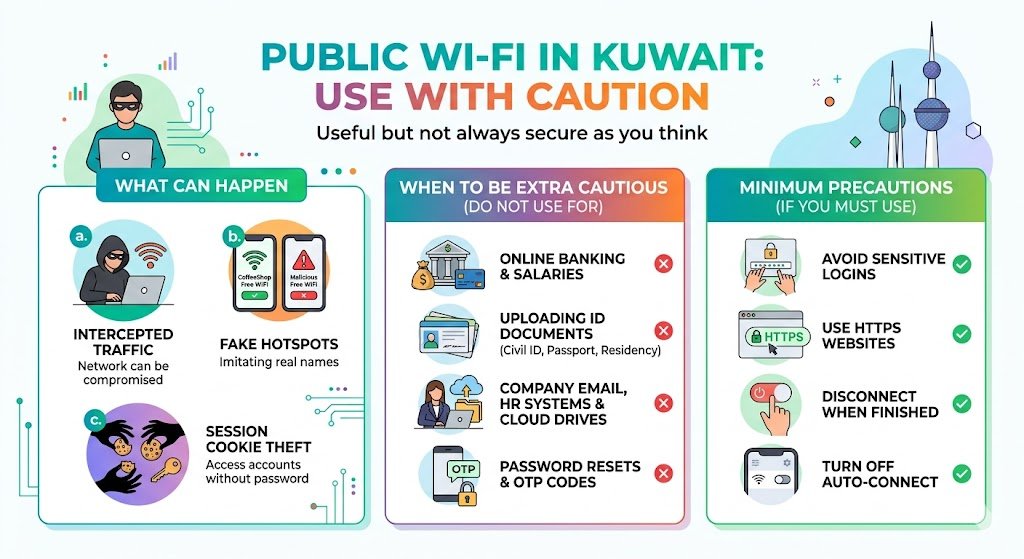
Public Wi-Fi is everywhere in Kuwait: airports, malls, cafés, even some residential buildings. I use it too sometimes. But I treat it like a public place, because it is.
What can happen on open or poorly secured Wi-Fi
- Your traffic may be intercepted if the network is misconfigured or compromised
- Fake hotspots can imitate real names (example: “CoffeeShop Free WiFi”)
- Some attackers target “session cookies” to access accounts without your password
When you should be extra cautious
If you are doing any of the following, do not use public Wi-Fi:
- Online banking or salary related portals
- Uploading Civil ID, passport, or residency documents
- Accessing HR systems, company email, or cloud drives
- Resetting passwords or receiving OTP codes
If you must use public Wi-Fi, at minimum do this:
- Avoid sensitive logins
- Use websites that show HTTPS in the browser
- Disconnect the moment you finish
- Turn off auto-connect so your phone does not join random networks later
Everyday data collection you rarely notice (and why it matters)
Even when nobody is “hacking” you, many apps and websites collect data constantly:
- IP address and approximate location
- Device type, language, and unique identifiers
- Browsing behavior and time spent
- Purchase intent signals (what you search, what you click)
Over time, this creates a detailed digital profile. For most people, the immediate risk is not dramatic, but it does lead to:
- More targeted scams (because criminals buy data too)
- More convincing phishing attempts
- More exposure if one account leaks and gets matched to another
A simple privacy mindset I use
I ask myself: “If this app or website got breached tomorrow, what would be exposed?”
If the answer includes my identity documents, financial info, or private communication, I reduce what I share and increase security.
Cybercrime is more convincing now (especially in Kuwait)
Scams today are not the old “you won a prize” emails. They are localized, cleanly written, and timed well. You may receive:
- SMS claiming to be delivery updates
- Messages pretending to be from a bank
- Emails that look like government or telecom notifications
- Fake job offers targeting expats
Common signs of phishing (quick checklist)
- A message pressures you to act fast
- The link domain looks slightly off (extra letters, weird endings)
- You are asked to “confirm” credentials or OTP codes
- The sender avoids your real name and uses generic wording
- The message redirects you to a login page that feels almost right
My advice is simple: never login from a link inside a random message. Open the official app or type the official website yourself.
Why expats often face extra exposure in Kuwait
If you are an expat, you usually manage:
- International bank accounts
- Employer systems in another country
- Family documents and dependents’ paperwork
- Cloud storage and remote work tools
- Multiple SIMs, numbers, and emails
Every additional platform is another possible entry point.
Also, many expats live in shared housing, use shared printers, shared Wi-Fi, or borrowed laptops. That is not “wrong,” it is just reality. But it increases risk, especially when personal documents are involved.
My expat rule for documents
I never leave passport scans or residency files sitting in:
- WhatsApp media folders
- shared desktops
- unprotected email inboxes
Instead, I use secure cloud storage with two-factor authentication, and I share time-limited links when possible.
Practical steps to improve your online privacy (without being technical)
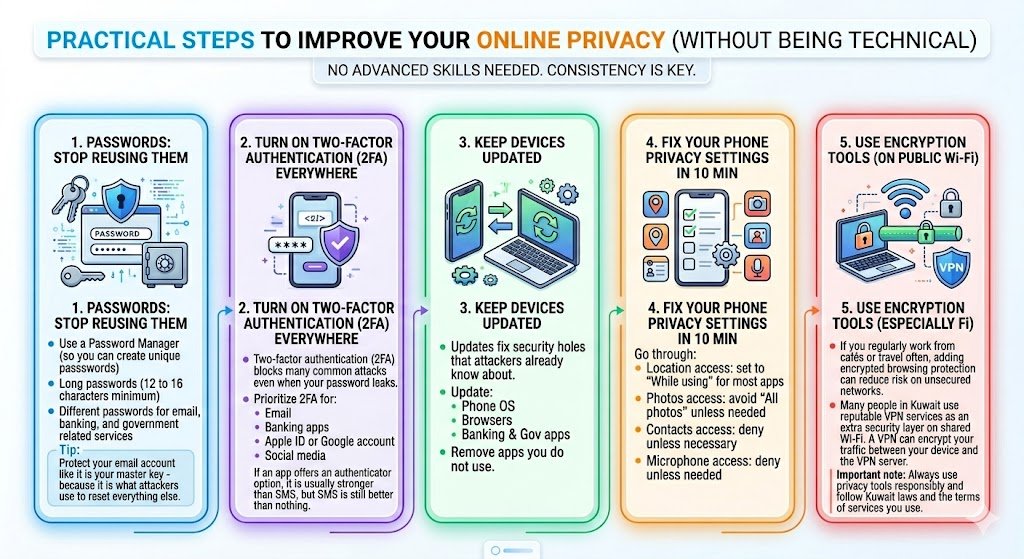
You do not need advanced skills. You need consistency.
1) Passwords: stop reusing them
Reusing passwords is still one of the biggest reasons people lose accounts.
Use:
- A password manager (so you can create unique passwords)
- Long passwords (12 to 16 characters minimum)
- Different passwords for email, banking, and government related services
Tip from experience: protect your email account like it is your master key, because it is what attackers use to reset everything else.
2) Turn on two-factor authentication everywhere
Two-factor authentication (2FA) blocks many common attacks even when your password leaks.
Prioritize 2FA for:
- Banking apps
- Apple ID or Google account
- Social media (yes, because it can be used to scam your contacts)
If an app offers an authenticator option, it is usually stronger than SMS, but SMS is still better than nothing.
3) Keep devices updated (this matters more than people think)
Updates are not only new features. They fix security holes that attackers already know about.
- Update your phone OS
- Update browsers
- Update banking and government related apps
- Remove apps you do not use
4) Fix your phone privacy settings in 10 minutes
Go through:
- Location access: set to “While using” for most apps
- Photos access: avoid “All photos” unless needed
- Contacts access: deny unless necessary
- Microphone access: deny unless needed
You will be surprised how many apps ask for permissions they do not truly require.
5) Use encryption tools when you need them (especially on public Wi-Fi)
If you regularly work from cafés or travel often, adding encrypted browsing protection can reduce risk on unsecured networks.
Many people in Kuwait use reputable VPN services as an extra security layer on shared Wi-Fi. A VPN can encrypt your traffic between your device and the VPN server, which helps reduce exposure on untrusted networks.
Important note: Always use privacy tools responsibly and follow Kuwait laws and the terms of the services you use. My focus here is security and privacy, not bypassing rules.
How to choose a VPN for privacy (quick criteria)
| What to look for | Why it matters |
|---|---|
| Clear privacy policy and reputation | Reduces chance your data is sold or mishandled |
| No-log claims with transparency | Less stored activity linked to you |
| Strong encryption protocols | Better protection on public networks |
| Kill switch option | Helps prevent accidental exposure if connection drops |
A simple 7 day privacy upgrade plan (easy and realistic)
If you want a structured approach, follow this:
Day 1: Change your email password and enable 2FA
Day 2: Update your phone and delete unused apps
Day 3: Enable 2FA for banking and key services
Day 4: Review app permissions and limit location access
Day 5: Check your saved passwords in browser and clean them up
Day 6: Secure your cloud storage and document sharing habits
Day 7: Audit public Wi-Fi settings and disable auto-connect
This is the type of routine I personally follow whenever I change phones or travel.
Privacy is about control, not avoidance
Online privacy in Kuwait is not about being paranoid or avoiding digital services. Kuwait is moving fast into digital-first life, and that is good. But it means you and I have to take ownership of basic digital safety.
If you take small steps today, you protect:
- Your identity
- Your salary and bank accounts
- Your residency related documents
- Your peace of mind