Ooredoo Balance Check
I’m Saleh Muhammad, a Kuwaiti citizen, and I’ve been living outside Kuwait for more than 10 years. I’ve spent a lot of time dealing with Kuwait SIM cards from abroad, topping up for family, keeping my own line active for banking OTPs, and helping friends who land in Kuwait and suddenly realize their data is finished.
If you’re using Ooredoo Kuwait, checking your balance is something you’ll do often, especially on prepaid. In this guide I’ll walk you through every practical method that actually helps in real life, not just a list of codes. I’ll also explain what each result means, when to use each method, and how to avoid common mistakes.
Kuwait is a very mobile-first country. Many industry reports regularly rank Kuwait among the top countries globally for mobile and smartphone usage, and it’s normal for people to maintain more than one SIM. That’s exactly why fast balance checking matters: you don’t want your internet to cut off during work, a delivery order, or a banking verification.
Quick summary: Best ways to check Ooredoo balance
| Method | Best for | Works without internet | Speed | What you get |
|---|---|---|---|---|
| USSD codes | Fast check on any phone | Yes | Instant | Main balance, validity, sometimes bundles |
| My Ooredoo App | Full account control | No | Fast | Balance, data usage, add-ons, billing, recharge |
| SMS | When USSD fails | Yes | Fast | Balance summary by text |
| Ooredoo Website | Bigger screen and history | No | Medium | Account details, invoices (postpaid), services |
| Customer care (121) | Complex issues | Yes | Medium | Human support, troubleshooting, account checks |
If you want the fastest method, use USSD. If you want the most detailed method, use the app.
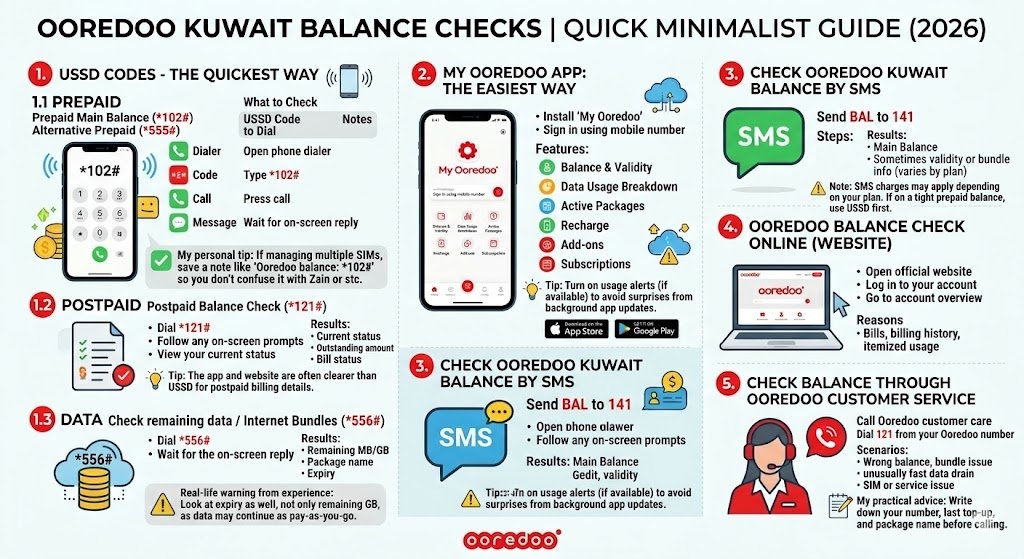
1) Ooredoo balance check using USSD codes (2026)
USSD codes are the quickest way because they work on any phone and don’t need mobile data or Wi‑Fi. You dial a code like you’re making a call, and a message pops up on your screen.
1.1 Ooredoo prepaid balance check code Kuwait
For prepaid lines, these are the most commonly used balance check codes:
| What you want to check | USSD code to dial | Notes |
|---|---|---|
| Prepaid main balance | *102# | Common “old-school” balance check |
| Alternative prepaid balance check | *555# | Useful if *102# doesn’t respond |
How to do it:
- Open your phone dialer
- Type *102# (or *555#)
- Press call
- Wait for the on-screen reply
What you usually see in the reply:
- Remaining credit balance
- Expiry date of your balance or line validity (depends on your plan)
My personal tip: If you’re managing more than one Kuwait SIM (very common), save a note in your phone like “Ooredoo balance: *102#” so you don’t confuse it with Zain or stc codes.
1.2 Ooredoo postpaid balance check code Kuwait
Postpaid works differently. You don’t normally have “credit” like prepaid, but you may want to check your current usage, outstanding amount, or bill status.
| Type | USSD code |
|---|---|
| Postpaid balance check | *121# |
Steps:
- Dial *121#
- Follow any on-screen prompts (some menus are interactive)
- View your current status
If you’re postpaid and your goal is to avoid bill surprises, the app and website are often clearer than USSD because they show billing cycles and itemized usage.
1.3 Ooredoo data balance check (internet remaining)
This is the one most people care about day-to-day, especially if you’re on a data bundle.
| What you want | USSD code |
|---|---|
| Check remaining data / internet bundles | *556# |
Steps:
- Dial *556#
- Wait for the reply showing remaining data and active package info
What the result may include:
- Remaining MB or GB
- Package name
- Expiry date/time of the bundle
Real-life warning from experience: If your bundle expires, your phone may continue using pay-as-you-go data (depending on your settings and plan). That can burn credit quickly. So when you check your data, always look at expiry as well, not only remaining GB.
2) My Ooredoo App: the easiest way to manage everything
If you want one tool that does it all, the My Ooredoo app is the best option. When I’m outside Kuwait and helping someone back home, the app is usually how we troubleshoot because it shows more details than short USSD replies.
How to download and log in
- Install “My Ooredoo” from the Apple App Store or Google Play
- Sign in using your mobile number
- Complete any verification steps (OTP)
What you can do inside the app (beyond balance checking)
| Feature | Why it matters |
|---|---|
| Balance and validity | See remaining credit and when it expires |
| Data usage breakdown | Track daily or monthly usage patterns |
| Active packages | Confirm which bundle is active and when it renews |
| Recharge | Top up without visiting a shop |
| Add-ons | Buy extra data quickly when you run out |
| Subscriptions | Identify and cancel services you don’t use |
My tip (important): Turn on usage alerts or low-balance alerts if the app offers them. In my experience, most “my credit disappeared” complaints are simply background app updates or auto-play videos. Alerts keep you in control.
3) Check Ooredoo Kuwait balance by SMS
If USSD is not responding (it happens sometimes during network congestion), SMS is a simple backup.
Ooredoo balance check via SMS
- Send BAL to 141
You’ll receive a reply that typically includes:
- Main balance
- Sometimes validity or bundle info (varies by plan)
Note: SMS charges may apply depending on your plan (often it’s just the standard local SMS cost). If you’re on a tight prepaid balance, use USSD first since it’s usually free.
4) Ooredoo balance check online (website)
If you prefer a bigger screen or you’re handling postpaid billing, the website is a good option.
How to check balance via Ooredoo Kuwait website
- Open the official Ooredoo Kuwait website
- Log in to your account
- Go to account overview or balance/usage section
- View balance, usage, packages, and billing (especially useful for postpaid)
Why I like the website for postpaid:
- Bills and billing history are easier to review
- You can take screenshots or download invoices if you need them for reimbursement, office claims, or personal records
5) Check balance through Ooredoo customer service
Sometimes you don’t need another code. You need a human, especially when:
- Your balance looks wrong
- A bundle didn’t activate
- Your data is draining unusually fast
- Your SIM has registration or service issues
Call Ooredoo customer care
- Dial 121 from your Ooredoo number
What to expect:
- You may go through an IVR menu first
- Once connected, ask directly for your remaining balance, active bundles, and expiry
My practical advice: Before you call, take 30 seconds and write down:
- Your number
- The last top-up amount and time
- The package name you subscribed to (if any)
It makes the call much faster and more professional.
Common Ooredoo balance check problems and fixes
Here’s the troubleshooting table I wish more guides included, because these are the issues people actually face.
| Problem | What it usually means | What to do |
|---|---|---|
| USSD code not working | Temporary network issue or wrong code | Move to better coverage, try again, restart phone |
| No response after dialing | Network congestion or SIM issue | Toggle airplane mode, reboot, try alternative code *555# |
| App not opening or stuck | Cache issue or outdated version | Update app, clear cache, reinstall |
| Balance seems to drop fast | Background data, auto renewals, pay-as-you-go data | Check data usage in app, disable background data, confirm bundle is active |
| SMS method not replying | Short code service delay | Try again after a few minutes or use USSD/app |
| You are postpaid and “balance” is confusing | Postpaid shows bill/usage not “credit” | Use app/website to check billing cycle and outstanding amount |
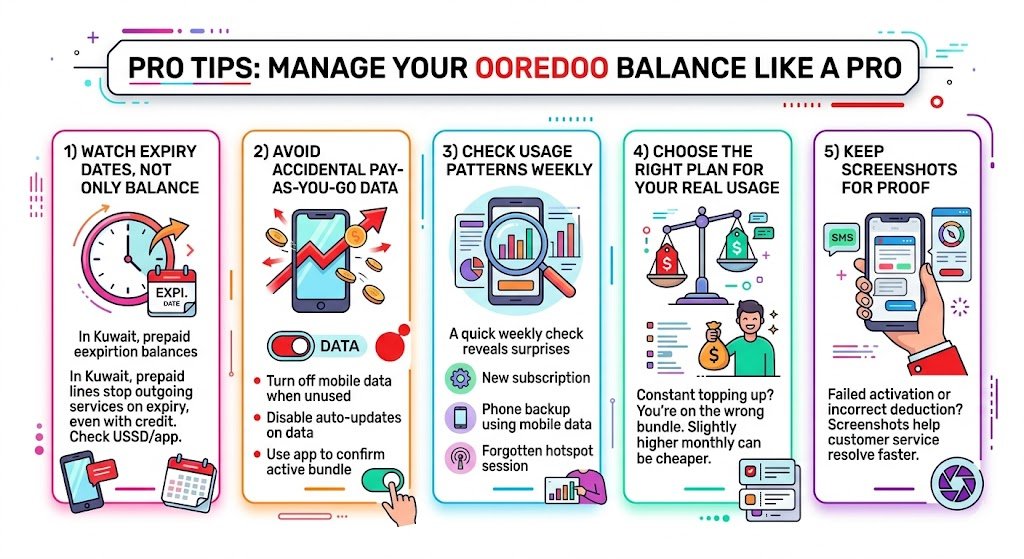
Pro tips from my experience to manage your Ooredoo balance like a pro
1) Watch expiry dates, not only balance
In Kuwait, many prepaid lines stop outgoing services if validity expires even if you still have a few fils left. Always note the expiry shown in USSD/app.
2) Avoid accidental pay-as-you-go data
If your bundle ends and your phone continues using mobile data, it can consume prepaid credit quickly. What you can do:
- Turn off mobile data when you’re not using it
- Disable auto-updates on mobile data
- Use the app to confirm the bundle is active
3) Check usage patterns weekly
A quick weekly check can reveal surprises:
- A new subscription
- A phone backup using mobile data
- A hotspot session you forgot about
4) Choose the right plan for your real usage
If you constantly top up, you’re probably on the wrong bundle. Even a slightly higher monthly bundle can be cheaper than repeated extra-data purchases.
5) Keep screenshots for proof
If a bundle activation fails or credit is deducted incorrectly, screenshots of:
- The activation SMS
- App package screen
- Balance before and after
can help customer service resolve it faster.
Frequently asked questions (FAQ)
Which is the fastest Ooredoo balance check method in Kuwait?
USSD is the fastest. For prepaid, start with *102#. For data, use *556#.
How do I check Ooredoo postpaid balance?
Dial *121# or use the My Ooredoo app/website for clearer billing details and current usage.
Can I check my Ooredoo balance without internet?
Yes. USSD codes and SMS work without internet.
What if all methods fail?
Call 121. If there’s a SIM issue, account restriction, or system outage, customer care is the only method that can confirm what’s happening.
Final recap
If you want a simple routine that works in 2026:
- Prepaid credit: dial *102# (or *555#)
- Postpaid: dial *121#
- Data remaining: dial *556#
- Full control and history: use the My Ooredoo app
- Backup method: SMS BAL to 141
- Complex issues: call 121