Ooredoo Number Check
I am Saleh Muhammad, a Kuwaiti citizen, and I have been living outside Kuwait for over 10 years. In that time, I have kept Kuwaiti SIMs active for banking, OTP messages, deliveries, and family communication. I cannot tell you how many times I personally forgot a number right when I needed it most, especially after swapping phones, using a second SIM, or landing in Kuwait for a short trip.
If you are on Ooredoo Kuwait and you are thinking, “What’s my number?”, this guide will solve it quickly. I’ll walk you through the same methods I use myself, and I’ll also tell you what to do if one method does not work.
A quick trust note: telecom codes and menus can change. I’m sharing the most commonly used and reliable options, and I also include the official fallback methods so you are never stuck.
Why This Happens So Often in Kuwait
Kuwait is one of the countries with very high mobile usage. In recent years, Kuwait has consistently recorded mobile subscriptions well above 100 per 100 people (meaning many people have more than one SIM) based on widely cited World Bank mobile subscription indicators. In real life, you see it everywhere: a work line, a personal line, a data SIM, a travel phone.
So if you have multiple SIMs, it is completely normal to forget which number is in which phone.
Quick Answer: Best Ways to Check Your Ooredoo Number
Here is the simplest overview. If you want the fastest option, start with the USSD code.
Ooredoo number check methods (comparison)
| Method | Works without internet | Works with zero balance | Typical time | Best for |
|---|---|---|---|---|
| USSD code | Yes | Usually yes | 5 to 15 seconds | Fastest option on any phone |
| My Ooredoo app | No | Yes | 30 to 90 seconds | People who manage accounts and packages |
| Customer care (111) | Yes | Yes | 2 to 10 minutes | When you need human help |
| Phone settings and SIM info | Yes | Yes | 30 to 60 seconds | When codes fail or SIM is in a spare device |
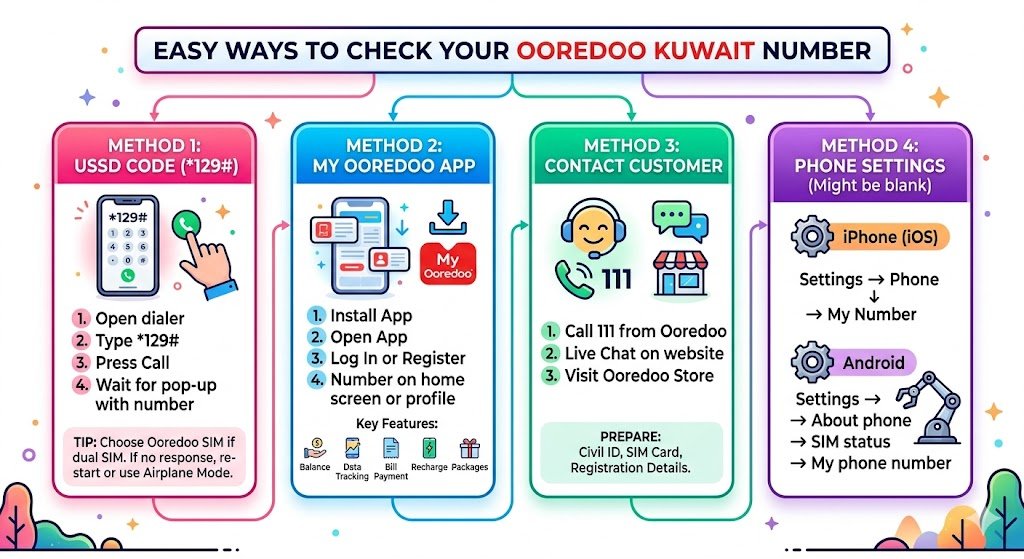
Method 1: Ooredoo Number Check Code (USSD) in Kuwait
This is the method I use first because it works on basic phones and smartphones, and you do not need internet.
Ooredoo number check USSD code
Dial: *129#
Step by step
- Open your phone dialer.
- Type *129#
- Press the call button.
- Wait a few seconds for the pop-up message.
- Your Ooredoo Kuwait number should appear on the screen.
My personal tip
If you are using a dual SIM phone, make sure you dial using the Ooredoo SIM. On most Android phones, you will see SIM 1 and SIM 2 options after pressing call. Pick the Ooredoo one.
If the USSD code does not respond
Sometimes USSD can fail due to roaming, temporary network issues, or SIM toolkit problems. If it does not work:
- Turn airplane mode on for 10 seconds, then off, and try again.
- Restart the phone.
- If you are outside Kuwait, try again after connecting to a stable roaming network, or use the app method below.
Method 2: Check Your Number in the My Ooredoo App
If you prefer apps, the My Ooredoo app is not only for checking your number. It is also where you manage packages, see usage, and pay bills. When I’m outside Kuwait, this is often my easiest way because I can do everything over Wi‑Fi.
How to check your number in My Ooredoo
- Install My Ooredoo from your phone’s app store.
- Open the app.
- Log in or register using your mobile number.
- Your number is usually shown on the home screen or under profile or account details.
What else you can do inside My Ooredoo (useful features)
| Feature | Why it matters in real life |
|---|---|
| Balance check | Avoid surprise cut-offs or failed calls |
| Data usage tracking | Helps you prevent running out mid-day |
| Bill payment | Great if you maintain a postpaid line while abroad |
| Recharge and top up | Useful for prepaid lines and keeping the SIM active |
| Package management | Add or cancel data and roaming bundles |
| Offers and add-ons | Sometimes you find cheaper bundles than via SMS |
My personal tip
If you are registering and you do not remember the number, use Method 1 first. The app usually wants the number to sign up, so the USSD code is the quickest starting point.
Method 3: Contact Ooredoo Customer Service to Get Your Number
If you want a real person to help, Ooredoo customer service is the most reliable fallback. This is also the best route if you have a SIM ownership issue, SIM swap, or you need to confirm your registered details.
How to contact Ooredoo Kuwait
- Call 111 from your Ooredoo line (commonly used customer care number in Kuwait)
- Use live chat on Ooredoo Kuwait’s official website
- Visit an Ooredoo store or customer service center (best for identity verification)
What to prepare before you call or visit
To make it fast (and to protect your account), have:
- Your Civil ID details if the line is registered under you
- The SIM card you are calling from
- Any information you still have (SIM pack, old recharge receipts, or WhatsApp showing the account number)
Method 4: Check Your Number from Phone Settings (Works Sometimes)
This method is not perfect, but it can help when you cannot use USSD.
On iPhone
Go to:
Settings, Phone, My Number
If it is blank, do not worry. Many SIMs do not store the number in a way iOS displays.
On Android
Go to:
Settings, About phone, SIM status (or Status), My phone number
Android brands vary, so the menu may be slightly different.
Common Problems and Fixes (Troubleshooting Table)
| Problem you face | Most likely reason | What to do |
|---|---|---|
| USSD code not working | Network or roaming issue | Restart phone, toggle airplane mode, try again |
| Dual SIM confusion | Dialed from wrong SIM | Select the Ooredoo SIM when dialing |
| App login requires number | You forgot the number | Use USSD first, then register in the app |
| Phone settings show blank | Number not stored on SIM | Use USSD or contact customer care |
| You are outside Kuwait | Roaming and USSD sometimes fail | Use Wi‑Fi and the app, or contact support |
Safety and Privacy Tips (From My Experience)
Because I live abroad, I’m extra careful with SIM security. Kuwait numbers are often tied to bank OTP messages, government services, and delivery accounts.
Here is what I recommend you do:
- Do not share your Civil ID or OTP codes with anyone, even if they claim to be support.
- If someone asks for your number, share the number only, not screenshots of your SIM settings that might reveal extra device info.
- If you suspect your SIM was swapped or your number stopped receiving SMS, contact Ooredoo immediately and visit a branch with your Civil ID.
Frequently Asked Questions
Can I check my Ooredoo number with zero balance?
In many cases, yes. USSD services often work even with zero balance. If it fails, use the My Ooredoo app on Wi‑Fi or contact customer care.
What if I have more than one Ooredoo SIM?
Check each SIM separately by dialing the USSD code from the SIM you want to identify. On dual SIM phones, always confirm which SIM is used to place the request.
I am outside Kuwait. Will the USSD code still work?
Sometimes yes, sometimes no. Roaming networks can block certain USSD functions. In that case, the app or customer support is your best option.
Final Words
If you only remember one thing, remember this: the fastest way to check your Ooredoo Kuwait number is to dial *129# from the Ooredoo SIM.
And if that does not work for any reason, you are still covered through the My Ooredoo app or by calling 111 and letting customer care verify it properly.