STC Number Check Kuwait
I am Saleh Muhammad, a Kuwaiti citizen and an expat who has lived outside Kuwait for more than 10 years. During that time, I have kept my Kuwaiti SIM active for banking, OTP messages, work, and family. So I know exactly how annoying it feels when you need to recharge, register for an app, or receive a delivery and you suddenly realize you do not remember your STC number.
In this guide, I will show you the fastest and most reliable ways to check your STC number in Kuwait in 2026, with clear steps, real-world troubleshooting, and a few practical tips I personally use.
Quick answer (fastest method)
If you just want the quickest option:
Dial *116*1# and press Call
Your STC number should appear on your screen within a few seconds.
If that does not work, scroll down to the MySTC app method or call STC customer care on 102.
Why this happens a lot in Kuwait (a small reality check)
Kuwait is one of those countries where many people keep more than one SIM for work, family, offers, or data. It is normal to forget which line is which, especially if you are using:
- Dual SIM phones
- eSIM plus physical SIM
- A spare STC line only used for OTP messages
- A router SIM for home internet
Helpful context (industry stats)
To put things in perspective, Kuwait consistently ranks among the higher countries globally for mobile usage. Many telecom reports over recent years place Kuwait’s mobile subscription rate well above 100 percent of the population, which usually means a lot of people maintain multiple active lines. Smartphone adoption is also very high, which is why the MySTC app method works well for most users.
All working methods to check your STC number (comparison table)
| Method | Internet needed | Works on any phone | Typical time | Best for |
|---|---|---|---|---|
USSD code *116*1# | No | Yes | 5 to 15 seconds | Fastest, no data, no app |
| MySTC app | Yes (usually) | No (smartphone only) | 1 to 2 minutes | Managing everything in one place |
| SIM card pack (plastic holder) | No | Yes | 1 to 5 minutes | If you kept the original pack |
| Call STC customer care 102 | No | Yes | 2 to 10 minutes | When USSD and app fail |
| Call or SMS another phone | No | Yes | 10 to 30 seconds | Quick workaround if you have another phone nearby |
| Phone settings (may show number) | No | Yes | 30 to 60 seconds | Sometimes works, not always reliable |
Now I will walk you through each method step by step.
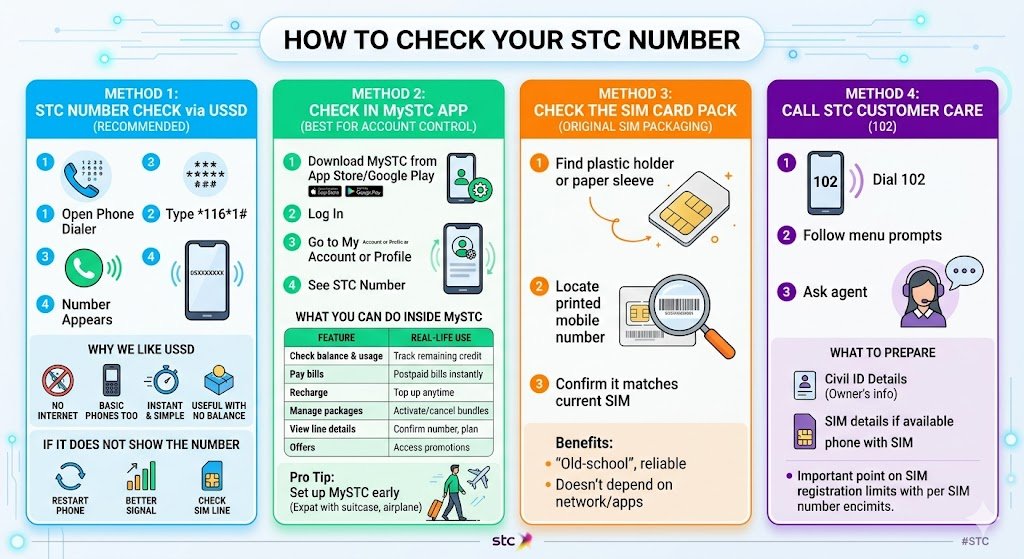
Method 1: STC number check using USSD code (recommended)
This is the method I use most often, especially when I am traveling or do not have data.
Steps
- Open your phone Dialer.
- Type
*116*1# - Press Call.
- Your STC number should appear on your screen.
Why I like USSD
- You do not need internet
- Works on basic phones too
- It is instant and simple
- Useful when your line has no balance
If it does not show the number
Sometimes USSD fails due to network delay, SIM issue, or you are roaming. Try this:
- Restart your phone and retry
- Move to an area with better signal
- Make sure you dialed it from the correct SIM
Method 2: Check your STC number in the MySTC app (best for full account control)
If you manage your plan, bills, and add-ons, the MySTC app is the most practical long-term solution.
Steps
- Download MySTC from the App Store or Google Play.
- Log in (or register your number).
- Go to My Account or Profile (wording can change slightly with updates).
- You should see your STC number and line details.
What you can do inside MySTC (useful table)
| Feature | What it helps you do (real-life use) |
|---|---|
| Check balance and usage | Track remaining credit and data before it runs out |
| Pay bills | Pay postpaid bills without visiting a branch |
| Recharge | Top up anytime, especially when traveling |
| Manage packages | Activate or cancel data and calling bundles |
| View line details | Confirm your number, plan type, and sometimes SIM info |
| Offers | Access promotions based on your line |
From personal experience, if you are an expat who travels often, having MySTC set up before you need it saves you time later.
Method 3: Check the SIM card pack (the original SIM packaging)
If you still have the original STC SIM pack, your number is usually printed on it.
Steps
- Look for the plastic card holder or paper sleeve that came with the SIM.
- Check for a printed mobile number
- Confirm it matches the SIM you are using
This is old-school, but it is still one of the most accurate ways because it does not depend on network, apps, or phone settings.
Method 4: Call STC customer care (102)
If USSD is not working and you cannot access the MySTC app, call STC directly.
Steps
- Dial 102
- Follow the menu prompts
- Ask the agent to help you identify your number
What to prepare (to make it faster)
Support may ask you to verify your identity. It helps if you have:
- Civil ID details (for the line owner)
- SIM details if available (SIM serial sometimes)
- The phone you are calling from (the SIM must be in it)
If your SIM is not registered under your Civil ID, customer care may be limited in what they can share, which brings me to an important point about SIM registration.
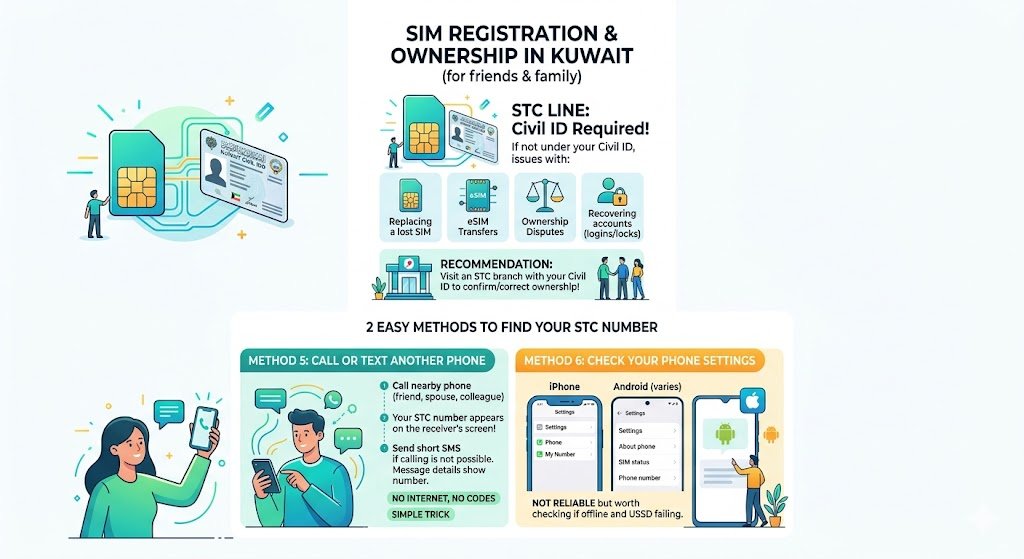
Important: SIM registration and ownership in Kuwait (what I tell friends and family)
In Kuwait, SIM registration is taken seriously. If your STC line is not under your Civil ID, you can face issues later with:
- Replacing a lost SIM
- eSIM transfers
- Ownership disputes
- Recovering access to accounts tied to the number
If you discover your number but you are unsure it is registered to you, I strongly recommend visiting an STC branch to confirm and correct ownership (bring your Civil ID).
Method 5: Call or text another phone (quick workaround)
If you have a second phone nearby, this is the simplest trick.
Steps
- Call the other phone and let it ring once.
- Your STC number will appear on the receiver’s screen.
If calling is not possible, send a short SMS. The recipient can see your number in the message details.
This works even without internet, and you do not need to remember any codes.
Method 6: Check your phone settings (works sometimes)
This method depends on the device and whether the SIM has stored the number.
On iPhone
- Settings
- Phone
- My Number (may show it, may be blank)
On Android (varies by brand)
- Settings
- About phone
- SIM status
- Phone number (may show it)
Troubleshooting: common issues and how to fix them
| Problem | Why it happens | What to do |
|---|---|---|
| USSD code not working | Weak signal, roaming, SIM issue | Restart phone, try again, move location, call 102 |
| MySTC app login problems | Wrong OTP, old account, roaming SMS delay | Ensure SMS works, retry, reset password, contact support |
| SIM shows no number in settings | SIM not storing number | Use USSD or call another phone |
| SIM not working | SIM damaged, not activated, phone tray issue | Reinsert SIM, clean tray, test in another phone, visit branch |
| Dual SIM confusion | Dialing from the wrong SIM | Select the correct SIM before dialing USSD |
Managing your STC account online (what I personally recommend)
Once you retrieve your number, do this immediately so you do not repeat the problem:
- Save the number in your contacts as “My STC Kuwait”
- Create or update your MySTC login
- Keep a screenshot of your line details in a secure place (not publicly shared)
- If you use the line for banking, confirm it is registered under your Civil ID
This is especially important for expats and frequent travelers. I have seen people lose access to bank OTPs just because they did not keep their SIM ownership and account details organized.
Final thoughts (from my own experience)
Checking your STC number in Kuwait is usually easy. In most cases, the USSD code *116*1# solves it in seconds. And if you want a smoother experience long term, the MySTC app is worth setting up properly.
If you get stuck, do not waste time guessing. Call 102 or use the simple workaround of calling another phone to display your number. Then save it immediately so you do not have to repeat the same headache next month.
FAQs
How can I check my STC number in Kuwait?
You can check it by dialing *116*1#, using the MySTC app, checking your SIM pack, calling 102, or calling another phone to display your number.
What is the USSD code to check my STC Kuwait number?
The commonly used code is *116*1#.
How do I contact STC customer service in Kuwait?
Dial 102 from your STC line.
Can I find my STC number in phone settings?
Sometimes yes, but it is not guaranteed. If it is blank, use the USSD method or MySTC app.
What should I do after I find my number?
Save it in your contacts, set up MySTC, and make sure the line is registered under your Civil ID if you use it for important services.