Zain Internet Packages 2026: All Plans, Prices, Activation
I’m Saleh Muhammad, a Kuwaiti citizen, and I’ve been living outside Kuwait for more than 10 years. Because of that, I’ve had to manage my Kuwait number and internet in a very practical way, sometimes while I’m abroad, sometimes during short visits, and often while helping family and friends inside Kuwait choose the right plan.
In this guide, I’ll walk you through Zain Kuwait internet packages for 2026 in a way that’s actually useful. I’ll cover the eeZee online exclusive prepaid plans, business packages, pay monthly 5G internet options, and the exact activation and management steps you’ll rely on day to day.
Important note: Telecom offers can change. I’m listing the plans and activation methods as commonly published by Zain and as provided in your source. Before you pay, always double-check inside the Zain KW website/app or by contacting Zain support, especially for business and pay-monthly pricing.
Why Zain is a Top Choice in Kuwait (My honest perspective)
Kuwait is one of the strongest mobile-internet markets in the region, and in my experience Zain is usually chosen for one of three reasons:
- Strong 5G availability in many populated areas
- Good prepaid flexibility (especially eeZee)
- Simple activation and account management through SMS and app
If you’re an expat, a student, or someone who just wants predictable monthly internet without complicated contracts, Zain’s eeZee line is usually where you start.
Quick Recommendations (So you don’t waste time)
If you want my straight advice before all the details:
- Light user (WhatsApp, maps, browsing): start with 30GB or 60GB
- Daily social + streaming: 100GB is the most balanced for many people
- Heavy user (multiple devices, hotspot, lots of video): 150GB or 300GB
- No stress at all: Unlimited 5G plan
- Company line or serious business: look at Business Beyond and above
Zain Internet Packages Kuwait 2026 Overview
Zain generally organizes internet plans into:
- eeZee online exclusive prepaid plans
- Business plans
- Pay monthly 5G internet plans (larger quotas, sometimes “registration interest based”)
Let’s break them down clearly.
Zain eeZee Online Exclusive Plans 2026
These are the plans most people ask me about because they’re straightforward and priced reasonably.
eeZee Plans Table (Prepaid, 30 days)
| Plan | 5G Data | Local Minutes | Zain-to-Zain | Night Internet | Social Media | Validity | Price | Auto Renewal | Activation SMS |
|---|---|---|---|---|---|---|---|---|---|
| eeZee 30GB | 30GB | 100 | Unlimited | No | No | 30 days | KD 5 | Yes | Send 51 to 999 |
| eeZee 60GB | 60GB | 100 | Unlimited | N/A | N/A | 30 days | KD 6 | Yes | Send 61 to 999 |
| eeZee 100GB | 100GB | 500 | Unlimited | Unlimited 11:00 PM to 5:00 AM | Unlimited | 30 days | KD 9 | Yes | Send 91 to 999 |
| eeZee 150GB | 150GB | 1000 | Unlimited | Unlimited 11:00 PM to 5:00 AM | Unlimited | 30 days | KD 12 | Yes | Send 121 to 999 |
| eeZee 300GB | 300GB | 2500 | Unlimited | Unlimited 11:00 PM to 5:00 AM | Unlimited | 30 days | KD 15 | Yes | Activation code in source shows 121 to 999 |
| eeZee Unlimited 5G | Unlimited | Unlimited | Unlimited | Unlimited 11:00 PM to 5:00 AM | Unlimited | 30 days | KD 20 | Not stated | Send 201 to 999 |
A small caution about activation codes
The source presents 150GB and 300GB as accessible through the same activation code (121). The system mapping might experience changes throughout its operational lifespan or it could be a publishing error. If the SMS you sent results in an incorrect confirmation message which does not match your desired plan, stop and check the app or contact Zain support before you make the payment.
Which eeZee plan gives the best value?
I like to look at “cost per GB” (even though minutes and extras matter too). Here’s a quick value snapshot:
| Plan | Price | Data | Approx KD per GB |
|---|---|---|---|
| 30GB | KD 5 | 30GB | 0.167 |
| 60GB | KD 6 | 60GB | 0.100 |
| 100GB | KD 9 | 100GB | 0.090 |
| 150GB | KD 12 | 150GB | 0.080 |
| 300GB | KD 15 | 300GB | 0.050 |
My takeaway: 60GB and above starts getting “good value”, and 300GB is the best price per GB if you truly consume a lot of data.
How to get Zain eeZee SIM Online Exclusive Plans (Step-by-step)
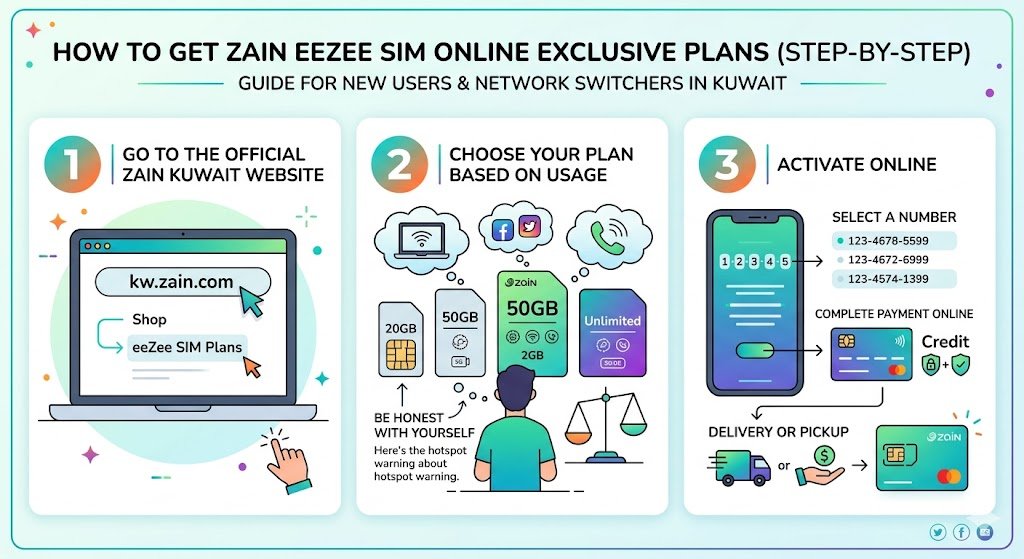
If you’re new to Kuwait or you’re switching networks, do this:
1) Go to the official Zain Kuwait website
- Visit kw.zain.com
- Go to Shop
- Look for eeZee SIM Plans
2) Choose your plan based on your real usage
Be honest with yourself here. If you’re going to hotspot your laptop daily, don’t buy the smallest plan and then get frustrated mid-month.
3) Activate online
You typically:
- Select a number (if it’s a new line)
- Complete payment online
- Follow the instructions for SIM delivery or pickup (depending on the current process)
Zain Business Plans in Kuwait 2026
If you own a small company, manage staff SIMs, or need premium numbers and higher allowances, Zain Business plans are designed differently. They may involve registration steps and tailored pricing.
Business Plans Table
| Plan | Local Minutes | Internet | SMS Local | SMS International | Extras Included | Price |
|---|---|---|---|---|---|---|
| Business Beyond Mini | 2000 | 200GB 4G | 1000 | 100 | Silver Number | KD 10 monthly |
| Business Beyond | Unlimited | 300GB 5G | Unlimited | 500 | Gold Number | Registration interest based |
| Business Beyond Plus | Unlimited | 1TB 5G | Unlimited | 1000 | Platinum Number | Registration interest based |
| Business Elite | Unlimited | 4TB 5G | Unlimited | 1000 | Gold Number, Primary Smartphone | Registration interest based |
What “Silver, Gold, Platinum Number” means in real life
From what I’ve seen in Kuwait culture and business, premium numbers matter more than people admit. A Gold Number is typically a number with an easy pattern, often used by executives and businesses because it’s memorable and looks premium on branding.
Pay Monthly 5G Internet Plans (Large Quotas)
These plans are often used for heavy internet needs and can be suitable for:
- Home internet via 5G router
- Staff housing where many people share Wi-Fi
- Temporary setups when you don’t want fixed broadband
Pay Monthly 5G Internet Options (as listed)
| Plan | Internet | Price | Notes |
|---|---|---|---|
| 3TB Internet | “Unlimited” shown as 4G internet | Registration interest | New Line |
| 5TB Internet | 5TB 5G | Registration interest | New Line |
| Unlimited 5G Internet | Unlimited 5G | Not specified | Registration interest, New Line |
Because pricing is not clearly specified in the source for these, I strongly recommend you check in the Zain app or store for the exact monthly fee and whether there’s any contract duration.
How to Register for Zain Internet in Kuwait
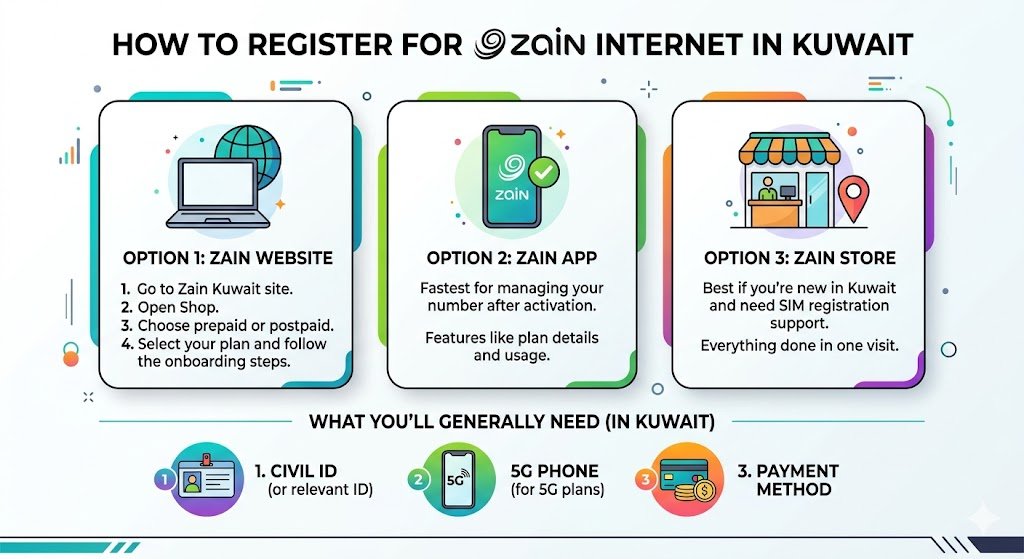
You can register in three common ways:
Option 1: Zain website
- Go to Zain Kuwait site
- Open Shop
- Choose prepaid or postpaid
- Select your plan and follow the onboarding steps
Option 2: Zain app
This is usually the fastest for managing your number after activation.
Option 3: Zain store
If you’re new in Kuwait and want everything done in one visit, the store option is easier, especially if you need SIM registration support.
What you’ll generally need in Kuwait:
- Your Civil ID (or relevant identification for residents)
- A phone that supports 5G if you’re buying 5G plans
- Payment method
How to Activate Your Zain Internet Plan (SMS method)
For eeZee plans, the source activation method is simple:
- Send the plan code by SMS to 999
- Example: send 51 to 999 for eeZee 30GB
In my experience, always wait for the confirmation SMS and read it carefully before you assume the plan is active.
Need more data? Zain Xtra packages
Sometimes you underestimate your usage, especially in Kuwait where video and calls are heavy. Zain offers add-ons often referred to as “Xtra” packages.
Example given:
- KD 2 for 1GB valid 30 days
The best practice: only buy add-ons if you’re near month-end. If you’re constantly buying add-ons early, you chose the wrong base plan.
Manage Your Zain Internet Like a Pro (This saves money)
Check your data balance
- Dial 142# to view remaining data (as provided in the source)
Renew or upgrade
- Use the Zain app or website
- Or follow the SMS instructions for your plan
Set usage alerts
If your phone supports data alerts, set a warning at:
- 70 percent usage
- 90 percent usage
This is one of the simplest ways to avoid surprise slowdowns.
Auto-renewal
If you hate interruptions, enable auto-renewal. If you’re the type who travels often and doesn’t want renewals while abroad, keep it off and renew manually.
Real-world tips I share with expats in Kuwait
1) 5G speed depends on your area more than your plan
A premium plan won’t fix weak signal inside some buildings. If your internet is slow:
- Move closer to a window
- Try another room
- Toggle airplane mode for 10 seconds
- Restart the phone or router
2) If you’re using a 5G router, placement matters a lot
Put the router:
- High up (on a shelf)
- Away from thick walls
- Not inside a cabinet
3) Match the plan to your lifestyle
If you stream a lot at night, a plan that includes night unlimited (11 PM to 5 AM) can be a huge win.
Kuwait Mobile Internet Stats (Helpful context)
Kuwait has established itself as a top mobile-internet market because its 5G technology shows high adoption rates throughout the country, although different devices and locations create variations in actual internet speeds.
I maintain a benchmark table to set people expectations because it shows typical real-world speed ranges which do not provide exact results.
| Connection Type | Typical Experience in Kuwait (varies by area) | Best for |
|---|---|---|
| 4G LTE | Stable browsing, HD video, video calls | Everyday use, wide compatibility |
| 5G | Faster downloads, smoother 4K streaming, better hotspot performance | Power users, home router setups, gamers |
If you want a precise measurement in your exact location, test using:
- Speedtest-type apps
- Two different times of day (evening congestion is real)
Frequently Asked Questions
Which Zain plan is best for an expat?
For customers who need easy products with high value, I recommend starting with eeZee 60GB or 100GB. You can change your plan after one month based on your actual usage.
Can I activate without visiting a store?
Yes, eeZee online exclusive plans are designed for online activation. Business plans often require more registration steps.
What if I send the SMS code and it activates the wrong plan?
Do not ignore the confirmation message. If it’s wrong, contact Zain support immediately or use the app to confirm what is active before you continue using data.