Zain Quick Pay Kuwait | How I Pay My Zain Bills and Recharge in Under a Minute
I’m Saleh Muhammad. I’m a Kuwaiti citizen, but I’ve been living outside Kuwait for more than 10 years. During that time, I still had to manage Kuwaiti numbers, help family with bills, keep SIM lines active, and fix payment issues from abroad. So I learned the fastest ways to handle telecom payments without wasting time in branches or waiting for someone else to do it.
If you’re in Kuwait or you’re an expat managing your Zain line, Zain Quick Pay is one of the simplest tools you can use to pay bills, recharge, and manage services online. In this guide I’ll walk you through how it works, how I use it, what can go wrong, and how to fix it quickly.
What Is Zain Quick Pay in Kuwait?
Zain Quick Pay is Zain Kuwait’s online payment feature that lets you pay your Zain bills and recharge lines through the Zain app or Zain Kuwait website, without logging into complicated dashboards or visiting a store.
When people say “Quick Pay,” they usually mean one of these actions:
- Paying a postpaid bill
- Recharging a prepaid line
- Paying for internet and add-ons
- Viewing recent transactions and confirmations
From my experience, the biggest value is not only speed, but control. You can confirm the number, amount, and payment method yourself, and you instantly get a payment confirmation.
What You Can Do With Zain Quick Pay (Services Table)
Here’s a clear view of the most common actions people use Quick Pay for:
| Service | What it helps you do | When you’d use it |
|---|---|---|
| Pay Zain bills | Pay postpaid bills instantly | End of month, avoiding service suspension |
| Recharge prepaid | Top up any Zain prepaid number | Daily use, emergency credit, keeping line active |
| Buy data bundles | Subscribe to internet packs and add-ons | More data, better value than pay-as-you-go |
| Manage line payments | Keep a record of your payments | For expense tracking, company reimbursements |
| Roaming and add-ons | Pay for extras (when available in your plan) | Before travel or during travel |
Note: Some services depend on your line type (prepaid, postpaid, corporate) and what Zain enables in your account region and plan.
What You Need Before Using Zain Quick Pay
I always tell people to prepare these first. It prevents 90 percent of payment errors.
| Requirement | Why it matters |
|---|---|
| Zain Kuwait number | Quick Pay is tied to your Zain line |
| Civil ID (sometimes) | For registration and account verification |
| Payment method | Usually KNET, debit card, credit card depending on the channel |
| Active internet | App and web need stable connection |
| Correct number format | Wrong digit means topping up the wrong line |
My tip: If you’re paying for a friend or family member, ask them to send you the number by WhatsApp text so you don’t mistype it.
How to Use Zain Quick Pay (App Method)
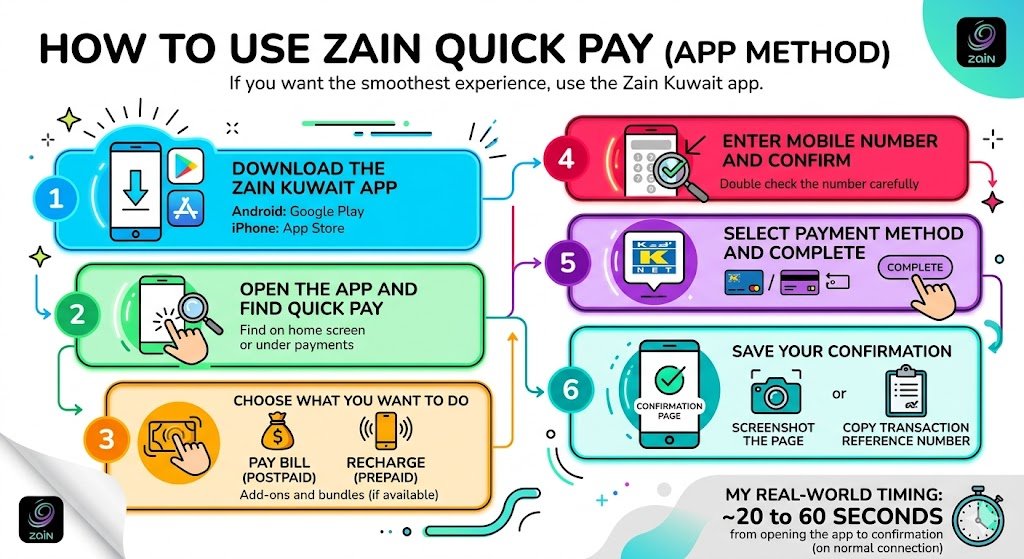
If you want the smoothest experience, use the Zain Kuwait app. This is what I personally use most of the time.
Step 1: Download the Zain Kuwait app
- Android: Google Play
- iPhone: App Store
Step 2: Open the app and find Quick Pay
Most versions place it on the home screen or under payments.
Step 3: Choose what you want to do
- Pay bill (postpaid)
- Recharge (prepaid)
- Add-ons and bundles (if available)
Step 4: Enter the mobile number and confirm
Double check the number. I always read it twice before paying.
Step 5: Select payment method and complete
Depending on your setup, you might see:
- KNET
- Debit or credit card
- Saved card (if you previously saved one)
Step 6: Save your confirmation
After payment, I take one quick action:
- Screenshot the confirmation page, or
- Copy the transaction reference number
That reference number is extremely useful if you ever need support.
My real-world timing: On a normal connection, a recharge usually takes me around 20 to 60 seconds from opening the app to confirmation.
How to Use Zain Quick Pay on the Zain Website
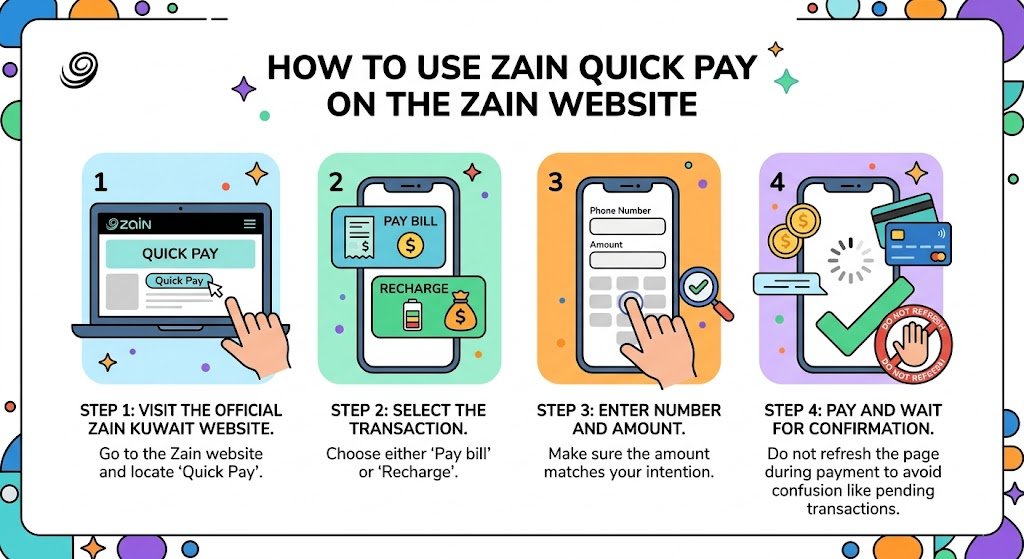
If you’re on a laptop or you don’t want to install apps, the website option is strong.
Step 1: Visit the official Zain Kuwait website
Go to Zain Kuwait and locate Quick Pay.
Step 2: Select the transaction
You’ll typically see:
- Pay bill
- Recharge
Step 3: Enter number and amount
Make sure the amount matches what you intended.
Step 4: Pay and wait for confirmation
Do not refresh the page during the payment step. If you refresh too early, you might create confusion like pending transactions.
Why I Recommend Zain Quick Pay (Benefits That Matter)
Here’s what makes it genuinely useful compared to paying in-store:
| Benefit | What it means for you |
|---|---|
| 24/7 access | You can pay at night, weekends, holidays |
| No queue, no driving | No branch visits, no waiting |
| Fast confirmation | You know instantly if the payment succeeded |
| Works anywhere | Helpful for expats and travelers managing Kuwait lines |
| Better tracking | You can keep proof of payment and references |
Zain Quick Pay vs Other Payment Methods (Comparison Table)
This is the honest comparison I give friends when they ask if Quick Pay is worth it:
| Method | Speed | Convenience | Proof of payment | Best for |
|---|---|---|---|---|
| Zain Quick Pay (App/Web) | Very fast | Very high | Strong (digital confirmation) | Most people, especially expats |
| Paying in Zain store | Medium to slow | Low | Paper receipt | If you need in-person help |
| Paying via reseller shop | Medium | Medium | Varies | Quick top-ups near home |
| ATM or bank portal | Medium | Medium | Good | If you prefer banking channels |
Common Zain Quick Pay Problems and How I Fix Them
Even good systems fail sometimes. Here are the real issues I see most often, and the fixes that usually work.
| Problem | What’s happening | Fix I recommend |
|---|---|---|
| Payment failed | Card declined or session timed out | Recheck card limits, try again on stable internet |
| OTP not received | Bank OTP delay or wrong phone | Wait 2 minutes, confirm bank SMS works, retry |
| Recharge not reflected | System delay | Wait 5 to 10 minutes, then restart app and check balance |
| Pending transaction | Page refreshed or connection drop | Do not repay immediately, check bank statement first |
| Wrong number recharged | Typo error | Contact Zain support fast with transaction reference |
| App not loading | Old version or cache issue | Update app, clear cache, reinstall if needed |
My personal rule before paying again
If your payment looks stuck, check your bank SMS or statement first. I’ve seen people pay twice because they panicked and repeated the transaction.
Security and Safety (How to Protect Yourself)
I’m careful with telecom payments because they are frequent, and frequent payments attract mistakes.
Here’s what I do, and what you should do too:
- Use your own phone, not public devices
- Avoid public Wi-Fi when paying
- Never share OTP codes with anyone
- Save transaction references for every payment
- If you save a card in the app, lock your phone with PIN or biometrics
If something feels suspicious, stop and contact official support.
Zain Customer Support (When You Need Human Help)
If you’ve tried the fixes and still have an issue, contact Zain directly.
What I prepare before contacting support:
- The Zain number involved
- Transaction reference number
- Date and time of payment
- Amount paid
- Bank message screenshot (if relevant)
Common official support channel in Kuwait:
- Zain customer care: 107 (within Kuwait)
If you’re outside Kuwait, I recommend using Zain’s website contact options or app support chat where available, because calling internationally can be inconsistent depending on your country.
Frequently Asked Questions (Quick Answers)
Can I use Zain Quick Pay for someone else’s number?
Yes. Just be extremely careful with the number you enter.
Is Zain Quick Pay only for postpaid?
No. It’s used for prepaid recharge as well, depending on the option you choose.
What if my card was charged but the recharge didn’t happen?
Wait a short time, then check if the balance updated. If not, contact Zain and provide the transaction proof. This is where screenshots help.
My Final Advice (From One Expat to Another)
If you live in Kuwait, Zain Quick Pay saves you time. If you live outside Kuwait like me, it gives you control. You can manage your Zain line without depending on someone else, and you can solve urgent situations fast, like topping up a number before it expires or paying a bill to prevent suspension.