STC Balance Check Kuwait (Prepaid and Postpaid) 2026
I’m Saleh Muhammad, a Kuwaiti citizen, and I’ve been living outside Kuwait for more than 10 years. Because I move in and out of Kuwait a lot, I’ve personally used STC lines as prepaid for short stays and postpaid when I needed stability for work and banking. One small thing I learned the hard way is this: if you don’t check your balance and data regularly, STC services can stop at the worst moment, like when you’re waiting for an OTP, calling a delivery driver, or using maps.
In this guide, I’ll show you every practical way to check your STC balance in Kuwait in 2026, for both prepaid and postpaid. I’ll also share which method I recommend depending on your situation, plus troubleshooting tips that save time.
Quick Summary (If You’re in a Hurry)
STC balance check codes and SMS (Kuwait)
| Line type | Fastest method | USSD code | SMS method |
|---|---|---|---|
| Prepaid | USSD menu | 556# | Send “balance” to 888888 |
| Postpaid | USSD instant | 166# | Send empty SMS to 900 |
Tip from my own use: If you’re stuck with no data, the USSD or SMS method is the most reliable because it works on the mobile network without internet.
Why Checking Your STC Balance Actually Matters (More Than People Think)
A lot of people only check balance when things stop working. I used to do the same. But once you start tracking it regularly, you avoid surprises and you can control your spending better.
Here’s what balance checking helps you with:
| Benefit | What it protects you from | Real-life example |
|---|---|---|
| Avoid service interruption | Calls and data suddenly stop | Your internet cuts while booking a taxi |
| Control spending | Unexpected usage or add-on charges | Extra data bundle renews automatically |
| Track data properly | Running out mid-day | Video calls stop during work |
| Catch unusual activity | Unauthorized usage or SIM misuse | Balance drops even though you barely used it |
| Choose the right package | Overpaying for the wrong plan | Paying for big data but you mostly use Wi-Fi |
My advice: if you rely on your number for banking, residency, or work, check balance and data at least once a week.
1) STC Balance Check Kuwait for Prepaid Lines
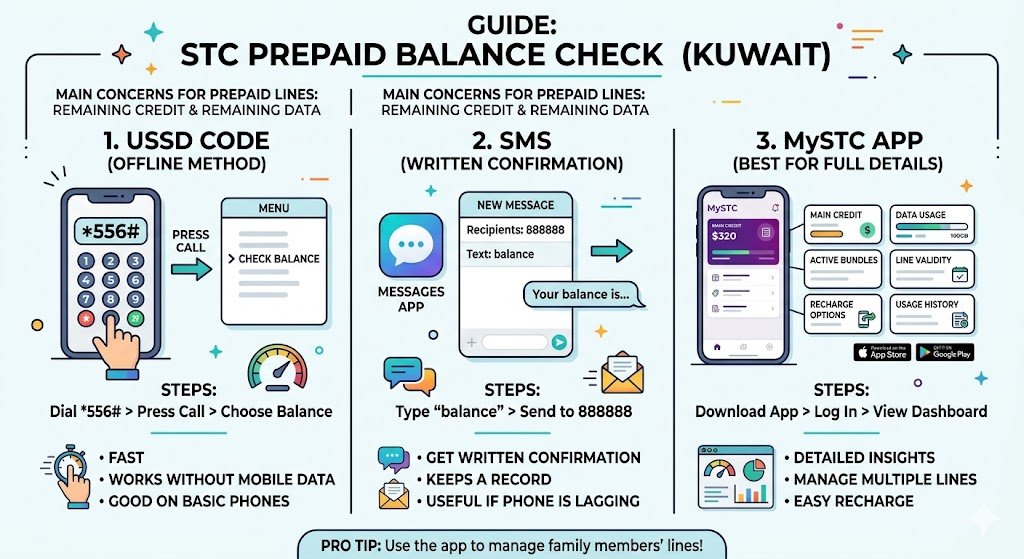
If you’re on STC prepaid, your main concern is usually remaining credit and remaining data (if you have a data bundle active). Here are the most effective methods.
1.1 Prepaid Balance Check Using USSD (Works Without Internet)
This is the method I personally use the most, especially when I land in Kuwait and I’m not connected to Wi‑Fi yet.
How to do it:
- Open your phone dialer
- Dial 556#
- Press call
- A menu appears
- Choose the option for checking balance
Why I like it:
- Fast
- Works without mobile data
- Works on basic phones too
If the menu is in Arabic and you prefer English, don’t worry. The “balance” option is usually very easy to spot, and you can still navigate by numbers.
1.2 Prepaid Balance Check by SMS (Good When Menus Don’t Load)
If you prefer a written confirmation you can screenshot, SMS is a great option.
Steps:
- Open your Messages app
- Type: balance
- Send it to: 888888
- You’ll receive an SMS with your remaining credit
When this method is best:
- You want something saved in writing
- Your phone is lagging and USSD menus take time
1.3 Check Prepaid Balance in the MySTC App (Best for Full Details)
If you want more than just “how many fils left”, the MySTC app is the most detailed option.
What you can usually see in the app:
- Remaining credit
- Remaining data
- Active bundles and add-ons
- Line validity or expiry details (when available)
- Recharge options
- Usage history (helpful if balance drops unexpectedly)
How to use it:
- Download MySTC from the App Store or Google Play
- Log in with your STC number
- Go to your line dashboard to view balance and usage
My personal tip: If you manage more than one line (your line plus a family member’s), the app is the easiest way to keep everything in one place.
2) STC Balance Check Kuwait for Postpaid Lines
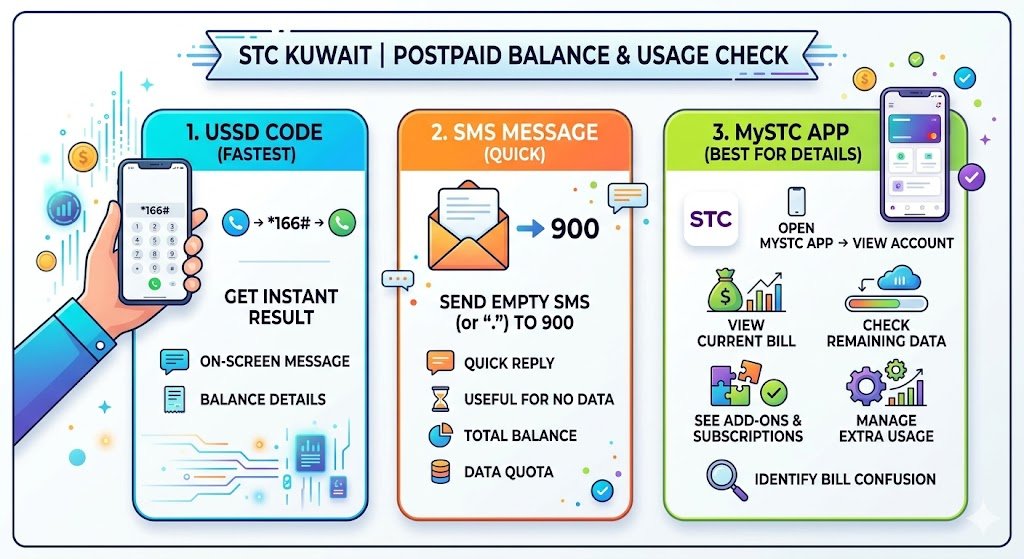
Postpaid is different. You’re not only checking “balance” in the prepaid sense, you’re also checking:
- current bill amount (if available)
- remaining data quota (if your plan includes a quota)
- add-ons and extra usage
Here’s how to check quickly.
2.1 Postpaid Balance Check Using USSD
Steps:
- Open your phone dialer
- Dial 166#
- Press call
- You’ll receive an on-screen message with your balance details
This is the fastest method for postpaid when you want an instant result.
2.2 Postpaid Balance Check by SMS
This is very useful when:
- you have no data
- you want a quick response without opening apps
Steps:
- Open Messages
- Send an empty SMS (leave the message blank)
- Send to 900
- You’ll receive an SMS with your balance details
If your phone doesn’t allow a fully empty message, type a single dot and send it. In most cases, the system still responds, but I recommend trying empty first.
2.3 Postpaid Account Tracking in MySTC App (Best for Bills and Add-ons)
For postpaid users, the app is where you get the most clarity.
In the app, you can usually:
- view your current bill
- check remaining data
- see add-ons and subscriptions
- manage services and line settings
If you ever had bill confusion (I’ve seen this with expats who subscribe to roaming or extra data), the app makes it easier to identify where usage is coming from.
3) Other Ways to Check Your STC Balance in Kuwait
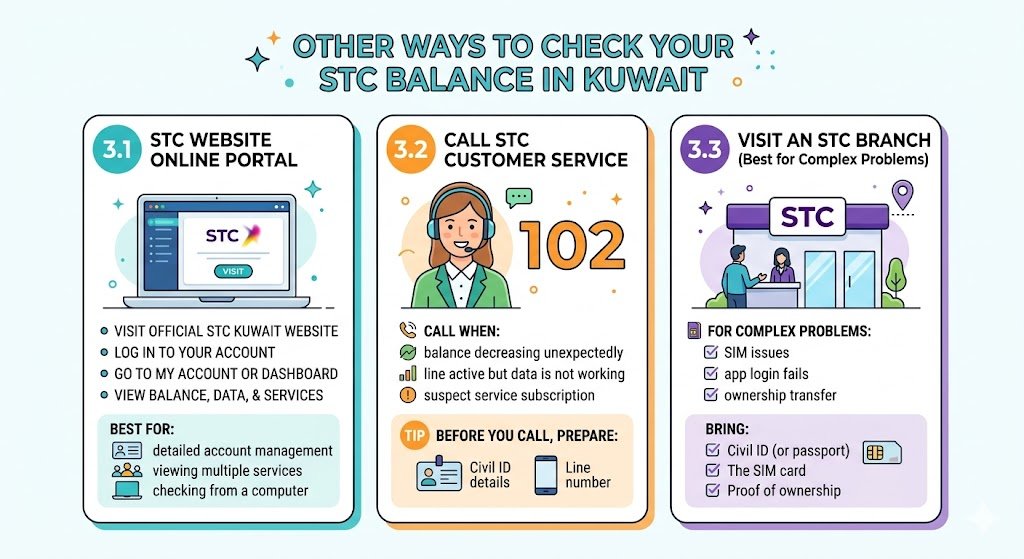
Sometimes USSD doesn’t respond or you’re helping someone who isn’t comfortable with codes. These options are reliable.
3.1 STC Website Online Portal
If you’re on a laptop or you prefer a browser:
- Visit the official STC Kuwait website
- Log in to your account
- Go to My Account or Dashboard
- View balance, data, and services
Best for:
- detailed account management
- viewing multiple services
- checking from a computer at work
3.2 Call STC Customer Service
If you want a human response, call STC support:
- 102
I recommend calling when:
- your balance is decreasing unexpectedly
- your line is active but data is not working
- you suspect a service subscription you didn’t request
Tip: Before you call, prepare your civil ID details and your line number. It speeds things up.
3.3 Visit an STC Branch (Best for Complex Problems)
If your SIM has issues, your app login fails, or you’re dealing with ownership transfer, going in-person is often the fastest overall solution.
Bring:
- Civil ID (or passport for some cases)
- The SIM card (if available)
- Any proof of ownership if the line is not under your name
Which STC Balance Check Method Should You Use?
Here’s a simple decision table I use myself:
| Your situation | Best method | Why |
|---|---|---|
| No internet available | USSD or SMS | Works without data |
| Need proof or screenshot | SMS | Written response stays in messages |
| Want data, add-ons, full details | MySTC app | Shows usage and subscriptions |
| Something looks wrong | Call 102 or visit a branch | Faster resolution for disputes |
| Managing multiple lines | MySTC app or website | Easier account overview |
Troubleshooting: When STC Balance Check Is Not Working
I’ve had moments where a code didn’t respond or the app didn’t refresh. Try these fixes:
USSD not responding
- Make sure you typed the code correctly
- Toggle airplane mode on and off
- Restart your phone
- Try again after 2 to 5 minutes (sometimes it’s network congestion)
SMS method not replying
- Check you have signal
- Confirm the recipient number is correct (888888 for prepaid balance keyword, 900 for postpaid empty SMS)
- Try sending again once
App not showing correct balance
- Log out and log back in
- Update the MySTC app
- Clear app cache (Android)
- If it still looks wrong, cross-check with USSD or SMS
Practical Safety Tips (Especially for Expats)
Because I’ve been an expat for years, I’m very careful with SIM-related issues. Your phone number is linked to banking, residency portals, delivery apps, and OTPs.
Here’s what I recommend:
- Do not share OTP codes with anyone
- Check for unexpected subscriptions if your balance drops quickly
- Keep your SIM registered under your correct ID
- If your phone is lost, contact STC quickly to secure the line
Frequently Asked Questions
What is the easiest way to check my STC balance in Kuwait?
For most people, the easiest is USSD:
Prepaid: 556#
Postpaid: 166#
What are the STC balance check SMS numbers?
Prepaid: send “balance” to 888888
Postpaid: send an empty SMS to 900
Is STC balance check free?
In most cases, yes, balance checking via USSD and the standard SMS inquiry is treated as a basic service. If anything changes, STC will reflect it in their official support channels. If you want to be extra safe, use USSD first.
How can I check my STC internet data balance?
The most reliable way is through:
MySTC app (best for details)
STC website portal
Customer service 102 if the numbers look wrong
Final Notes From Me (So You Don’t Get Stuck)
If you take one thing from this guide, make it this: save the correct method for your line type now, before you urgently need it. I keep a note on my phone with the key codes and numbers, and it has saved me more than once.
Codes and service methods can change over time, so if anything doesn’t work exactly as written, your best confirmation is the MySTC app, STC’s official website, or calling 102.