Ooredoo Quick Pay 2026
I’m Saleh Muhammad, a Kuwaiti citizen, and I’ve been living outside Kuwait for over 10 years. During that time, I’ve managed my own Kuwait lines from abroad, helped family members inside Kuwait pay bills when they were busy, and supported expat friends who were confused about prepaid vs postpaid, terminated numbers, and online payments.
If you’re in Kuwait or you’re an expat managing your Ooredoo line, this guide is exactly what I wish I had years ago. I’ll walk you through Ooredoo Quick Pay in a practical way, including steps, common issues, and the small details that competitors usually skip.
What is Ooredoo Quick Pay in Kuwait?
Ooredoo Quick Pay is Ooredoo Kuwait’s online payment service that lets you do essential account payments without logging into a complicated portal or visiting a branch. In real life, it’s the fastest way to:
- Recharge a prepaid line
- Pay a postpaid bill (full or partial)
- Redeem a voucher
- Pay dues for a terminated number
- Request credit from someone else (they pay for you through a secure link)
From my experience, Quick Pay is most useful when:
- You are in a hurry and don’t want branch queues
- You are outside Kuwait and need to top up a line urgently
- Your line is terminated and you want to clear dues to avoid issues later
Quick overview table (what you can do)
| Feature | What it helps you do | Who it’s for |
|---|---|---|
| Prepaid recharge | Add balance immediately | Anyone with prepaid |
| Postpaid bill payment | Pay full or partial bill | Postpaid customers |
| Voucher payment | Recharge or pay using a scratch card | Cash buyers, gifts |
| Terminated number payment | Clear outstanding dues even after termination | Anyone with an old line |
| Request Credit | Ask someone to pay your recharge via WhatsApp or email | Students, travelers, emergencies |
Why I recommend Quick Pay (especially for expats)
Kuwait is already heavily digital in day-to-day payments. Recent “Digital Kuwait” style reports (DataReportal-style country snapshots and telecom market summaries) consistently show very high internet access and smartphone usage in Kuwait, which is why services like Quick Pay have become normal instead of “optional”.
Here’s the practical benefit list:
- Convenience: You pay from your phone, anywhere.
- Speed: Most payments reflect in minutes (often instantly).
- Multiple payment options: Usually KNET and cards.
- Fewer mistakes: You see the number and amount before confirming.
What you need before using Ooredoo Quick Pay
Before you start, keep this checklist ready. It saves time and reduces failed payments:
| Item | Why it matters |
|---|---|
| Correct Ooredoo number | Most errors happen because of a wrong digit |
| Civil ID or Passport (for terminated lines) | Used to locate old terminated numbers and dues |
| KNET details or bank card | You’ll need it to complete payment |
| Stable internet | Prevents payment timeout during the gateway step |
| Screenshot or receipt save | Useful if payment is delayed or disputed |
My personal advice: if you’re paying for someone else (your driver, family, a colleague), confirm the number with them on WhatsApp first. One wrong digit means you recharged a stranger.
How to recharge Ooredoo prepaid using Quick Pay (step-by-step)
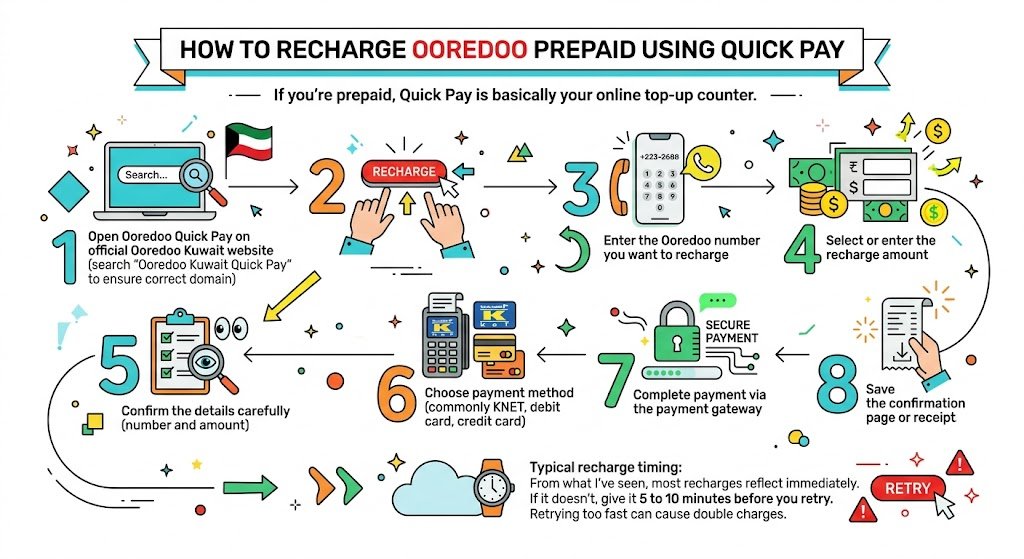
If you’re prepaid, Quick Pay is basically your online top-up counter.
Steps
- Open Ooredoo Quick Pay on the official Ooredoo Kuwait website (search “Ooredoo Kuwait Quick Pay” to ensure you land on the correct domain).
- Choose Recharge (or Prepaid Recharge).
- Enter the Ooredoo number you want to recharge.
- Select or enter the recharge amount.
- Confirm the details carefully (number and amount).
- Choose payment method (commonly KNET, debit card, credit card).
- Complete payment via the payment gateway.
- Save the confirmation page or receipt.
Typical recharge timing
From what I’ve seen, most recharges reflect immediately. If it doesn’t, give it 5 to 10 minutes before you retry. Retrying too fast can cause double charges.
How to pay Ooredoo postpaid bills with Quick Pay
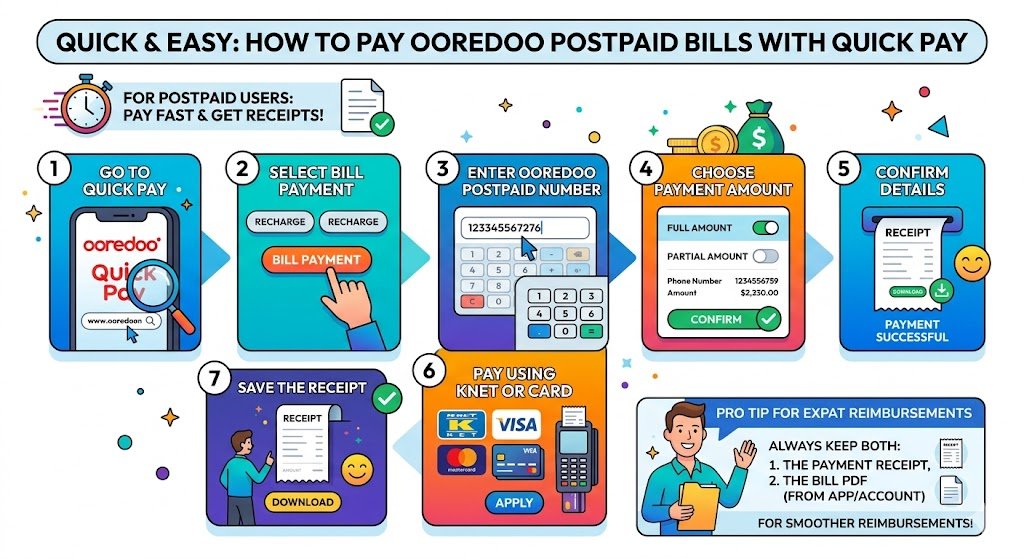
Postpaid users normally want two things:
- Pay the bill fast
- Download proof (receipt) for personal records or reimbursements
Steps
- Go to Quick Pay.
- Select Bill Payment.
- Enter the Ooredoo postpaid number.
- Choose to pay:
- Full amount, or
- Partial amount (if allowed on your bill)
- Confirm details.
- Pay using KNET or card.
- Save the receipt.
Pro tip from my experience
If you’re an expat and your company reimburses your line, always keep:
- The payment receipt
- The bill PDF (if available in your account/app)
That makes reimbursements much smoother.
Paying with Ooredoo vouchers (how it works and when it’s better)
Vouchers are still popular in Kuwait because they are simple and they make good gifts. If you don’t want to use online banking or cards, vouchers are a good backup.
How to redeem voucher using Quick Pay
- Open Quick Pay.
- Choose Pay via Voucher (or Voucher Recharge).
- Enter your Ooredoo number.
- Scratch the voucher panel to reveal the code.
- Enter the voucher code carefully.
- Confirm and submit.
Where to buy Ooredoo vouchers in Kuwait
You can usually find vouchers at:
- Ooredoo branches
- Authorized dealers and mobile shops
- Supermarkets and convenience stores
- Some co-ops and kiosks in busy areas
Voucher usage table (quick decision)
| Situation | Best option |
|---|---|
| No KNET or card available | Voucher |
| Gifting credit to someone | Voucher |
| You’re paying online from abroad | Quick Pay with card |
| You want fastest top-up | Quick Pay (KNET/card) |
How to pay terminated Ooredoo numbers (this is where people get stuck)
This is one of the most important features and one of the most searched topics. Many people assume once a number is terminated, they can ignore it. In Kuwait, unresolved telecom dues can create headaches later, especially if you’re trying to clean up your records, apply for services, or simply close your past obligations properly.
What “terminated number payment” means
If your line was terminated (non-payment, cancellation, contract end), there may still be an outstanding amount. Quick Pay can help you locate and pay it using identification details.
Steps to pay dues for terminated numbers
- Go to the Terminated Numbers payment section on Ooredoo’s Quick Pay.
- Choose identification method:
- Civil ID
- Passport number
- Contract number (if you have it)
- Enter the ID details exactly.
- View the list of terminated numbers linked to your details (if any).
- Select the number you want to clear.
- Confirm the outstanding amount.
- Pay via KNET/card.
- Save the receipt.
My advice
If the system shows multiple old numbers, pay attention before selecting. I’ve seen cases where people cleared the wrong line because they didn’t recognize an old SIM.
Ooredoo Quick Pay “Request Credit” (someone else pays for your top-up)
This feature is honestly useful in real-life situations:
- You ran out of balance
- You can’t access KNET
- You’re traveling
- Your card is blocked
- Your parents or friend will pay for you
How to request credit
- Open Quick Pay and select Request Credit.
- Enter:
- Your name
- Your Ooredoo number
- The amount you need
- Choose how to send the request:
- WhatsApp, or
- Enter the payer’s WhatsApp number or email.
- Send the request.
What the payer does
- They receive a message with a secure payment link.
- They open the link, review the request details.
- They pay using their preferred method.
- Both of you receive confirmation after payment.
Important: Always request credit only from people you trust, and the payer should verify the link is genuinely Ooredoo before paying.
Using Quick Pay inside the myOoredoo app (most convenient day-to-day)
If you manage your number regularly, the myOoredoo app is usually more practical than the browser.
Steps in the app
- Download myOoredoo from Google Play or the Apple App Store.
- Log in using your Ooredoo number.
- Go to Pay or Payments.
- Choose the payment type (recharge or bill).
- Select payment method (commonly KNET/cards).
- Confirm number and amount.
- Pay and save the receipt.
From my personal routine: I use the app when I’m paying my own line monthly, and Quick Pay web when I’m paying for someone else quickly.
Common problems and how to fix them (real troubleshooting)
These are the issues I see most often with online payments in Kuwait, especially for expats.
| Issue | What it usually means | What you should do |
|---|---|---|
| Payment failed | Bank declined, wrong OTP, gateway timeout | Try again after 10 minutes, verify OTP, call bank if repeated |
| Charged but no balance | Payment pending or delayed posting | Wait 10 to 30 minutes, then contact support with receipt |
| Wrong number recharged | Human entry error | Contact Ooredoo support immediately, keep transaction proof |
| Quick Pay page not loading | Connection, browser cache, or site maintenance | Switch network, try private mode, or use myOoredoo app |
| KNET redirect stuck | Gateway session issue | Don’t refresh repeatedly, close and restart payment |
Safety and anti-scam tips (please read)
Because payment links and fake pages exist everywhere now:
- Only use the official Ooredoo Kuwait website or the official app
- Do not share OTP with anyone
- Do not pay from a link sent by a stranger
- Save your receipt after every transaction
Useful stats for context (why online payments are now the norm in Kuwait)
While exact figures change each year, Kuwait consistently ranks among the top countries in:
- Smartphone usage
- Internet penetration
- Digital banking adoption
That’s exactly why telecom self-service tools like Quick Pay are not just “nice features” anymore. They are part of everyday life, especially for expats who manage everything from their phone.
If you want, I can add a short “Kuwait digital payments snapshot” section with cited numbers based on the specific sources you prefer (for example DataReportal, GSMA, or Kuwait government ICT reports). I’m keeping this page clean and practical, but I can make it more data-heavy if that matches your site style.
Final thoughts (from me to you)
Ooredoo Quick Pay is one of those services you appreciate most when you’re busy, outside Kuwait, or trying to solve a problem without visiting a branch. If you use it the right way, it covers almost everything: prepaid top-ups, postpaid bills, vouchers, terminated number dues, and even requesting someone else to pay for you.