How to Open a Bank Account in Kuwait (Step by Step for Expats)
I’m Saleh Muhammad, a Kuwaiti citizen, and I’ve spent more than 10 years living outside Kuwait as an expat. I know first hand how stressful “basic” admin tasks can feel when you’re new in a country or even when you’re just switching jobs. Banking is one of those things: you usually need it immediately for salary, rent, online payments, and daily life, but one missing detail can delay everything.
In Kuwait, opening a bank account is generally straightforward once your Civil ID is active and your residency is valid. The biggest change in recent years is that many banks now allow mobile account opening using PACI authentication, OTP verification, and identity checks through the bank app.
Below is the exact step by step process I recommend to expats, plus common issues I’ve seen and how to avoid them.
Quick Answer (What You Need Before You Start)
To open a bank account in Kuwait, you typically need:
- A valid Civil ID
- Active residency (Iqama)
- A local Kuwait mobile number for OTP
- An email address
- In some cases, an initial deposit or salary details
Most expats can open an account either:
- Digitally through the bank’s mobile app, or
- In person at a branch
Who Can Open a Bank Account in Kuwait?
In practical terms, banks in Kuwait open personal accounts for individuals who have legal residency and an active Civil ID in PACI. This commonly includes:
- Expats under work residency (Article 18)
- Dependents with valid residency (family visa)
- Government employees and private sector employees
- Long term residents transferring salary to a new bank
If you’re a visitor or you do not have a Civil ID yet, your options are very limited. For almost all standard personal accounts, the Civil ID is the key because banks verify your identity through PACI linked records.
Required Documents and Information (Expats Checklist)
Even when the process is “paperless,” your information still needs to match official records.
Basic requirements table
| Requirement | Why the bank needs it | Notes from my experience |
|---|---|---|
| Valid Civil ID | Primary identity verification | If your Civil ID is newly issued, it may take time to reflect in systems |
| Active residency status | Confirms legal status | Banks often reject applications if residency is not active |
| Kuwait mobile number | OTP and account security | Use a number registered in your name whenever possible |
| Email address | Statements and alerts | Keep it accessible for password resets |
| Address (as per Civil ID) | Compliance and delivery | Mismatched address is a very common reason for delays |
| Salary info or employer details (sometimes) | For salary accounts and compliance | Some banks ask for a salary certificate or employer letter |
Optional or sometimes requested
Depending on the bank and your profile, you may be asked for:
- Employer letter or salary certificate
- Passport copy
- Work permit details
My practical advice: keep your Civil ID, passport, and employer details ready, even if the app says “no documents needed.” It saves time if the bank requests an extra verification step.
Before You Apply: 5 Things to Check (This Prevents Rejection)
- Your Civil ID is active in PACI
- If you received your Civil ID very recently, wait a short period and try again if the app cannot find you.
- Your mobile number is working and can receive OTP
- Banking OTPs sometimes fail if your SIM is inactive, blocked, or misregistered.
- Your Civil ID address is correct
- Card delivery and compliance checks often use the same address.
- Your name matches official records
- Spelling differences between passport, Civil ID, and app entry can cause verification failure.
- You know what account you need
- Salary account vs savings vs current account makes a difference, especially for salary transfer.
Step by Step: Open a Bank Account Through Mobile (Fastest Method)
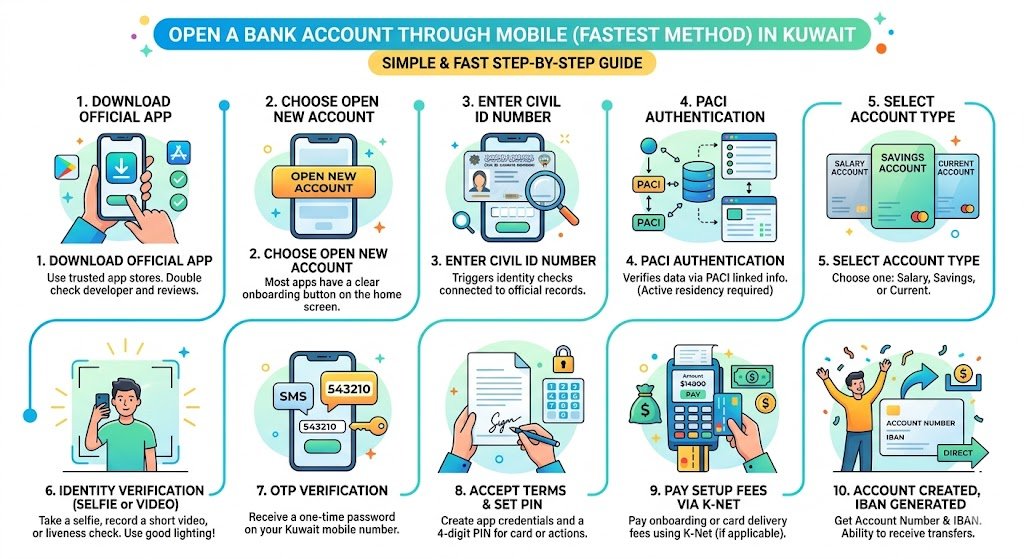
Most major banks in Kuwait now support some form of digital onboarding through their mobile app. The flow is usually similar across banks.
Mobile account opening steps
Step 1: Download the official bank app
- Use the official app store listing.
- Double check the developer name and reviews.
Step 2: Choose “Open New Account” (or similar)
Most apps have a clear onboarding button on the home screen.
Step 3: Enter your Civil ID number
This triggers identity checks connected to official records.
Step 4: PACI authentication
The app verifies your data through PACI linked information.
If your residency or Civil ID is not active, this is often where the process stops.
Step 5: Select account type
You’ll usually choose one of these:
- Salary account
- Savings account
- Current account
I’ll explain which one to pick in a later section.
Step 6: Identity verification (selfie or video)
Many banks ask you to:
- Take a selfie
- Record a short video
- Or complete a liveness check
Tip: do this in good lighting, with no glare, and make sure your camera lens is clean. I’ve seen perfectly valid applications fail because the selfie check couldn’t confirm the face properly.
Step 7: OTP verification
You’ll receive a one time password on your Kuwait mobile number.
Step 8: Accept terms and set your PIN
You’ll usually create:
- App login credentials
- A 4 digit PIN for card or app actions
Step 9: Pay any setup fees (if applicable) via K-Net
Some banks charge a small onboarding or card delivery fee.
This is often collected through K-Net.
Step 10: Account created, IBAN generated
If everything matches, you’ll get:
- Account number
- IBAN
- Ability to receive transfers (including salary, depending on bank setup)
How long does mobile approval take?
In many cases, it can be same day, sometimes within 10 to 20 minutes if your records match and the verification passes.
If it doesn’t work, don’t assume you did something wrong. In Kuwait, it’s often a system timing issue (Civil ID newly issued, PACI sync delay, mobile number mismatch).
Opening a Bank Account at a Branch (When It’s Better)
Even with mobile onboarding, I still recommend branch opening in certain situations:
- You need a special account setup (joint account, extra services)
- Your app verification keeps failing
- Your employer requires specific salary transfer formatting
- You want your debit card issued immediately (some branches can do this)
Branch process (what usually happens)
- Take a queue ticket and request “new account opening”
- Present your Civil ID (and sometimes passport)
- Fill and sign account forms
- Provide salary certificate if required for salary account
- Confirm address and phone number
- Receive account details and instructions for app setup
Tip: during Ramadan and public holidays, branch hours may be reduced. Check timings before you go so you don’t waste half your day.
Which Account Type Should You Choose?
Here’s a simple guide I use when advising expats:
| Account type | Best for | What to watch |
|---|---|---|
| Salary account | Employees receiving monthly salary | Employer may require a specific bank or salary transfer format |
| Savings account | Keeping money separate, budgeting | May have limits on withdrawals or require minimum balance |
| Current account | Regular transactions, bill payments | Some banks link it with cheque book options (if available) |
If you’re new in Kuwait and you’re employed, start with a salary account because:
- It’s the easiest for payroll
- It creates a consistent banking history
- It helps with future services (cards, loans) if you ever need them
Debit Card, Delivery, and PIN Setup
Once approved, you can request a debit card. Depending on the bank:
- The card may be delivered to your registered address
- Or issued at a branch
- Or activated through the app
My advice: make sure your Civil ID address is accurate before ordering delivery. Delivery problems are one of the most common delays I see, especially for new arrivals living in temporary housing.
First Deposit and Account Activation (Don’t Skip This)
Some accounts remain inactive or may be closed automatically if they receive no funds within a short time.
What I personally recommend:
- Add a small first deposit immediately (even if your salary arrives later)
- If the bank has a funding deadline, do not wait for payroll day
This avoids the frustrating situation where you “opened an account,” but it gets frozen or closed before your first salary transfer hits.
Common Problems Expats Face (And How to Fix Them)
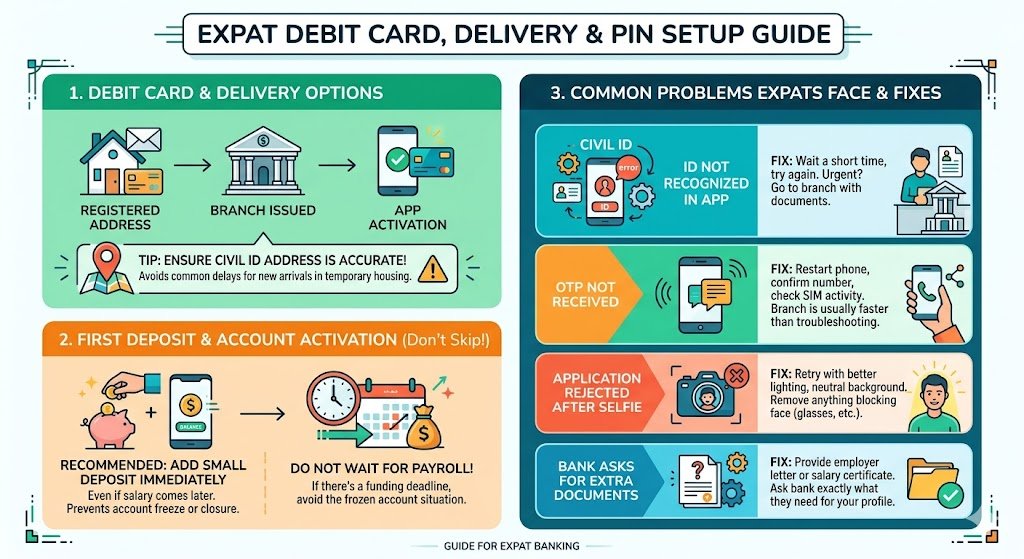
Civil ID not recognized in the app
Possible reasons:
- Civil ID newly issued and not fully synced
- Residency not active yet in systems
Fix:
- Wait a short time and try again
- If urgent, go to a branch with your documents
OTP not received
Possible reasons:
- SIM issues, network issues, blocked promotional messages
- Wrong number entered
Fix:
- Restart phone, confirm number, ensure SIM is active
- If it still fails, branch opening is usually faster than troubleshooting endlessly
Application rejected after selfie verification
Possible reasons:
- Poor lighting or camera quality
- Face mismatch due to angles, glasses glare, etc.
Fix:
- Retry with better lighting and neutral background
- Remove anything that blocks your face
Bank asks for extra documents
This happens sometimes depending on employment category, internal compliance, or profile checks.
Fix:
- Provide employer letter or salary certificate
- If you’re a dependent, ask the bank exactly what they need (it varies)
Helpful Numbers and Practical Banking Notes (What Expats Usually Ask)
These are typical ranges and expectations in Kuwait. Exact rules depend on the bank and account type.
| Item | Typical expectation |
|---|---|
| Mobile onboarding time | 10 to 20 minutes if verified successfully |
| Branch visit time | 30 to 90 minutes depending on queue |
| Debit card delivery | Often a few business days if delivered |
| Core requirements | Civil ID, residency, Kuwait mobile number |
If you want, tell me your situation (new arrival, dependent, salary transfer, switching banks), and I can help you choose the smoothest route.
Security Tips I Give Every Expat (Because Scams Happen)
- Only install banking apps from official stores
- Never share OTP codes with anyone, even if they claim to be the bank
- Use a strong phone lock and enable app biometrics if available
- Keep your Civil ID and bank SMS secure, especially when traveling
FAQs
Can I open a bank account in Kuwait without a Civil ID?
In almost all cases, no. A valid Civil ID is the standard requirement for identity verification and PACI authentication.
Is mobile account opening safe?
Generally yes, because banks typically use multiple layers such as OTP verification, identity checks (selfie or video), and secure payment channels like K-Net where applicable. You still need to protect your phone and OTP messages.
How long does it take to get approved?
If your data matches official records, approval is often same day and can be very fast. If your Civil ID is new or details don’t match, it may take longer or require a branch visit.
My Final Checklist (Do This Before You Start)
- Civil ID valid and active
- Residency active
- Kuwait mobile number working
- Civil ID address correct
- Decide account type (salary vs savings)
- Try mobile onboarding first, branch if it fails