Telephone Bill Payment Kuwait 2026 (Online Guide)
If you searched for “telephone bill payment Kuwait”, you’re usually trying to do one simple thing: check your landline dues and pay them online without wasting time at a counter.
I’m Saleh Muhammad. I’m a Kuwaiti citizen, and I’ve been living outside Kuwait for over 10 years. In that time, I’ve handled countless Kuwait payments and government portal tasks remotely for family, property, and paperwork. In this guide, I’ll show you the clean, practical way to pay your Kuwait telephone bill online in 2026, the exact details people miss, and how to avoid the common payment and reconnection delays.
This guide is for you if you are:
- Living in Kuwait and paying a home landline bill
- An expat who left Kuwait but still maintains a line at home
- Paying on behalf of parents, tenants, or a family apartment
- Trying to confirm a bill before it becomes a disconnection issue
Do this next (fast plan)
- Keep the landline number or service number ready.
- Use the official Ministry of Communications (MOC) online payment service first.
- If you prefer one portal for everything, use Kuwait Government Online (KGO).
- Pay via K-Net, then save the receipt as a PDF or screenshot.
- If service is suspended, wait a short window and recheck status before calling support.
Telephone bill payment in Kuwait: what it covers and what it does not
In Kuwait, “telephone bill payment” usually refers to MOC landline services and related fixed-line charges that are billed through the Ministry of Communications.
It usually does not mean mobile postpaid bills from private telecom companies (Zain, Ooredoo, stc). Those are normally paid through the provider’s app, website, or payment channels.
Why most people pay online now
Kuwait is highly digital for day-to-day services, and online payments are the norm for many residents. Publicly available digital reports in recent years commonly place Kuwait’s internet usage very high (often reported above 95 percent), which is one reason online bill payment is now the easiest option for most households.
The important part is not “where” you pay. It’s that you pay through the correct official channel and keep proof of payment.
Official ways to pay telephone bill Kuwait (2026)
You have two reliable official routes:
Option 1: Ministry of Communications (MOC) online payment
This is the primary route for landline bill inquiry and payment.
Option 2: Kuwait Government Online (KGO)
KGO often links you to the same payment infrastructure, but through the central government portal experience.
In real life, both work. If one portal is slow during peak times, try the other.
What you need before you start (checklist)
Prepare these items first. This is what prevents 90 percent of failed attempts.
| Item you need | Why it matters | My note from experience |
|---|---|---|
| Landline phone number or service number | Pulls the correct invoice | Double-check digits. One wrong digit can pay the wrong account |
| Civil ID or document number | Identity verification in the portal | Use the Civil ID of the line owner if possible |
| K-Net enabled bank card | Payment method | Make sure your card is active for online purchases |
| Email (optional) | Receipt delivery | Still save a screenshot even if you receive an email |
Tip I always follow: before paying for a parent or tenant, ask them to send you a photo of the last bill or the line contract page. It reduces number mistakes.
How to pay telephone bill in Kuwait via MOC website (step by step)
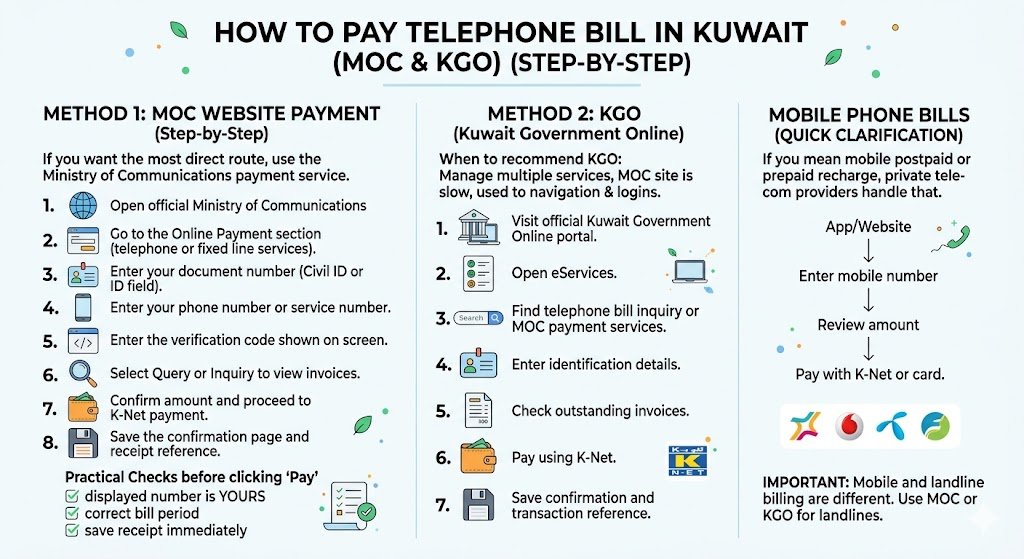
If you want the most direct route, use the Ministry of Communications payment service.
Steps (MOC online payment)
- Open the official Ministry of Communications website.
- Go to the Online Payment section (telephone or fixed line services).
- Enter your document number (often Civil ID or the required ID field).
- Enter your phone number or service number.
- Enter the verification code shown on screen.
- Select Query or Inquiry to view outstanding invoices.
- Confirm the amount and proceed to K-Net payment.
- After successful payment, save the confirmation page and receipt reference.
My practical checks before clicking Pay
- Make sure the displayed number is your number.
- Make sure the bill period looks correct (some people accidentally pay an old line).
- Save the receipt reference immediately. Do not assume you can retrieve it later.
How to pay telephone bill via Kuwait Government Online (KGO)
Some people prefer KGO because they already use it for other services.
Steps (KGO)
- Visit the official Kuwait Government Online portal.
- Open eServices.
- Find telephone bill inquiry or MOC payment services.
- Enter the requested identification details.
- Check outstanding invoices.
- Pay using K-Net.
- Save the confirmation and transaction reference.
When I recommend KGO
- You manage multiple Kuwait services in one place
- MOC site is slow at the moment
- You are used to KGO navigation and saved login workflows
How to pay mobile phone bills in Kuwait (quick clarification)
If you mean mobile postpaid or prepaid recharge, that is usually handled by the private telecom providers.
Typical flow is:
- Open the provider app or official website (Zain, Ooredoo, stc).
- Enter the mobile number.
- Review the amount due.
- Pay using K-Net or card options shown.
Important: mobile and landline billing systems are different. If your goal is a Ministry landline bill, use MOC or KGO.
What happens if you delay telephone bill payment in Kuwait?
Late payment can lead to service restrictions. In my experience, this is what usually happens in stages:
| Situation | Common outcome | What you should do |
|---|---|---|
| Small overdue amount, early stage | Reminder and pending balance | Pay online and keep receipt |
| Longer overdue | Outgoing calls may be suspended | Pay and wait for system update |
| Extended non-payment | Full disconnection risk | Pay immediately and keep proof for reconnection |
Processing and reconnection timing can vary, especially around public holidays. If you pay and the line is not restored quickly, your receipt reference is the strongest proof when you contact support.
Common problems and how to fix them (real-life troubleshooting)
These are the issues I see most often when helping family and readers.
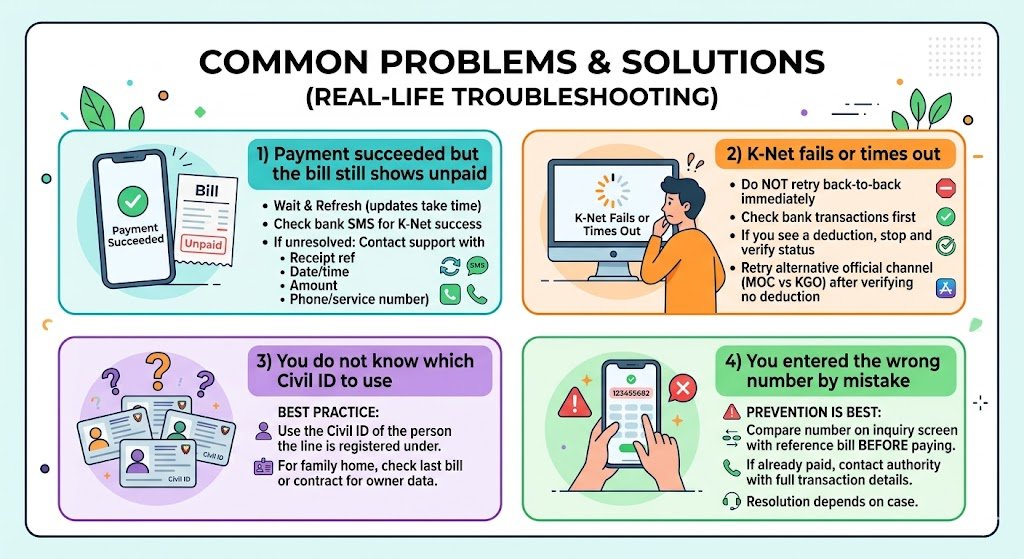
1) Payment succeeded but the bill still shows unpaid
What to do:
- Wait a short period and refresh inquiry (sometimes the update is not instant).
- Check your bank SMS to confirm K-Net success.
- If it still shows unpaid after a reasonable time, contact the relevant support channel and provide:
- Receipt reference
- Date and time
- Amount
- Phone/service number used
2) K-Net fails or times out
What to do:
- Do not attempt multiple payments back-to-back without checking your bank transactions.
- If you see a deduction, stop and verify status first.
- Retry using the other official channel (MOC vs KGO) once you confirm no successful deduction.
3) You do not know which Civil ID to use
Best practice: use the Civil ID of the person the line is registered under.
If you are paying for a family home, ask for a copy of the last bill or contract page so you match the exact owner data.
4) You entered the wrong number by mistake
This is the painful one. Prevention is best. Before paying:
- Compare the number displayed on the inquiry screen with your reference bill.
- If you already paid the wrong number, you’ll need to contact the authority with full transaction details. Resolution depends on the case.
Best time to pay and how to plan it (simple advice)
I plan payments around two rules:
- Pay a few days before the due date, not on the last day.
- Avoid late-night payment attempts if you are troubleshooting or if you need immediate service restoration.
Here is a realistic planning view:
| Scenario | Recommended timing | Why |
|---|---|---|
| Normal monthly payment | 3 to 7 days before due date | Avoid last-day portal traffic and delays |
| You already received a suspension warning | Same day | Reduces risk of disconnection |
| You are abroad paying for family | Earlier than usual | Gives you time to handle mismatches or errors |
Security tips I personally follow (especially when paying from abroad)
- Only use the official MOC website or KGO portal.
- Never share OTP codes with anyone.
- Avoid paying through random “helper” links sent on WhatsApp.
- Save a receipt screenshot and also email it to yourself.
Quick FAQ
Can I do telephone bill payment Kuwait completely online?
Yes. Landline bill inquiry and payment can typically be done online through the official MOC service or KGO, and payment is completed through K-Net.
Is telephone bill inquiry free?
The inquiry itself is usually free. You pay only the outstanding invoice amount.
What payment method is used?
For government online bill payments, K-Net is the standard method.
How do I check my telephone bill status?
Use MOC or KGO, enter the required document number and phone or service number, and use the inquiry option to view outstanding amounts.
Final checklist before you close the tab
- I checked the number on the inquiry screen matches my line
- I paid via K-Net and saw the success confirmation
- I saved the receipt reference and screenshot
- I rechecked the bill status (if needed) after a short wait
If you tell me what you are trying to pay (landline or mobile), and whether you are inside Kuwait or paying from overseas, I can help you choose the cleanest option and the exact details to prepare so you avoid failed payments or delays.