Zain Number Check 2026: 6 Easy Ways to Find Your Zain SIM Number

I’m Saleh Muhammad, a Kuwaiti citizen and an expat myself. I’ve been living outside Kuwait for more than 10 years, and one thing I’ve learned the hard way is this: you only realize you don’t know your SIM number when you urgently need it.
Maybe you want to top up, give your number to someone, set up WhatsApp, register for a Zain offer, or complete a bank or delivery app verification. Whatever your situation, I’ll walk you through the easiest and most reliable ways to check your Zain number in Kuwait in 2026.
Below are 6 methods that actually work in real life, not just on paper.
Quick Comparison: Which Zain Number Check Method Is Best?
Here’s a simple table I use to decide the fastest option depending on what I have available (internet, packaging, another phone, etc.).
| Method | Needs Internet | Works on Any Phone | Speed | Best For |
|---|---|---|---|---|
| USSD code *34# | No | Yes | Very fast | Most people, anytime |
| Zain Online Self Service | Yes | Yes | Fast | When you prefer web access |
| Call Zain Customer Care (107) | No | Yes | Medium | When you need support too |
| SIM packaging | No | Yes | Fast | New SIMs |
| Zain App | Yes | Smartphone | Fast | Managing account + offers |
| Missed call method | No | Yes | Fast | If you have a friend nearby |
My personal recommendation: start with the USSD code because it’s quick and doesn’t require internet.
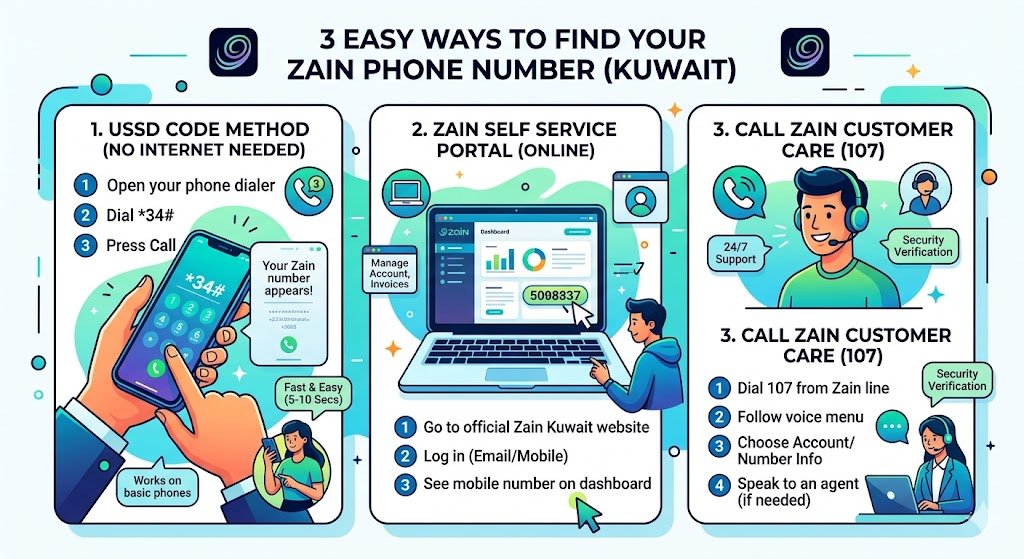
1. Zain Number Check Using USSD Code (No Internet Needed)
This is the method I use the most, especially when I’m traveling or stuck with weak internet.
Steps
- Open your phone dialer (the same screen you use to make calls)
- Dial *34#
- Press Call
- Your Zain number should appear on the screen
Why this method is great
- Works on basic phones and smartphones
- Works even with no mobile data
- Takes around 5 to 10 seconds in most cases
2. Find Your Zain Number Online (Zain Self Service Portal)
If you’re already on a laptop or you prefer managing everything online, Zain’s self-service portal is a clean option.
Steps
- Go to the official Zain Kuwait website and open the Self Service section
- Log in using your registered email or mobile login method
- Once you’re inside your account dashboard, you’ll typically see your mobile number listed clearly
When I personally use this
When I’m doing multiple things at once like checking my plan, seeing invoices, or managing add-ons, I just grab the number from the dashboard while I’m there.
3. Call Zain Customer Care (107)
If you want a human answer or you’re facing account issues, call Zain support directly.
Steps
- Dial 107 from your Zain line
- Follow the voice menu prompts
- Choose the option related to account or number information
- If needed, speak to an agent and request your SIM number
What to expect
- Customer care is generally available 24/7
- They may ask you to confirm identity details for security, especially if you request account-sensitive information
My advice: If you’re calling about a lost SIM, billing issue, or SIM swap, customer care is the best route because you’ll likely need extra help anyway.
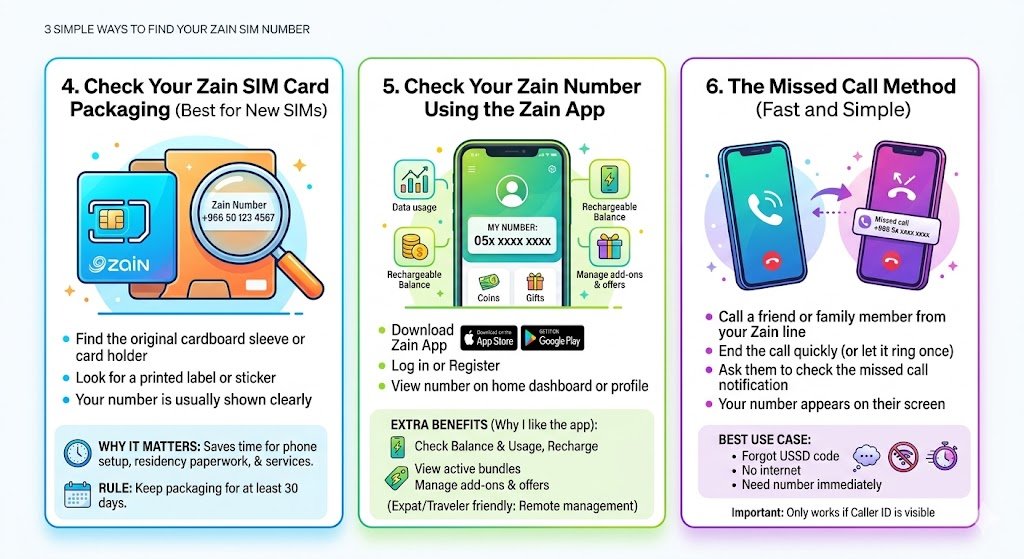
4. Check Your Zain SIM Card Packaging (Best for New SIMs)
If your SIM is new, your number is often printed on the original packaging. Many people throw this away too quickly.
Steps
- Find the SIM card holder or cardboard sleeve that came with your SIM
- Look for a printed label or sticker
- Your Zain number is usually shown clearly on it
Why this matters
When you’re setting up a new phone, doing residency paperwork, or registering services, having that packaging can save you time.
My rule: I always keep SIM packaging for at least 30 days, even if I think I won’t need it.
5. Check Your Zain Number Using the Zain App
If you manage your plan through your phone, the Zain App is one of the most convenient ways.
Steps
- Download the Zain app from the App Store or Google Play
- Log in or register
- On the home dashboard or profile section, you’ll usually see your Zain number displayed
Extra benefits (why I like the app)
You can also:
- check balance and usage
- recharge
- view active bundles
- manage add-ons and offers
If you’re an expat or you travel often, the app is helpful because you can manage things without visiting a branch.
6. The Missed Call Method (Fast and Simple)
This is the quick “real-life” trick when you have someone next to you.
Steps
- Call a friend or family member from your Zain line
- End the call quickly (or let it ring once)
- Ask them to check the missed call notification
- Your Zain number will appear on their screen
Best use case
- You forgot the USSD code
- No internet
- You need your number immediately
Important: This method only works if the call displays your number and isn’t hidden by caller ID settings.
Common Problems and Fixes (Troubleshooting)
Here are the issues I see most often, especially with new expats:
| Problem | What It Usually Means | Fix |
|---|---|---|
| USSD code not responding | Network delay or temporary issue | Try again after 30 seconds, restart phone |
| Portal login not working | Wrong password or unregistered account | Reset password or register again |
| App not showing number | Not fully logged in or linked | Log out, log in again, update app |
| Missed call shows “Unknown” | Caller ID hidden or phone setting | Use USSD or customer care instead |
| You lost SIM and need the number | Security risk and ownership issue | Call 107 and report lost SIM immediately |
Security Tip (Very Important in 2026)
I have to say this clearly because SIM-related fraud is real.
- Do not share OTP codes with anyone
- If your SIM suddenly stops working, contact Zain immediately (it could be a SIM swap attempt)
- Avoid posting your number publicly unless necessary
If you’re an expat dealing with banking apps or residency services, protecting your number is part of protecting your identity.
FAQs
Is checking my Zain number free?
Yes. The methods above are generally free, including USSD and customer care number checks. (Normal data charges may apply if you use the app or portal on mobile data.)
What if I don’t have internet at all?
Use the USSD method (*34#) or call 107. Both work without internet.
What if I lost my SIM card?
Call 107 immediately and report it. Ask them to block the SIM and guide you to a replacement. This is especially important if your number is linked to banking or government services.
Do these methods work for prepaid and postpaid?
Yes, they usually work for both. The app and portal may show even more details for postpaid users.
Final Thoughts
If you remember only one method, make it this: dial *34#.
But in real life, having multiple options is what saves you time. That’s why I listed all 6. As an expat who has handled Kuwaiti SIMs while living abroad, I know how frustrating it is when something simple like “What’s my number?” blocks you from recharging, registering, or verifying an account.